Key-Person Risk on Remote Teams: When One Person Holds the Context
On remote teams, context collects in one person’s inbox and direct messages, and nobody notices until they’re out. A 30-minute audit, a rotating second owner and a planned week off show you where the risk is.
Priya goes on vacation for a week, and three things stall: a client renewal, the monthly report and a vendor invoice that only she knows how to approve. Nobody planned for it, because nobody knew. On an office team, you’d have heard “ask Priya” a dozen times a week and noticed the pattern. On a remote team, those questions happen in direct messages you never see.
That’s key-person risk: too much context held by one person. It’s an old problem, but remote work makes it quieter and therefore more dangerous. This guide covers how to find it and reduce it without slowing anyone down.
Why remote work hides key-person risk
In an office, dependence on one person is visible. People walk to the same desk, the same name comes up in meetings, and the person looks overloaded. Remotely, the questions route through private channels, and the person often looks fine, just busy.
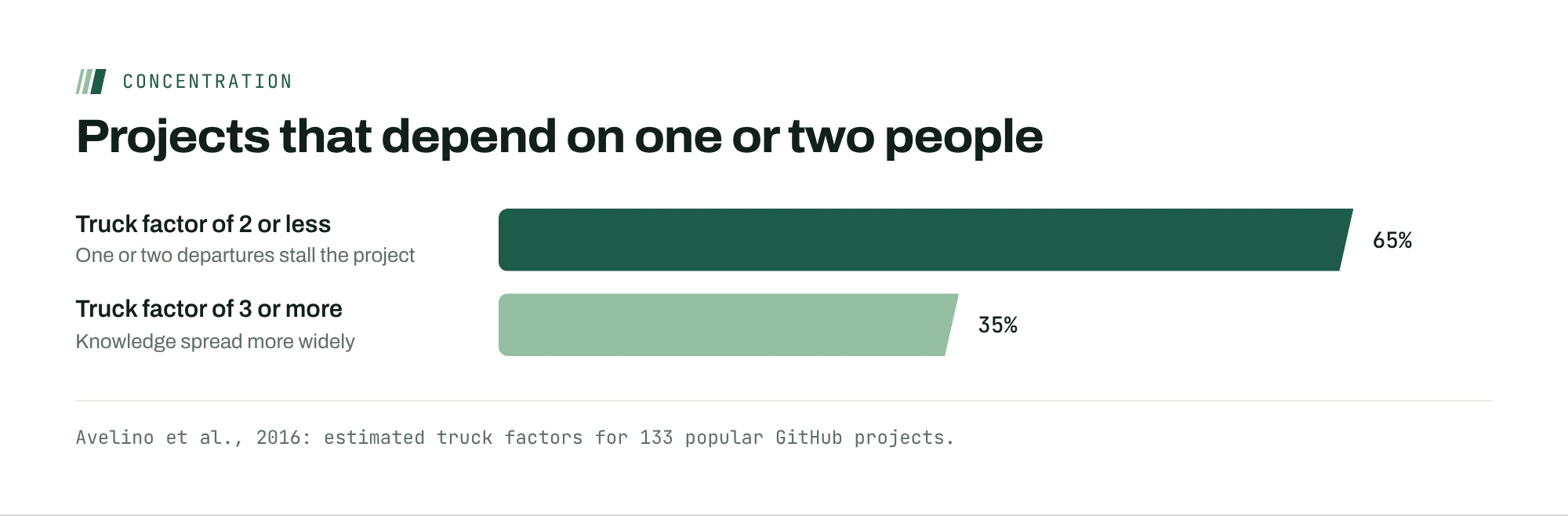
Software engineers have a blunt name for this measure: the truck factor, the number of people who would have to leave before a project stalls. When researchers estimated it for 133 popular open-source projects on GitHub, they found 65% had a truck factor of two or less. Those are public projects with open code and documentation. Client accounts and internal processes rarely have either.
The search cost shows up everywhere. In Atlassian’s survey of 12,000 knowledge workers and 200 executives, respondents said a quarter of their time goes to searching for answers. Much of that searching is really waiting for the one person who knows.

Run a 30-minute key-person audit
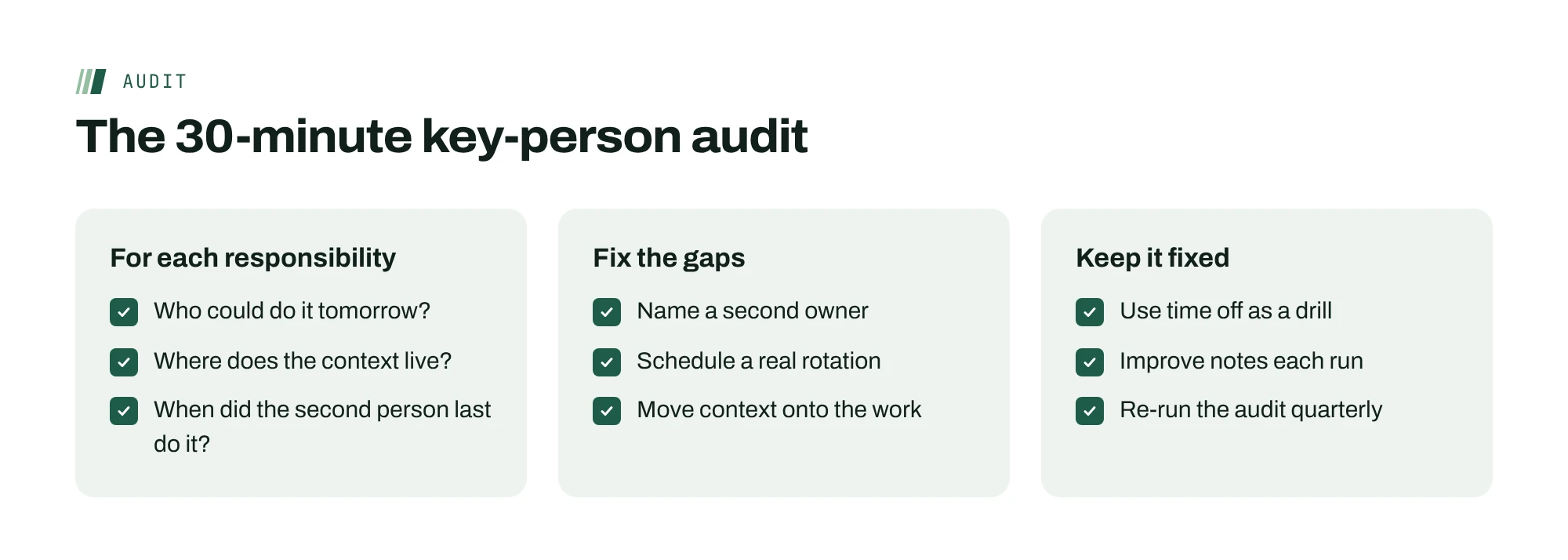
List your team’s ten most important ongoing responsibilities: key accounts, recurring reports, systems, vendor relationships. For each one, answer three questions in a shared table.
- Who could do this tomorrow if the owner were out? A name, not “the team.”
- Where does the context live? In the project tool, in a document, or in someone’s inbox and memory.
- When did the second person last do it? If the answer is “never,” the second person is theoretical.
Anything with no second name, context in someone’s head, or a second person who’s never done the work is a risk. Most teams find three or four in the first pass, and they’re rarely the ones the manager expected. Re-run the audit every quarter, because context collects again as soon as you stop looking.
Give every critical account a second owner who does real work
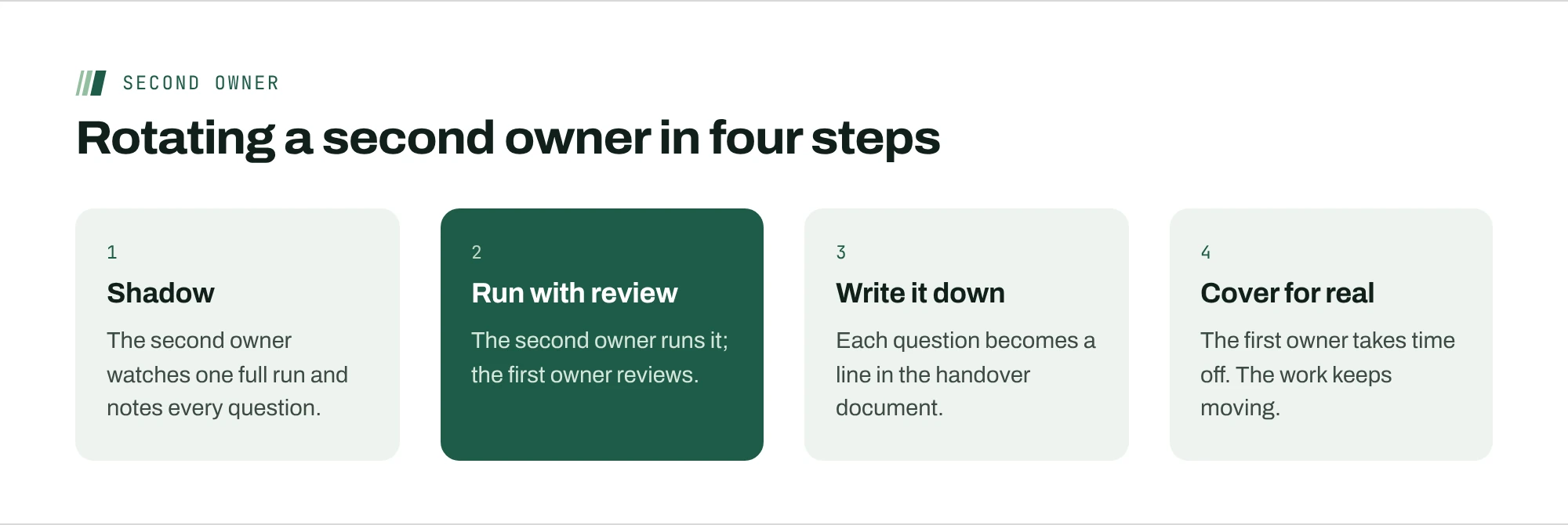
The usual fix is a backup: a name on a list. Backups on paper fail, because the backup has never actually done the work and doesn’t have the context. The less common fix is to make the second owner do part of the real work on a schedule.
Once a month or once a quarter, the second owner handles the task end to end while the first owner reviews. They write down everything they had to ask. That list is the context that was trapped, and it goes into the place the work lives. After two or three rotations, the second owner can genuinely cover, and the first owner can take a real week off.
Keep context with the work, not in messages
Most trapped context starts as a direct message: a client preference, an exception agreed on a call, a reason something is done the odd way it is. Agree on one rule: if it affects how the work gets done, it goes on the work, not in a message. A note on the client’s project, a line in the task, a comment in the document.
GitLab’s remote handbook calls this a handbook-first approach, and says every team member should be able to do their work at any time, whether or not their teammates are online. You don’t need a company handbook to apply the idea. You need the habit of writing the reason down next to the thing it explains.
What a good handover document contains
When a second owner writes down everything they had to ask, a pattern appears. Most handover documents need the same six parts.
- What this is and who it’s for. One paragraph a newcomer could read.
- The recurring steps, in order, with where each one happens.
- The exceptions: the client who pays late, the report that needs a manual fix every December.
- Access: which accounts, who grants them, and where credentials are stored. Never the credentials themselves.
- The people: who to contact outside the team, and what each of them cares about.
- What done looks like, so the second owner knows when to stop.
Keep it next to the work, and let whoever last ran the task update it.
Don’t solve it with more meetings
The tempting fix is a weekly knowledge-sharing call. It rarely works. The person holding the context ends up presenting to people who aren’t yet doing the work, and very little of it sticks.
Context moves when someone else does the task with the notes open and the expert available to answer questions in writing. That’s slower the first time and much faster after. Pair the rotation with a written handover, and keep live sessions for walking through the parts that are hard to put on paper.
Treat a planned week off as a drill
Here’s the counterintuitive part: you want people to take time off partly because it tests the team. Before someone’s planned week away, ask them to hand over everything as if they were leaving for a month. During the week, keep a list of every question that would have gone to them. When they’re back, each item on that list gets written down or reassigned.
It turns time off from a risk into a regular check, and it gives people something they rarely get on remote teams: a week when nobody messages them, because nobody needs to.
Watch your fastest replier
The person who answers everyone within minutes, at any hour, looks like your most reliable teammate. They’re often your biggest key-person risk. Fast replies are a sign that questions route to them, which means the context lives with them, and it usually comes with a person who never fully logs off. When you see that pattern, don’t thank them for being responsive. Ask what people keep asking them, and move those answers onto the work.
Pay a small write-it-down tax
Documentation projects fail because they’re separate from the work. Instead, attach a small tax to recurring work: the person who does a recurring task spends a few minutes improving its notes each time. A report that runs monthly gets twelve small improvements a year, written by the person who just did it, while the details are fresh.
A worked example
Taylor ran the audit on a ten-person support and operations team and found that two of the three largest accounts had no second owner, and the monthly renewal forecast lived entirely in one analyst’s spreadsheet and memory. Taylor named a second owner for each account, scheduled the second owner to run the next renewal call while the first listened, and moved the forecast’s assumptions into the forecast itself. The next time the analyst was out, the forecast went out on time, with three questions logged instead of three days of waiting.
Mistakes that keep the risk in place
- Documenting once. A handover written in a quiet week goes stale by the next quarter. The write-it-down tax keeps it current.
- Picking the most junior person as backup. A backup needs enough context to make judgment calls. Pair people who could plausibly cover each other’s work.
- Rewarding heroics. Praising the person who saved the day alone teaches everyone to hold context tightly. Praise the handover that meant nobody needed saving.
- Waiting for a resignation. The audit is cheapest when nobody is leaving. Run it in a calm month, not in someone’s notice period.
Map who knows what in an afternoon
For a quick picture of the whole team, build a simple grid. List the important responsibilities down the side and the people across the top. In each cell, mark one of three things: can do it alone, can do it with the notes, or can’t do it yet.
Then read the rows. Any responsibility with only one “alone” is a key-person risk. Any person whose column is full of “alone” marks is probably overloaded, and almost certainly the one everyone messages. Rows with no “with the notes” marks tell you the notes don’t exist yet.
Share the grid with the team. People are usually relieved to see it, because the person holding too much context often knows it and hasn’t had a way to say so. Revisit the grid each quarter alongside the audit, and move one mark per row from “can’t” to “with the notes.”
Where ActionOrder fits
In ActionOrder, every card carries its prep: the records it came from, the history and a first draft, attached to the work instead of someone’s inbox. When work is delegated, the context travels with it. Each person’s own inbox and calendar feed only their own cards, but what affects the work lives on the card, where the next person can see it. See how this works in the delegation use case.
Questions people ask
What is key-person risk?
The risk that work stalls when one person is unavailable because they hold context nobody else has. On remote teams it’s easy to miss, because the questions that reveal it happen in direct messages rather than in front of the whole team.
How do you measure key-person risk on a team?
For each important responsibility, ask who could do it tomorrow if the owner were out, where the context lives and when the second person last did the work. No second name, context in someone’s head, or a second person who’s never done it all signal risk.
Isn’t a named backup enough?
Usually not. A backup who has never done the work doesn’t have the context. Have the second owner do the real task on a schedule while the first owner reviews, and write down every question they had to ask.
How do I reduce dependence on one person without demotivating them?
Frame it as freeing them, not replacing them. Spreading context means they can take real time off, move to harder work and stop being interrupted. Most people who hold too much context are relieved to share it.
Sources
- A Novel Approach for Estimating Truck Factors (ICPC 2016)Avelino, Passos, Hora and Valente
- State of Teams 2025Atlassian (sells Jira and Confluence)
- Asynchronous communication for remote workGitLab Handbook