Write a Response-Time Agreement Instead of Expecting Instant Replies
Remote teams drift into an unwritten rule: answer everything right away. A short response-time agreement replaces it with windows by type of request, a narrow definition of urgent, and fewer interruptions for everyone.
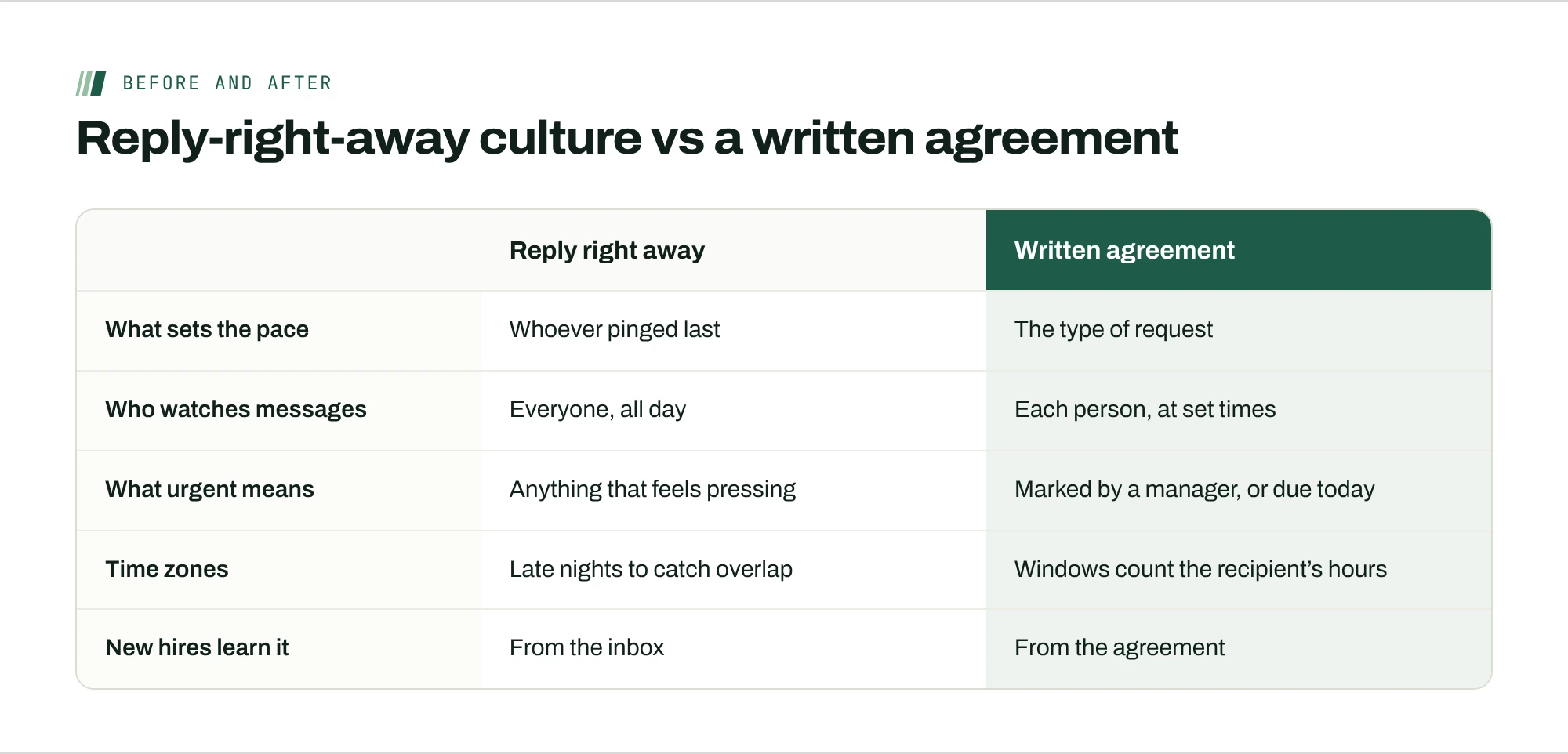
Nobody on your team agreed to answer every message within ten minutes. It happened anyway. Someone replied fast once, it felt good, and now a slow reply reads as a problem. On a remote team, that unwritten rule is expensive: it keeps everyone half-attentive to their inbox, all day, across every time zone.
A response-time agreement replaces the unwritten rule with a written one. It takes an hour to draft and a week to settle in, and it’s one of the cheapest changes a remote manager can make.
What instant replies cost
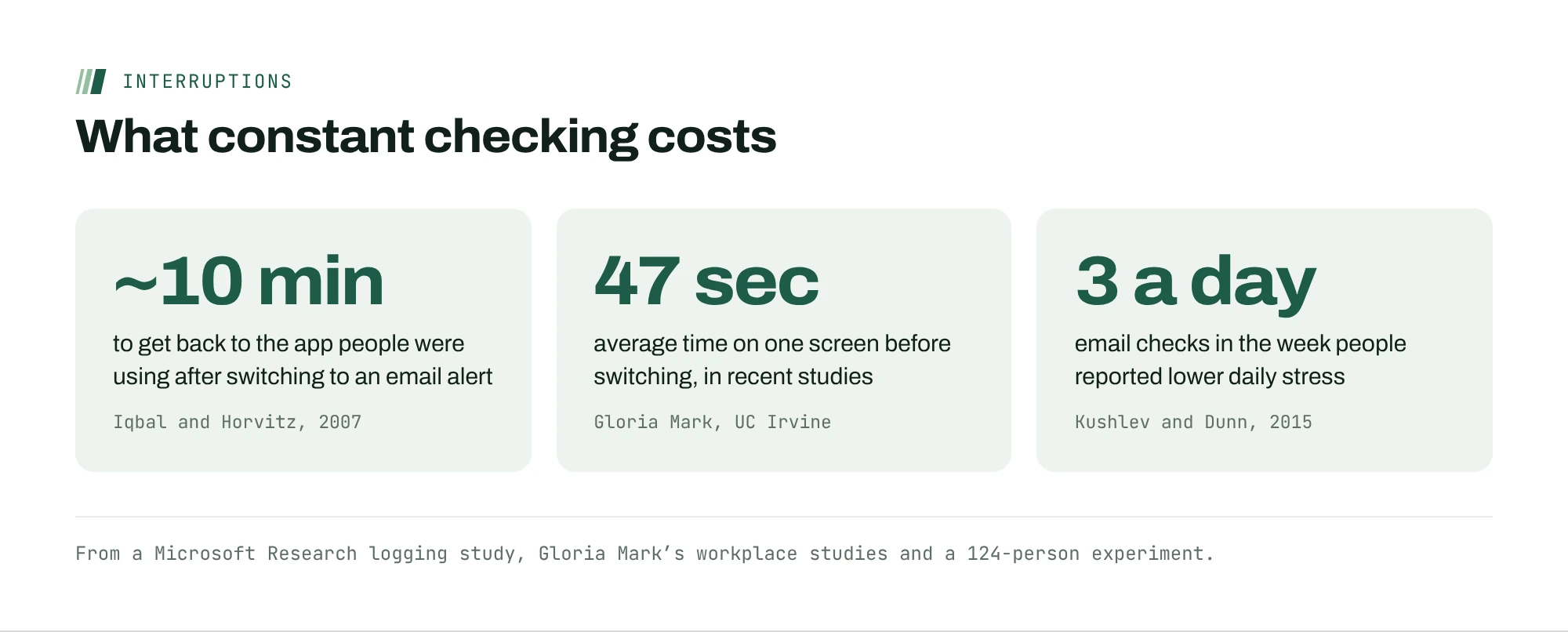
Every check of a message is a switch, and switches aren’t free. In a Microsoft Research study of people at work, Iqbal and Horvitz found it took nearly 10 minutes, on average, after switching to an email alert before people got back to the application they had been using. After 27% of alerts, they stayed away from that window for more than two hours.
Attention has been getting shorter, too. Gloria Mark, who studies how people use screens at UC Irvine, found people average 47 seconds on one screen before switching, down from about two and a half minutes in her first study in 2004. A team that’s expected to reply instantly is a team that’s always switching.
Checking less often helps. In an experiment by Kushlev and Dunn, 124 adults spent one week limiting email to three checks a day and another week checking as often as they liked. During the limited week, they reported significantly lower daily stress.
Set reply windows by type of request, not by tool
Most response-time rules are written per tool: “Slack within an hour, email within a day.” That trains people to pick the tool that gets the fastest reply, so everything migrates to chat. Set windows by what the request is instead.
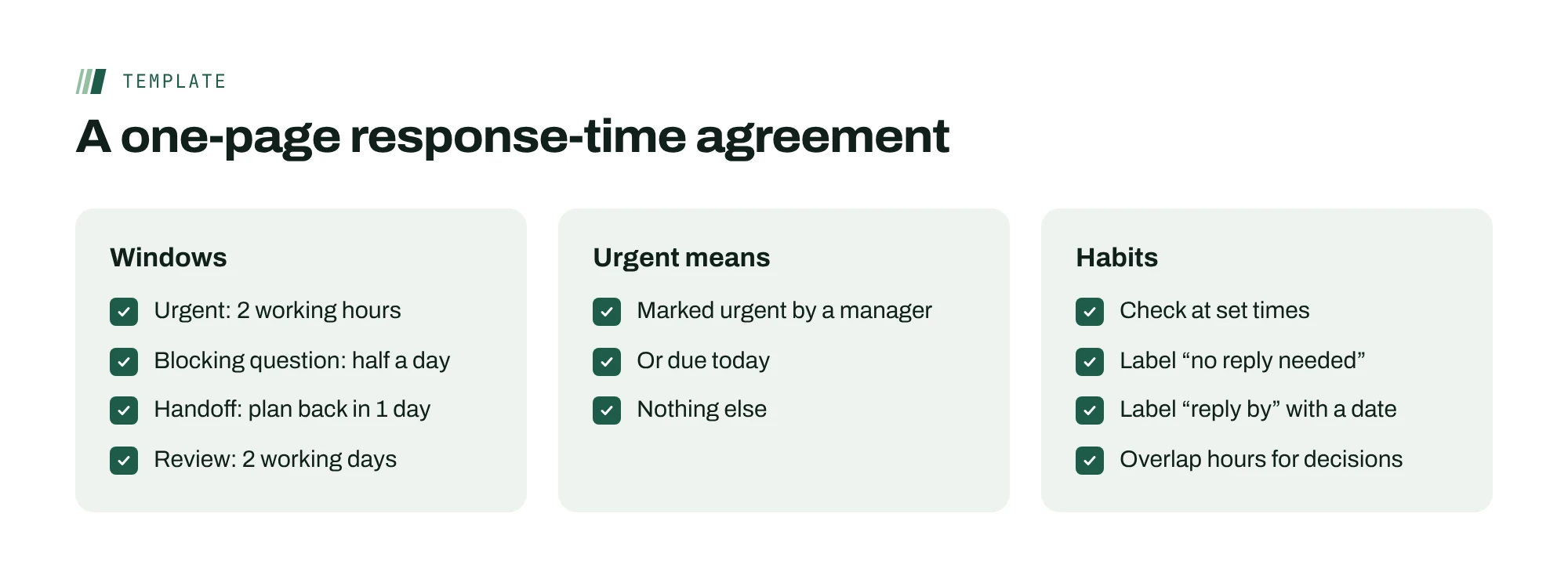
| Type of request | Reply within | Example |
|---|---|---|
| Urgent (marked by a manager, or due today) | 2 working hours | A client launch is blocked |
| A question blocking someone’s work | Half a working day | “Which version of the logo goes on the cover?” |
| Work handed to you | 1 working day to acknowledge with a plan | A delegated project plan |
| Review or feedback | 2 working days | Comments on a draft |
| FYI | No reply needed | A recap or a decision log entry |
“Working hours” matters. A two-hour window means two of the recipient’s working hours, not two hours on the sender’s clock. That one clause removes most of the guilt about time zones.
Define urgent narrowly, and say who decides
An agreement without a definition of urgent collapses within a week, because everything becomes urgent. Keep the definition short: something a manager has marked urgent, or something due today. Name who can mark urgent, and keep that list small.
Then protect it. If urgent gets used for routine requests, the answer isn’t a reminder about etiquette. It’s a look at why routine work keeps arriving at the last minute, which is usually a planning problem.

Batch, don’t stream
Once replies have windows, nobody needs to watch messages continuously. Encourage people to check at set times, such as the start of their day, after lunch and before they log off. The agreement makes this safe: anything that can’t wait for the next check is urgent by definition, and urgent has its own path.
Managers have to go first. If you reply to everything within minutes, people will assume that’s still the expectation, whatever the document says.
Label messages with what you need
Two small labels do a lot of work. Put “no reply needed” on anything that’s for information only, and put “reply by” with a date on anything that needs an answer. The sender knows what they need far better than the recipient can guess, and writing it down removes the most common reason people answer too fast: not knowing whether it matters.
Use overlap hours for decisions, not updates
Most distributed teams share a few overlapping hours. Don’t spend them on updates that could be read. Spend them on the conversations writing handles badly: a decision with trade-offs, a disagreement, feedback that needs tone. GitLab’s remote handbook describes a bias toward asynchronous communication, not a ban on talking live, and that’s the right framing. Async for information, live for judgment.
Hand off before you log off
Time zones turn reply windows into a relay. If Lisbon asks Manila a blocking question at 3 p.m., the answer arrives overnight, and nothing has been lost, provided the question was complete. The habit that makes this work is a short end-of-day handoff: before logging off, each person posts anything that will block someone in the next time zone, with the context needed to answer it without a follow-up. One complete question at 5 p.m. beats five quick ones spread across the afternoon, because each quick one starts another overnight round trip.
A worked example
Morgan leads a seven-person design and production team split across Lisbon, Toronto and Manila. Before the agreement, “quick question” messages arrived all day, and the Manila designers often worked late to catch Toronto’s afternoon. Morgan drafted the windows above, limited urgent to herself and the account lead, and asked everyone to post blocking questions in an end-of-day handoff. After a month, urgent had been used four times, all for launch-day issues. The Manila team stopped working late, and the number of overnight round trips on a typical project fell, because questions arrived complete.
Handle exceptions without breaking the agreement
Every agreement meets its first real emergency within a few weeks. Decide in advance what happens, so nobody has to improvise at 11 p.m.
- A client escalates out of hours. The account owner marks it urgent, or it waits for the next working window. Nobody else needs to watch for it.
- Someone misses a window. Treat it as a signal about load, not attitude. If the same person keeps missing it, look at how many requests reach them and from where.
- A launch week needs faster replies. Agree on a temporary window in writing, with an end date. “For launch week, blocking questions within two hours” is fine. An open-ended exception becomes the new rule.
Use the overlap hours for decisions, not updates
Most distributed teams share a few hours when everyone is online. Protect them for the work that genuinely needs a live conversation: a decision with several people, a disagreement that has gone back and forth twice in writing, or a new teammate’s first week.
Status, approvals that only need a yes, and anything a recap could carry should stay async. When the overlap fills with routine updates, the hard conversations get pushed into someone’s evening, which is exactly what a response-time agreement is meant to prevent.
Roll it out in a week
Draft the agreement yourself, then ask the team to change it in writing within two days. People follow rules they helped write. Publish the final version where the work lives, not in a document nobody opens. After a month, look at two things: how often urgent was used, and whether anyone’s waiting longer than the windows allow. Adjust the windows, not the principle. If people keep missing a window, it’s usually too tight for the team’s time zones, not a discipline problem.
Mistakes to avoid
- Setting windows by seniority. If managers get faster replies than everyone else, the agreement turns into a hierarchy. Windows depend on the type of request, not on who sent it.
- Measuring reply speed. Don’t track who replies fastest. That rewards the always-on behavior you’re trying to stop. Track whether anyone waited longer than the window.
- Forgetting new hires. People joining a remote team copy what they see. Walk them through the agreement in their first week, before they learn the old habits from the inbox.
- Writing it and never looking again. Put a review on the calendar for one month out. The first version is a draft, and the team will tell you where it pinches.
Write requests that don’t need a reply to start
The fastest async teams cut round trips at the source. A complete request has four parts: the context in one or two lines, exactly what you need, when you need it by, and what you’ll do if you don’t hear back.
That last part is the less common habit, and the most useful. “If I don’t hear by Thursday noon, I’ll go with option B” turns silence into a decision instead of a delay. The other person can still object, but nothing waits on them if they’re out, asleep or deep in other work.
Default actions only work for two-way doors: choices that are cheap to reverse. For anything that commits money, changes a contract or affects a client, ask for an explicit yes and mark the request urgent if it can’t wait for the normal window.
Where ActionOrder fits
ActionOrder is built for teams that work this way. Each person gets their prompts from ActionOrder alone: their next card, work handed to them or a question waiting on them. While someone has a card active, new cards wait their turn. Only items a manager marks urgent, and items due today, get through, as a small bar they can open or ignore. See how focus works in the product.
Questions people ask
What is a response-time agreement?
A short written agreement that says how quickly people on a team should reply to different kinds of requests, what counts as urgent and who can mark something urgent. It replaces the unwritten expectation to reply right away, which keeps everyone half-attentive to messages all day.
What’s a reasonable response time for a remote team?
It depends on the request, not the tool. Many teams use about two working hours for urgent items, half a working day for questions that block someone, a working day to acknowledge work handed to you, and two working days for reviews. Count the recipient’s working hours, not the sender’s clock.
How do you define urgent on an async team?
Keep it narrow: something a manager has marked urgent, or something due today. Name who can mark urgent and keep that group small. If urgent keeps getting used for routine work, look at planning rather than etiquette.
Won’t clients expect faster replies?
Client-facing roles can have their own windows. The agreement is about how the team works internally. Many teams find client replies get better, not slower, because the person answering isn’t also juggling every internal message as it arrives.
Sources
- Disruption and Recovery of Computing Tasks (CHI 2007)Iqbal and Horvitz, Microsoft Research
- Can’t pay attention? You’re not alone (May 11, 2023)University of California, on Gloria Mark’s research
- Checking email less frequently reduces stress (Computers in Human Behavior, 2015)Kushlev and Dunn
- Asynchronous communication for remote workGitLab Handbook