How to Stop Chasing Status Updates on a Remote Team
Asking “any update?” interrupts the person doing the work and still tells you less than the work itself would. Make status a byproduct, agree that silence means on track, and set clear rules for raising a hand.
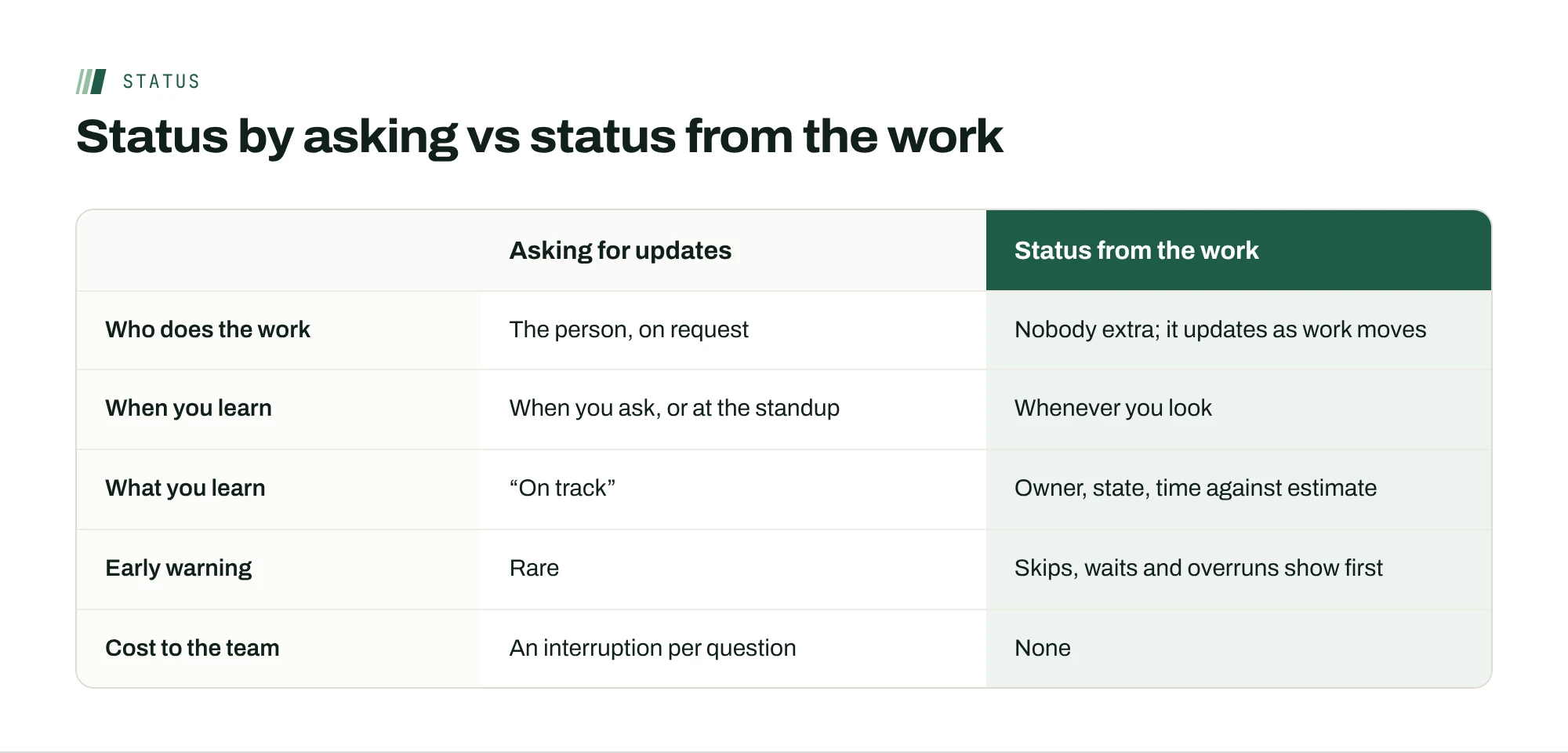
You send “any update on the Northwind QA?” at 4 p.m. It lands at 2 a.m. for Jordan, who answers first thing: “On track, about half done.” You’ve spent a message, Jordan has spent a context switch, and you’ve learned almost nothing you couldn’t have seen from the work itself.
Chasing status is the most common way managers try to see remote work, and it’s the worst one. It interrupts the people doing the work, it arrives late, and it’s self-reported in the least useful format: a reassuring sentence. This guide covers how to stop chasing status updates on a remote team without losing sight of what’s happening.
Why managers chase updates
The urge is understandable. In Microsoft’s 2022 Work Trend Index survey of 20,006 knowledge workers, 85% of leaders said the shift to hybrid work had made it hard to be confident their people were productive, while 87% of employees said they were. That gap doesn’t close by asking more often. It closes when leaders can see the work without asking.
Asking also has a cost. Microsoft’s 2025 analysis of Microsoft 365 data found that the most-interrupted fifth of users already get a meeting, email or chat every two minutes during core hours. Each “any update?” adds to that stream, often for the person you most need to be focused.
Make status a byproduct of the work
The fix is structural, not motivational. Status should be something the work produces as it moves, not something a person writes on request. That means every piece of work has three facts attached, visible to the team at any time:
- One owner. Not a team, not “we.” One person whose name is on it.
- A state. Done, in progress, waiting or stuck. Four states are enough, and fewer arguments start about what they mean.
- Time. How long it has waited before anyone started it, and how long it has been in progress compared with its estimate.
When those three facts are current, most status questions answer themselves. “Is QA moving?” becomes a glance: in progress, Jordan, two hours past the estimate. That last detail is worth more than any update, because it tells you where to look before anyone says there’s a problem.

Agree that silence means on track
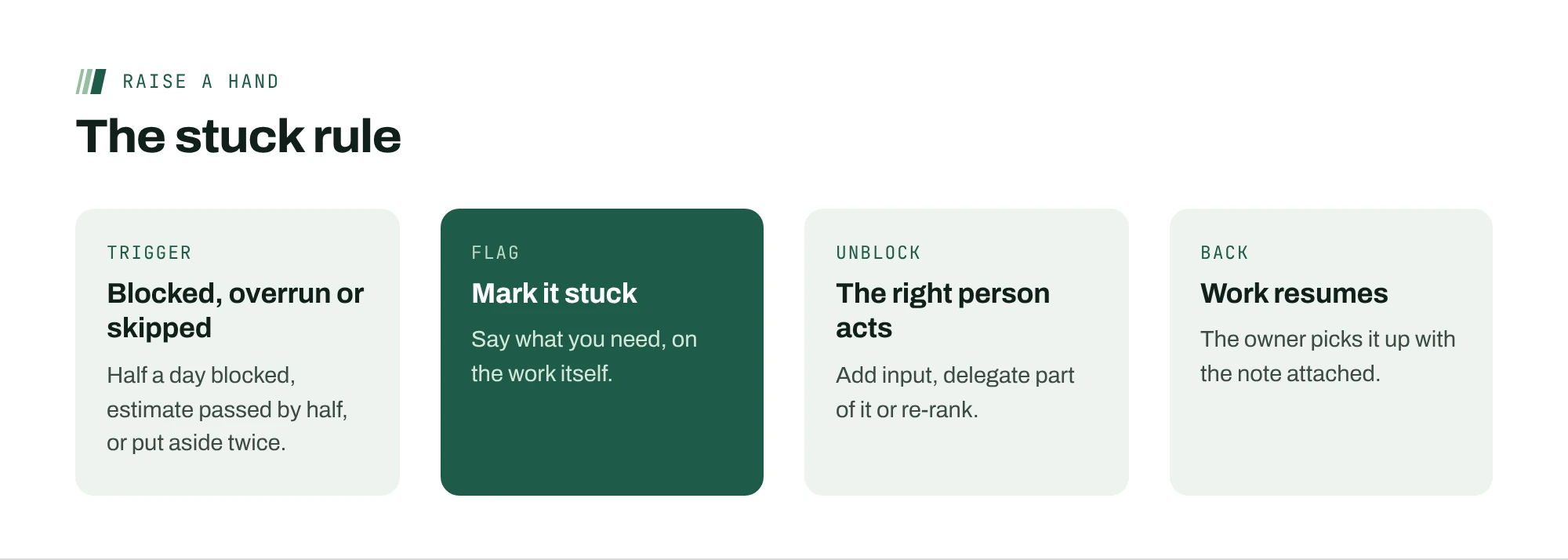
Here’s the less common move: make silence meaningful. Agree with the team that no news means the work is on track, and in return, agree on exactly when someone must raise a hand. Without the second half, silence is just silence. With it, silence is information.
Good triggers are specific and early:
- You’ve been blocked for more than half a working day.
- You’ve passed the estimate by half again, and you’re not close.
- You’ve put the same task aside twice in favor of something else.
- You learn something that changes the deadline, even if you think you can recover.
The third trigger is the one most teams miss. Repeatedly skipping a task is usually the first sign it’s stuck, often well before the person would describe it that way.
Replace the standup with a written recap
Daily standups were designed for teams in one room. On an async team, they force a meeting across time zones to share information that could have been read in two minutes. Researchers who studied 76 companies that introduced meeting-free days, writing in MIT Sloan Management Review, found that a single no-meeting day a week improved autonomy, communication, engagement and satisfaction, and reduced micromanagement and stress.
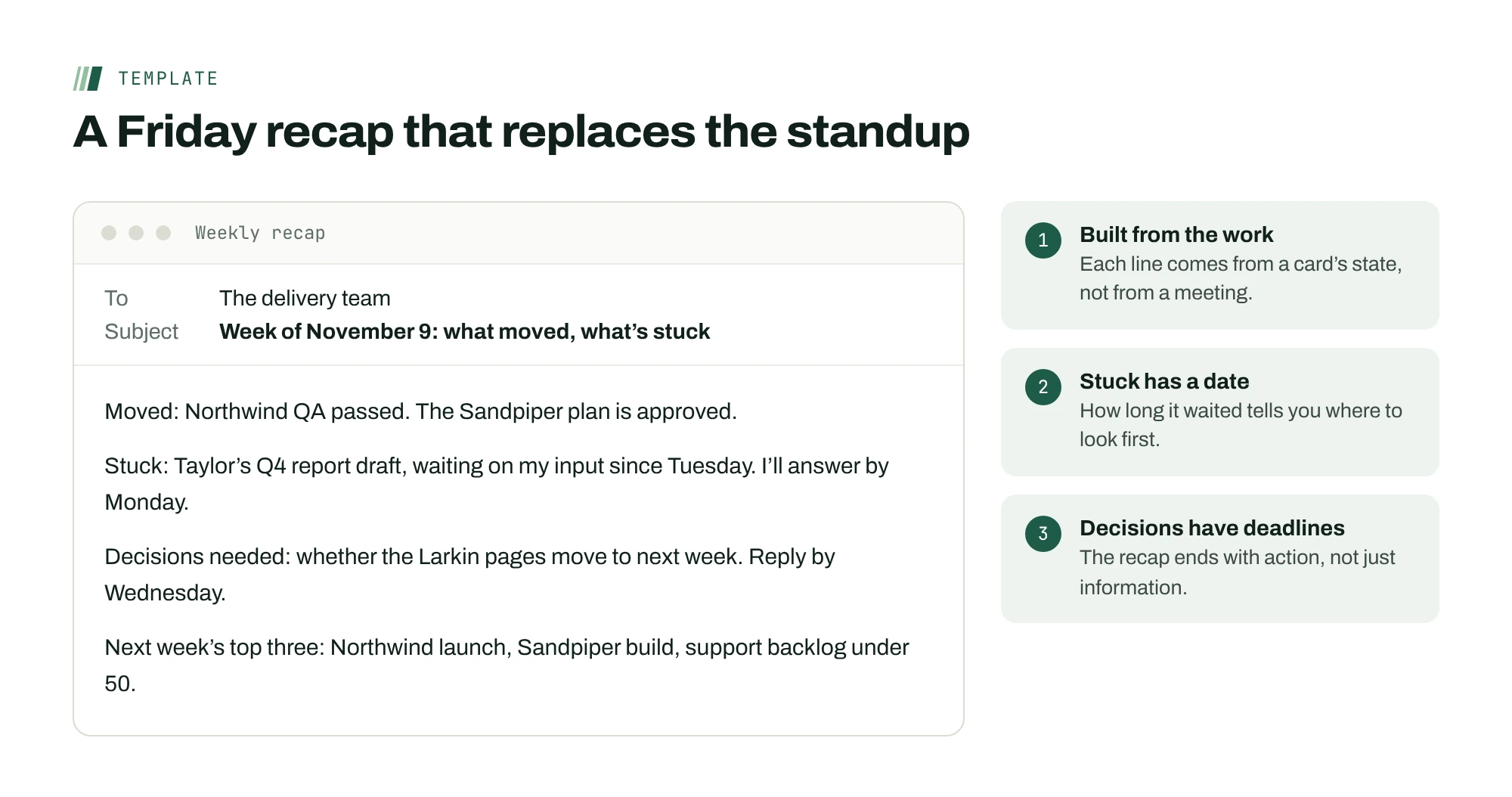
Try a written recap instead, built from the work rather than from memory. Once a week, list what moved, what’s stuck and what needs a decision from you. If status already lives on the work, the recap takes minutes to assemble, and anyone can read it on their own schedule. Keep live conversation for what it’s good at: decisions, disagreements and anything personal.
A weekly recap template
The recap replaces the standup only if it’s quick to write and quick to read. Keep it to four parts, built from the work rather than from memory.
- Moved: what finished or crossed a milestone, one line each.
- Stuck: what’s blocked, who it’s waiting on, and since when.
- Decisions needed: anything waiting on you, with a date you’ll decide by.
- Next week’s top three: copied from the priority post, so nobody has to look it up.
Write it on the same day every week. If it takes more than fifteen minutes, status isn’t living on the work yet, and the recap is still being assembled from messages.
Ask a better question than “any update?”
When you do need to check in, ask a question that predicts trouble instead of one that invites reassurance. “Any update?” almost always gets “on track.” Try “What would make this late?” or “What are you waiting on?”
Those questions do two things. They give the person permission to name a risk without admitting failure, and they turn a status ping into a decision you can act on. If the answer is “the client hasn’t sent the content,” that’s yours to chase, not theirs.
Measure the time something was stuck before you knew
If you track one number, make it this: how long work sits stuck before the person who can unblock it hears about it. On teams that chase status, the answer is often days, because problems surface at the next standup or the deadline. On teams where status comes from the work and people flag early, it should be hours.
Look at it once a week. When a card was stuck for two days before you heard, don’t ask why the person didn’t say something. Ask which trigger should have fired, and whether it was clear enough.
When someone goes quiet anyway
Some work will still stall without a flag. Before you ask about it, look at what the work already shows: whether the card has been skipped, whether it’s waiting on someone else, and how far it is past its estimate. Then ask one specific question about that, such as “This has been set aside twice. What’s in the way?” It reads as help rather than suspicion, and it teaches the team that you look at the work before you ask about the person.
A worked example
Alex used to run a 30-minute standup for a nine-person team across four time zones, which meant someone was always on camera at 7 a.m. or 9 p.m. Alex replaced it with three changes: every task carries an owner, a state and its time against the estimate; the team agreed on the four triggers above; and a written recap goes out on Fridays. In the first month, the number of “any update?” messages Alex sent fell to almost none, and the Q4 report draft was flagged as stuck on day one instead of at the deadline, because Taylor had put it aside twice.
Mistakes that bring the chasing back
- Asking anyway. If you still send “any update?” after the triggers are agreed, people learn that silence isn’t trusted. Look at the work first, then ask a specific question.
- Punishing the first flag. If someone marks work stuck and gets a lecture, they’ll wait longer next time. Thank them, and solve the blocker.
- Letting states go stale. A card marked “in progress” for three weeks tells you nothing. Ask people to update the state when it changes, not on a schedule, and look for cards whose state hasn’t moved in a week.
- Keeping a shadow tracker. A private spreadsheet of what you think is happening means you’re still chasing, just quietly. Retire it once the work carries its own status.
Make the first two weeks easy
Changing how status works is a habit change for you as much as for the team. A gentle rollout helps.
- Week one: agree on the four states and the stuck triggers in writing. Keep the standup for now, but run it from the work: open the board and talk only about what’s stuck.
- Week two: send the first written recap on Friday and cancel the standup for the following week. Say that it’s an experiment and that you’ll bring it back if things slip.
- After a month: look at how long stuck work waited before you heard about it, compared with the month before. That number is the case for keeping the change.
Most teams don’t ask for the standup back. The few who do usually want the social time, which is worth keeping as an optional, unhurried call that has nothing to do with status.
Keep the Friday recap short. Five lines that name what shipped, what moved and what’s stuck are read; two pages are skimmed.
Where ActionOrder fits
In ActionOrder, every card has one owner and a state: done, in progress, waiting or stuck. People mark a card stuck themselves, and it reaches the person who can unblock it right away. Time in the queue is tracked automatically, and people log their own time on the card they’re working, so the team view shows how long work has waited, how often it’s been skipped and logged time against the estimate. A recap lands every Friday. Nothing runs in the background. See the status-meeting use case.
Questions people ask
How do I know what my remote team is working on without asking?
Put three facts on every piece of work: one owner, a state (done, in progress, waiting or stuck) and its time against the estimate. When those are current and visible, most status questions answer themselves, and you only need to ask about the exceptions.
Should remote teams have daily standups?
Many async teams do better with a written recap. A standup across time zones puts someone on camera early or late to share information that could be read in two minutes. Keep live time for decisions and disagreements, and let status come from the work.
How do I get people to flag problems early?
Agree on specific triggers, such as being blocked for half a day or putting the same task aside twice, and agree that silence means on track. Then thank people who flag early, even when the problem turns out to be small. How you react to the first flag decides whether you get the next one.
Isn’t this just monitoring with extra steps?
No. Status from the work means the state and time on each task, set and logged by the person doing it. It doesn’t involve screens, keystrokes or activity tracking, and it never ranks people. It replaces asking, not trust.
Sources
- Hybrid Work Is Just Work. Are We Doing It Wrong? (September 22, 2022)Microsoft Work Trend Index (Microsoft sells Microsoft 365 and Teams)
- Breaking down the infinite workday (June 17, 2025)Microsoft WorkLab
- The Surprising Impact of Meeting-Free Days (2022)MIT Sloan Management Review