Billable Hours Tracking: How to Track Time Clients Will Pay For
Billable hours tracking that clients accept: utilization rate formulas, a worked example, strong vs. weak time entries and an invoicing checklist.
Billable hours tracking is the practice of recording time spent on client work, against a specific task, so it can be invoiced. Good tracking captures time the same day, describes the work in words the client understands, and follows one stated rounding policy. That makes the invoice easy to accept and the team's utilization rate easy to read.

What are billable hours?
Billable hours are the hours a person spends on work a client has agreed to pay for. Non-billable hours are everything else in the working week: internal meetings, sales, training, admin and time between tasks.
The line between the two is set by the client agreement, not by how hard the work was. A design review the statement of work covers is billable. The same review redone because of an internal mistake usually is not.
Three terms come up whenever teams talk about billable time:
| Term | What it means | Who uses it |
|---|---|---|
| Billable hours | Hours on client work that the agreement lets you invoice | Everyone who bills by time |
| Non-billable hours | Hours that support the business but can't be invoiced | Managers planning capacity |
| Utilization rate | Billable hours as a share of available hours | Managers, finance, leadership |
A fourth term matters at invoice time. Realization is the share of billable hours that actually reach an invoice. Clio, which sells legal practice software, reported in its 2023 Legal Trends Report that "the average law firm still only bills 86% of its billable work." Hours logged late or described vaguely are the easiest entries for a client to question.
How do you calculate billable hours and utilization rate?
Add up every time entry logged against client tasks for the period, then divide by the hours the person was available to work. The result, times 100, is the utilization rate.
Use these formulas:
\text{Billable hours} = \sum \text{hours logged against client tasks in the period}
\text{Utilization rate} = \frac{\text{Billable hours}}{\text{Available hours}} \times 100
\text{Realization rate} = \frac{\text{Hours invoiced}}{\text{Billable hours logged}} \times 100
Available hours are the hours someone is scheduled to work, minus paid time off and holidays. Decide once whether available hours include internal meetings and stick with it, so the rate means the same thing every week.
Example: Priya, an account lead at an agency, works a 40-hour week with no time off. She logs 29 hours against Northwind tasks and 11 hours to internal planning, hiring and a team retro.
Billable hours: 29.
Available hours: 40.
Utilization rate: 29 ÷ 40 × 100 = 72.5%.
Northwind's account manager reviews the entries and agrees to all but 1.5 hours of rework. Hours invoiced: 27.5.
Realization rate: 27.5 ÷ 29 × 100 = 94.8%.
For a team, add everyone's billable hours and everyone's available hours before you divide. Example: Alex's five-person delivery pod has 200 available hours in a week and logs 140 billable hours, so team utilization is 140 ÷ 200 × 100 = 70%. Averaging five individual percentages gives a different, less accurate number when people work different hours.
What's a good utilization rate?
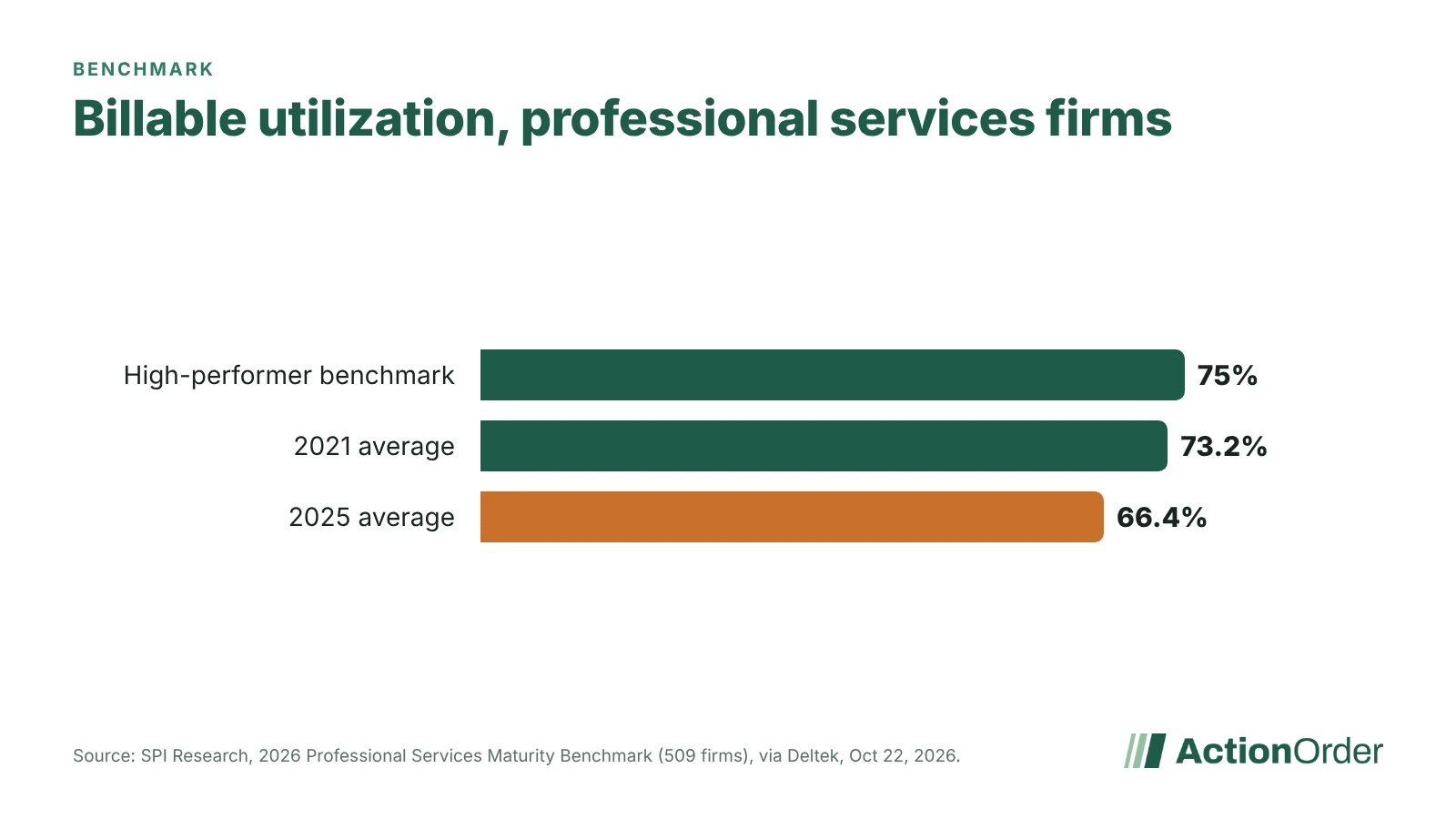
In SPI Research's benchmark for professional services firms, the high-performer mark is 75%. The 2025 average sat well below it.
Deltek's summary of the 2026 SPI Research Professional Services Maturity Benchmark (Oct 22, 2026; Deltek sells professional services software and partnered on the report) states that billable utilization "fell to 66.4%, well below the 75% high-performer benchmark." The same page reports that "In 2021, average billable utilization stood at 73.2%." Certinia's analysis (June 23, 2026) describes the report as "Based on responses from 509 professional services teams," and Diabsolut (June 2026) adds that the sample covered "245,000 employees."
Other fields measure the workday differently. Clio's 2023 Legal Trends Report highlights define utilization as "how much of a lawyer's eight-hour day gets put towards billable work," and say "nearly two-thirds of the workday still goes underutilized with respect to billable client work." That finding comes from aggregated data on Clio users and a survey of 1,446 U.S. legal professionals, so compare it only with other law firms.
A useful target depends on the role. People who sell, manage or hire carry more non-billable work by design, so set targets by role and review them quarterly rather than holding everyone to one number.
How do you track billable hours accurately?
Track time against a task, on the same day the work happens, with the method that fits how the person works. Accuracy falls fastest when entries are rebuilt from memory at the end of the week.
There are three common ways to capture time:
| Method | How it works | Best for | Watch out for |
|---|---|---|---|
| Running timer | Start a timer when you begin a task and stop it when you switch | Long, focused blocks on one task | Forgotten timers that run through lunch |
| Same-day entry | Log hours per task before signing off, from notes or the task list | People who switch tasks often | Waiting until Friday to remember Tuesday |
| Time blocks | Plan blocks on a calendar, then confirm or correct them as logged time | Planned work with few interruptions | Logging the plan instead of what happened |
Whichever method you choose, write down a rounding policy and share it with clients before the first invoice. Common increments are 6 minutes (a tenth of an hour) and 15 minutes. Federal rules for paying hourly employees take the same view of fairness: 29 CFR 785.48 accepts rounding to "the nearest one-tenth or quarter of an hour," provided that over time it does not result "in failure to compensate the employees properly for all the time they have actually worked." Round the same way in both directions and the totals stay honest for clients too.
What makes a time entry a client will accept?
A client accepts an entry when they can see what was done, for which piece of their work, and why it took that long. Vague entries invite questions and write-offs.
Example: compare these entries for the same morning of work:
| Weak entry | Strong entry |
|---|---|
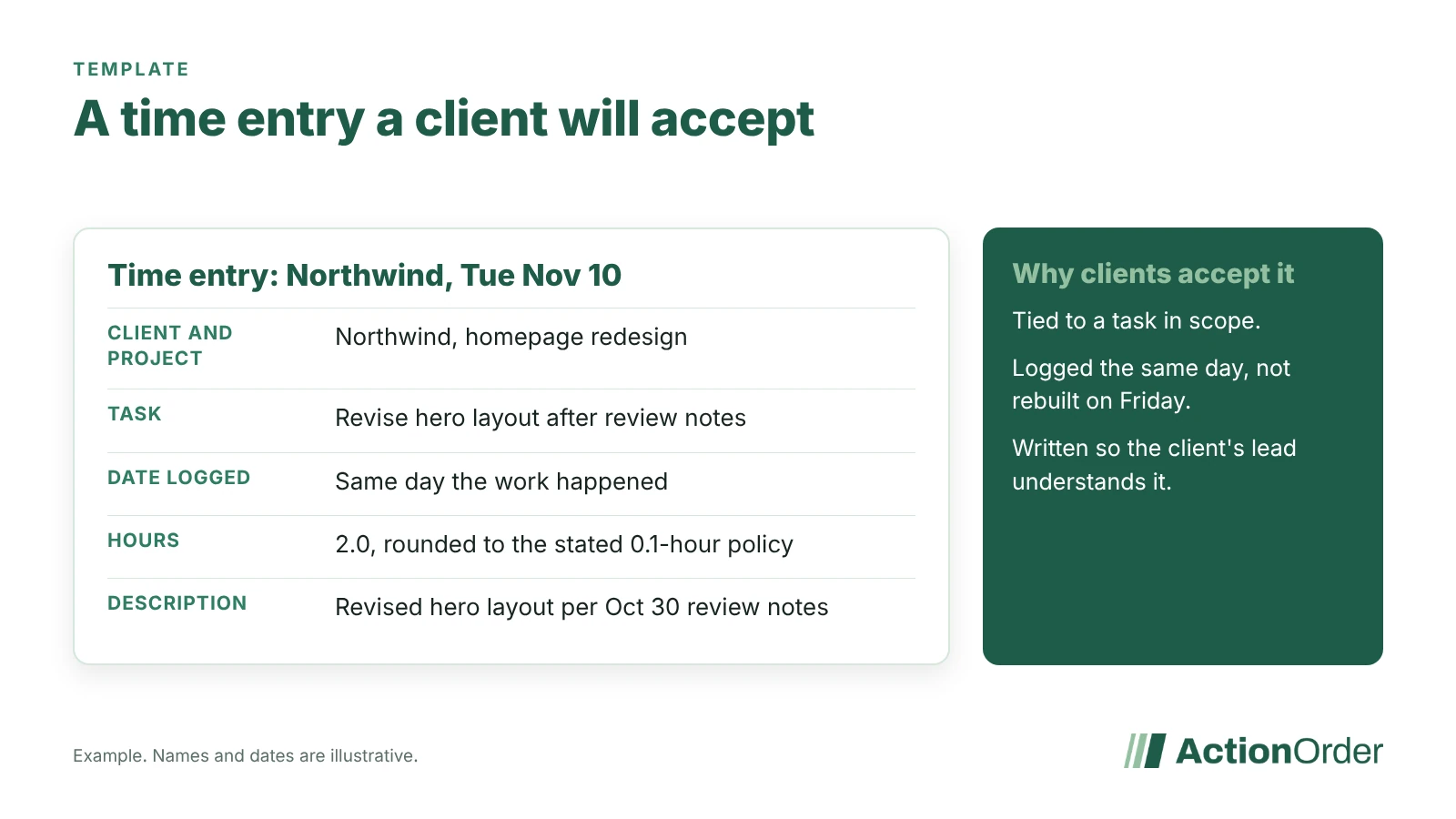
| Northwind, 3 hrs, misc. | Northwind, homepage redesign: revised hero layout after Oct 30 review notes, 2.0 hrs; prepared two mobile options for sign-off, 1.0 hr |
| Meetings, 1.5 hrs | Northwind, weekly review call: walked through checkout flow and agreed three changes, 0.5 hr |
| Admin, 0.75 hr | Not billed: internal stand-up, 0.25 hr (logged as non-billable) |
| Research | Northwind, payment provider comparison: compared three options against their refund rules, 1.5 hrs |
Each strong entry follows four rules:
Logged against a task. The entry names the client, the project and the task, so it lines up with the scope.
Logged the same day. Hours entered the day they happen are more accurate than hours rebuilt days later.
Described for the client. One line, written so the client's project lead understands it without a call.
Rounded by the stated policy. Every entry uses the same increment.
For setting realistic estimates from this history, see Better Estimates From Your Team's Own Logged Time.
How do you track billable hours on a remote team without monitoring software?
Let people log their own time against tasks and correct it when they spot a mistake. Self-reported, task-level time gives clients the detail they need without screenshots, keystroke logs or activity scores.
On an async team, this works best with a few agreements:
No time without a task. If work isn't on a task, create the task first. This keeps every hour tied to scope.
Same-day entry is the default. People in different time zones log before they sign off, not on Friday.
People can correct their own time. A wrong entry fixed by its owner is better than one silently adjusted by a manager.
Managers review entries, not people. Look for entries that are vague, late or far over estimate, and ask about the task.
Clear visibility rules. Decide who sees each person's hours, and say so in writing.
Activity software answers a different question. For why screenshots and activity data don't show whether client work is moving, read Employee Monitoring Software: What It Measures and What It Misses and How to Know If Remote Employees Are Working (Without Watching Them).
How do you turn time entries into an invoice?
Close the period, review the entries, then build the invoice from task-level hours. A short checklist keeps the review consistent every billing cycle.
Use this invoicing checklist:
If you pay contractors as well as bill clients, the same entries can drive both. Paying Remote Contractors: Hourly, by Outcome, or Both covers how to choose a pay model.
How ActionOrder handles this
ActionOrder, an efficiency and accountability tool for managers of remote teams, keeps time tied to the work. On the Pro and Business plans, people log their own time against the card they're working on and can correct it. Time can only be logged against a card, so every entry has a task, an owner and a status. Every logged hour is task time.
ActionOrder suggests each card's estimate from logged time on similar cards, and the person or their manager can change it. Logged time exports to CSV for payroll or invoicing. Hours are visible to the person, their managers, and admins with a payroll or billing role. Nothing runs in the background.
Join the waitlist. ActionOrder is in pre-launch.
Questions people ask
Is travel time billable?
It depends on the client agreement. Many agreements bill travel at a reduced rate or not at all, and some bill it only when work happens during the trip. Write the rule into the statement of work before the project starts, and log travel as its own task so the client can see it separately from delivery work.
Should internal meetings count toward utilization?
No. Internal meetings are non-billable, so they stay out of billable hours. They do count toward available hours, which is why heavy meeting loads lower utilization. If a meeting is about a client's work and the agreement covers it, log it against that client's task instead.
What is the difference between billable hours and billed hours?
Billable hours are hours logged on work the client agreed to pay for. Billed hours are the ones that actually appear on an invoice after review. The gap between them is the write-off, and realization rate measures it. Clear, same-day entries keep the gap small.
How often should a team log billable time?
Daily. Same-day entry is more accurate than weekly entry because people are recording what they just did instead of rebuilding it from memory. On async teams spread across time zones, ask everyone to log before they sign off, then review the week's entries before invoicing.
Can a manager edit someone's logged hours?
A manager can ask for a correction, but the person who did the work should make it. Self-corrected time is more accurate and keeps trust intact. If an entry has to change for the invoice, record the change and the reason so the person and the client can both see what happened.
Sources
- Utilization Has Hit an Historic Low: 4 Ways High-Performing Professional Services Firms Are Fixing ItDeltek (vendor; data from SPI Research's 2026 Professional Services Maturity Benchmark), Oct 22, 2026
- Analyzing the 2026 SPI Research Professional Services Maturity Benchmark ReportSarah Johansen, Certinia (vendor), June 23, 2026
- What the 2026 SPI Benchmark Is Telling UsUriah Hakala, Diabsolut (consultancy), June 2026
- Highlights from the 2023 Legal Trends ReportClio (vendor), 2023 (no date shown on the page)
- Clio's 2023 Legal Trends Report Unveils Surging Law Firm Productivity as the Legal Industry Enters into the Era of AIClio press release, 2023 (no date shown on the page)
- 29 CFR § 785.48 Use of time clocksLegal Information Institute, Cornell Law School (reproduces the Code of Federal Regulations); accessed Nov 11, 2026