How to Manage a Remote Team Without Chasing It
How to manage a remote team without chasing updates: seven async practices, what managing remote employees takes, a weekly rhythm and an eight-question scorecard.
How to manage a remote team without chasing it: judge results instead of hours, and keep routine updates asynchronous. Give every task one owner, keep status where the work lives, let the person doing the work flag what's stuck, and run one ranked priority list. Then read the work instead of asking for it, and meet only to decide.
How do you manage a remote team effectively?
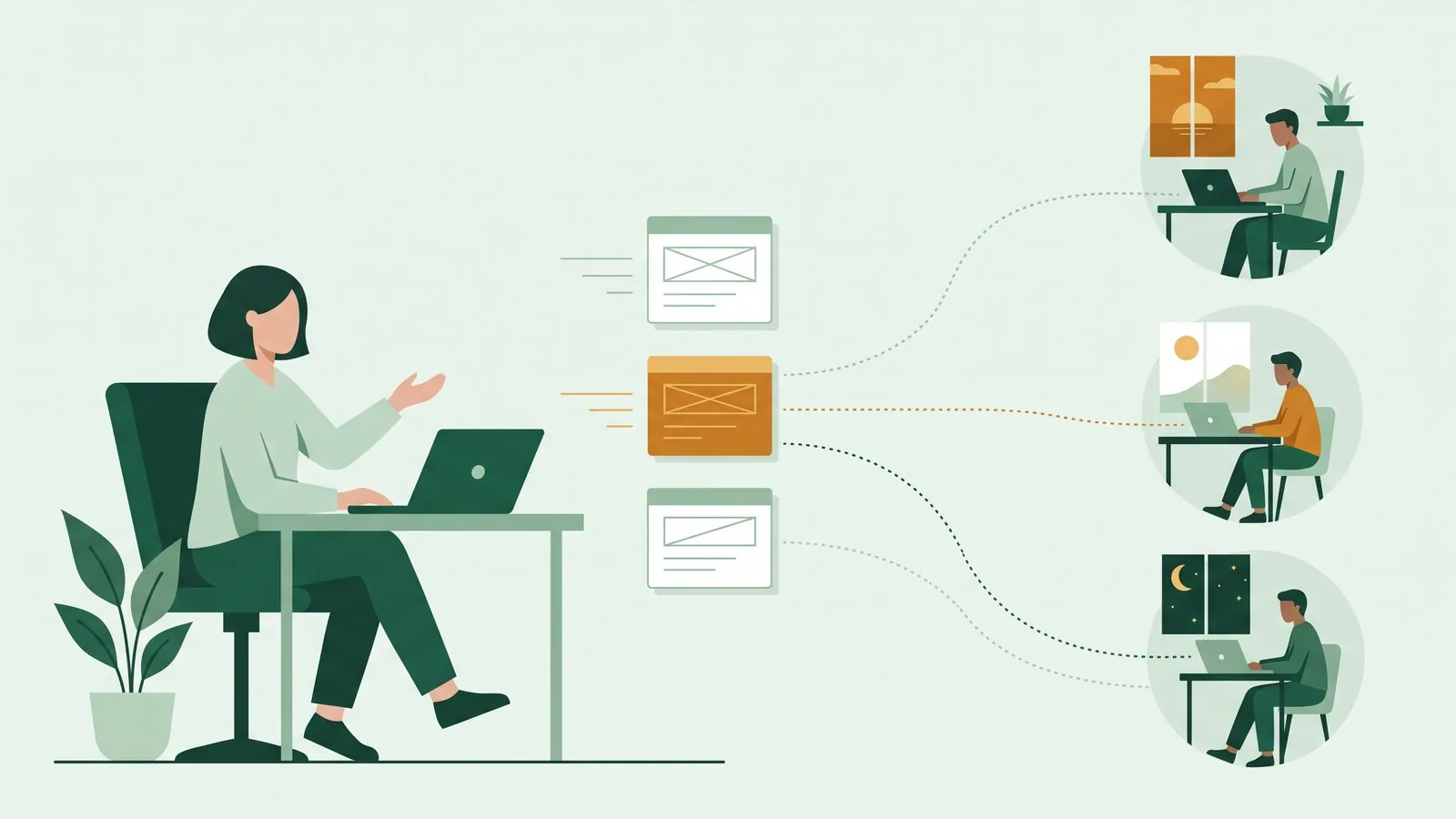
You manage a remote team effectively by making the work visible, so you never have to ask where it stands. That takes seven practices, each small on its own, that together replace most of the chasing.
One owner per task. Every task has exactly one person who answers for it. Shared ownership on a remote team usually means nobody moves first.
Status written where the work lives. The owner keeps status on the task itself: done, in progress, waiting or stuck. A status that lives in someone's head or a weekly meeting is out of date by Tuesday.
The person doing the work flags stuck work. Stuck is a status, not a confession. The owner marks it and names what they need, the same day it stalls.
One ranked priority list. The team works from a single list in a clear order, so "what should I do next?" has a written answer. When two requests collide, the manager re-ranks the list instead of answering in private messages. For methods to rank it, see task prioritization.
A response-time agreement. The team agrees in writing how fast each channel needs a reply, plus one urgent lane for things that can't wait.
A handoff standard. Work that changes hands carries its goal, status, links, decisions and next step, so the next person can act without a call. A handover document template makes this a habit.
A weekly written recap, and meetings only to decide. Each Friday, one short note covers what moved, what's stuck and what needs the manager. Live time is kept for decisions, conflict and relationships. A weekly status report template gives the recap a fixed shape.
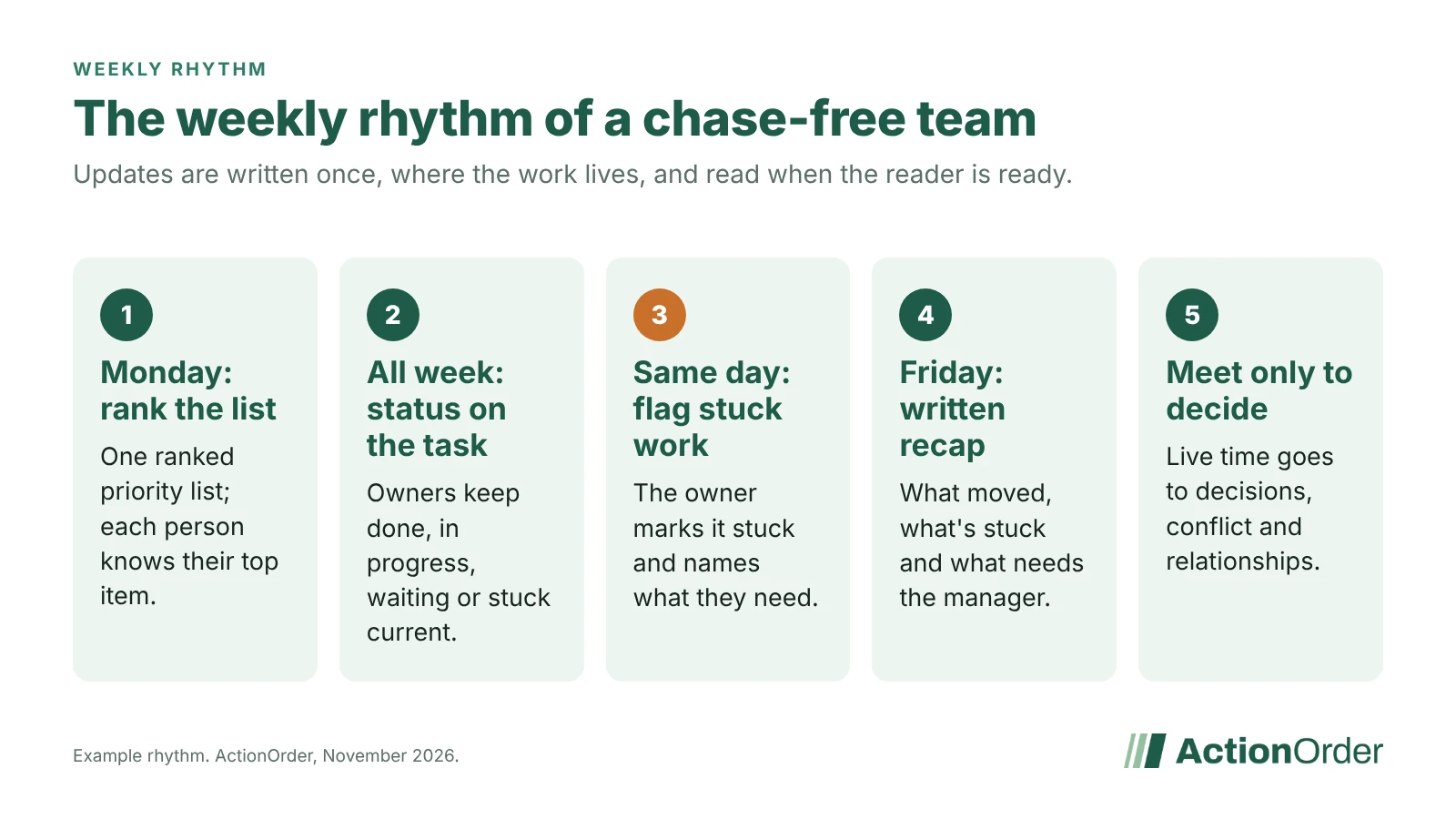
These practices run on a weekly rhythm. Monday sets the ranked list, the week runs on written status, stuck work surfaces the day it stalls, and Friday's recap closes the loop.
Why does chasing status updates fail on a remote team?
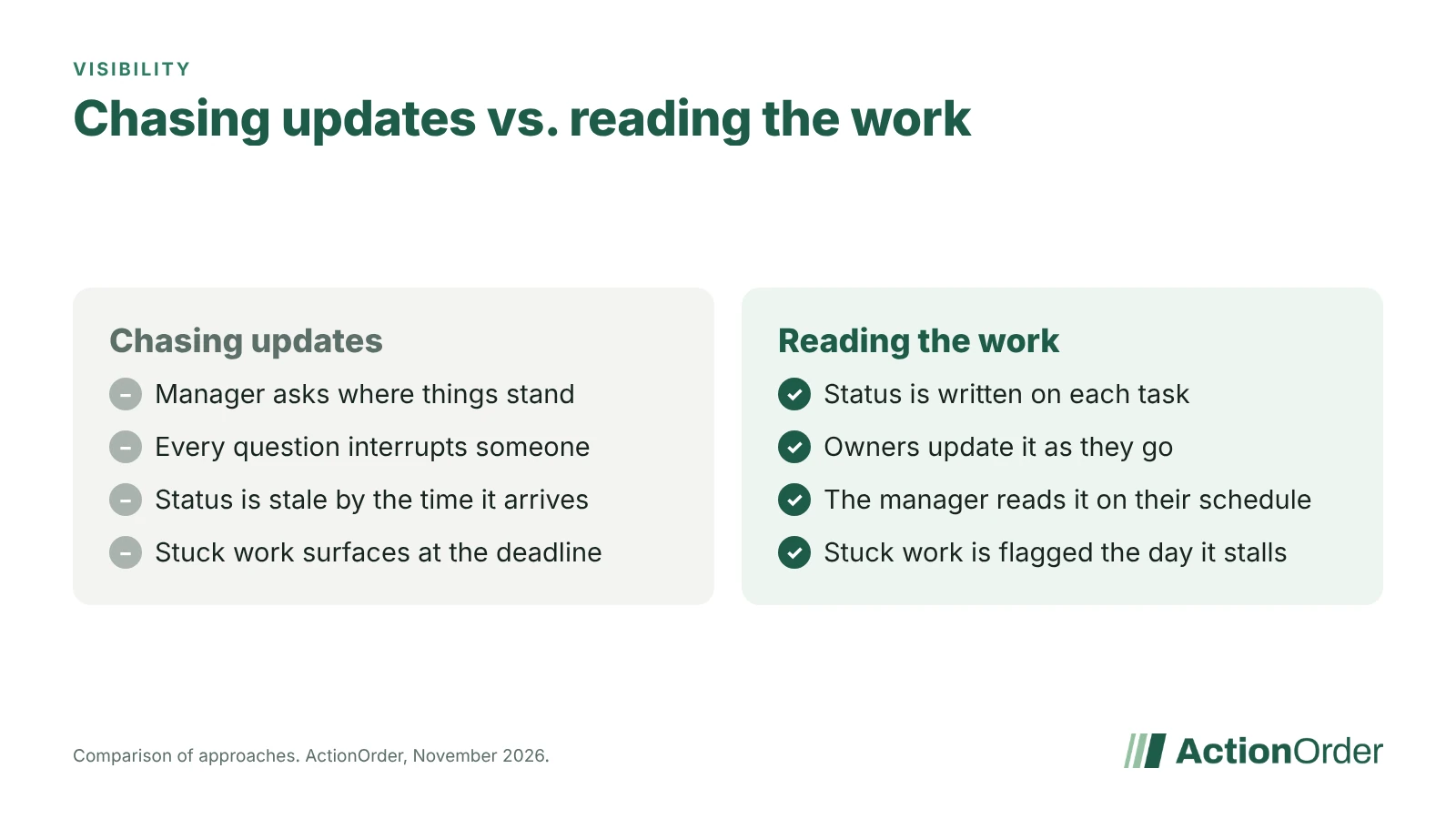
Chasing fails because it treats a visibility problem as an effort problem. When managers can't see the work, they ask about it, and every question interrupts the person doing it.
The visibility gap is real and measurable. In Microsoft's survey of 20,006 knowledge workers in 11 countries (July to August 2022), 87% of employees said they were productive at work, while 85% of leaders said hybrid work made it hard to have confidence that employees were productive (Microsoft Work Trend Index, Sept 22, 2022). Both sides can be sincere. They are looking at different evidence.
Clarity is slipping too. In Gallup's survey of 21,648 employed U.S. adults in August 2026, 46% strongly agreed they knew what was expected of them at work, down three points from the first half of the year (Gallup, Oct 28, 2026). Among exclusively remote employees, Gallup found that share fell from 59% in 2020 to 47% in 2023 (Gallup, Jan 22, 2024).
Chasing adds to an interruption load that is already heavy. Microsoft's telemetry found that the most-interrupted fifth of Microsoft 365 users (the top 20% by meetings, emails and chats received) are interrupted every two minutes during core work hours (Microsoft WorkLab, June 17, 2025). And Atlassian's survey of 12,000 knowledge workers and 200 executives found that "leaders and teams waste 25% of their time just searching for answers" (Atlassian, State of Teams 2025).
Reading the work fixes both problems at once. The manager gets current status without a question, and the team gets its focus back. For the full playbook on ending update requests, see how to stop chasing status updates on a remote team.
How do you keep a remote team accountable without micromanaging?
You keep a remote team accountable by agreeing on outcomes up front and then reading the signals the work produces. Micromanaging starts when the only way to know is to ask.
Accountability on an async team rests on three written agreements:
What done means. One sentence per task that describes the finished result, plus a due date.
Who owns it. One name per task, visible to the whole team.
When you'll look. Agreed check points based on risk: more for new people and new kinds of work, fewer for familiar work.
Example: Alex manages a 9-person delivery team. Instead of asking Sam for design updates each morning, Alex reads the board on Monday and Thursday. When a Northwind design task sat at "waiting" for four days, Alex had a specific question to ask: what is it waiting on? The answer was missing brand files from the client, which Priya fixed in one email.
Accountability is not surveillance. Watching screens or counting clicks tells you someone was busy, not that the work moved. If you're weighing what signals to trust, see how to know if remote employees are working, and for the trust argument in depth, accountability without surveillance on a remote team.
How often should you check in with remote employees?
Read written status two or three times a week, and hold a short one-to-one with each person every week or two. Reading covers progress, so live time can go to priorities, blockers and growth.
Match check-in frequency to risk rather than to habit:
| Situation | Read status | One-to-one | Extra check points |
|---|---|---|---|
| New hire, first month | Daily | Weekly | At each first deliverable |
| Experienced person, familiar work | Twice a week | Every two weeks | None |
| New kind of work or a new client | Twice a week | Weekly | At the halfway point |
| Work marked stuck | Same day | As needed | Until it moves |
The point of the table is that check-ins are planned, not reactive. When people know when you'll look, they stop guessing whether silence is a problem.
Managing remote employees: what each person needs from you
Managing remote employees comes down to five things each person needs: written expectations, a regular one-to-one, feedback they can see, a fair shot at growth and respected working hours. The practices above cover the work; these cover the person.
| What they need | What to do remotely |
|---|---|
| Written expectations | One page per person: outcomes, what done means and working hours. |
| A regular one-to-one | A short call every week or two about the person, not status. A one-on-one meeting agenda gives it a shape. |
| Feedback they can see | Specific comments soon after the work; thanks in the team channel. |
| A fair shot at growth | The same visible projects as people near you. See proximity bias. |
| Respected hours | Agreed hours and reply windows, and no late requests that look urgent. See core hours. |
Gallup's advice is to keep it frequent: "Between 15 and 30 minutes is enough time for a meaningful conversation, but only if it happens frequently." It also reports that "80% of employees who say they have received meaningful feedback in the past week are fully engaged" (Gallup, updated Feb 16, 2026).
Example: Morgan joins Taylor's support team as support lead. In week one, Taylor writes a one-page note with Morgan's first three outcomes and the team's reply windows. They meet for 20 minutes a week, and Taylor reads the queue first, so the call goes to Morgan's questions.
If people are paid on logged time, they log it themselves against the task; see billable hours tracking. Before anyone suggests watching screens, read what employee monitoring software measures and misses. When someone falls behind, follow the steps for holding employees accountable.
How do you manage a team across time zones?
Manage across time zones by making every handoff complete enough that the next person can act without waiting for a reply. Overlap hours are scarce, so spend them on decisions, not updates.
Four rules carry most of the load:
Write the handoff before you log off. Goal, status, links, decisions made and the next step.
Set reply windows by channel. For example, comments on a task within one working day, chat within four working hours, and an urgent lane for anything that blocks a client.
Rotate meeting times. If the team must meet live, rotate the slot so the same people don't always take the early or late call.
Keep decisions in writing. A short decision log means nobody reopens a choice because they were asleep when it was made.
The deeper guide on passing work between people who rarely overlap is how to delegate across time zones without losing context.
What tools does a remote team need?
A remote team needs a small set of tool categories, each with a clear job, rather than many tools that overlap. The rule that matters most: each kind of information lives in one place.
| Tool category | Its job on an async team |
|---|---|
| Task or project tracker | Owner, status and next step for every piece of work |
| Shared documents | Specs, decisions and handoff notes that outlast a chat thread |
| Team chat | Quick questions and the urgent lane, with agreed reply windows |
| Video calls and recorded walkthroughs | Decisions, conflict, relationships and demos |
| Time logging (where people are paid on logged time) | Hours logged by each person against the task they worked |
Write down which category holds which kind of information, and point people back to it when something lands in the wrong place.
How do you know if your team runs without chasing?
Answer the eight questions in this chase-free scorecard. Each "no" points to the practice to fix first.
| # | Question | If the answer is no, fix this first |
|---|---|---|
| 1 | Does every active task have exactly one named owner? | Assign one owner per task this week, starting with anything shared. |
| 2 | Can you see each task's status without asking anyone? | Move status onto the task: done, in progress, waiting or stuck. |
| 3 | Did someone mark their own work stuck in the last two weeks? | Say in writing that stuck is a normal status and thank the first person who uses it. |
| 4 | Is there one ranked priority list the whole team works from? | Merge the lists and rank the top ten items together. |
| 5 | Does the team have a written response-time agreement with an urgent lane? | Draft one in a shared doc and agree it at the next team meeting. |
| 6 | Can the next person act on a handoff without a call? | Adopt a five-part handoff note: goal, status, links, decisions, next step. |
| 7 | Do you get a written recap of the week without asking for it? | Set a Friday recap of what moved, what's stuck and what needs you. |
| 8 | Did your last three meetings each end in a decision? | Turn the status meetings into written updates and keep live time for decisions. |
Score one point for each "yes". Six or more means the team mostly runs without chasing. Fewer than four means start with questions 1 and 2, because the other practices depend on them.
How ActionOrder handles this
ActionOrder, an efficiency and accountability tool for managers of remote teams, builds these practices into the work itself. It reads the tools your team already uses and gives each person one clear next step at a time, already prepped with context, research and a first draft. Every card has one owner and a status: done, in progress, waiting or stuck, and people set "stuck" themselves. On Pro, the team view shows each card's owner and status and how long it waited in the queue, plus a Friday recap of what moved, what's stuck and what needs you. Nothing runs in the background.
Join the waitlist. ActionOrder is in pre-launch.
Questions people ask
What is the hardest part of managing a remote team?
The hardest part is knowing where work stands without interrupting the people doing it. On a shared floor you overhear progress; remotely, silence can mean focus or a problem. The fix is structural: one owner per task, status written on the task and stuck work flagged by its owner, so the answer is always readable.
How do you build trust on a remote team?
Build trust by making commitments visible and keeping them, in both directions. Agree what done means, read status instead of checking up, and respond within the windows the team agreed. Trust grows when people see that flagging a problem early gets help, not blame, so treat the first "stuck" flag as a good sign.
What should a remote team agree on in writing?
At minimum, write down who owns what, how status is shown, how fast each channel needs a reply, what counts as urgent, how work is handed off and how priorities are ranked. Keep it to one page. A written agreement turns unspoken expectations into something new teammates can read on day one.
How do you run a status meeting remotely?
Replace most status meetings with a written update in a fixed format, read on each person's schedule. Keep a short live meeting only when there is something to decide. If you do meet, have everyone post their update in writing beforehand and spend the time on blockers and decisions. Async meetings covers the formats.
How do you onboard a remote employee?
Give them a written first-week plan, a named buddy and three small first outcomes with a clear definition of done. Read their status daily in the first month and meet weekly. Our remote onboarding guide has a full 30-60-90 plan.
What's a common mistake new remote managers make?
A common mistake is replacing the office's casual visibility with more meetings and more messages. That adds interruptions without adding clarity. Start instead with the two practices everything else depends on: one owner per task and status written where the work lives.
Sources
- U.S. Employee Engagement Below 30% for First Time in 15 YearsJim Harter, Gallup, Oct 28, 2026
- In New Workplace, U.S. Employee Engagement StagnatesJim Harter, Gallup, Jan 22, 2024
- Hybrid Work Is Just Work. Are We Doing It Wrong?Microsoft Work Trend Index, Sept 22, 2022
- Breaking down the infinite workdayMicrosoft WorkLab, June 17, 2025
- State of Teams 2025Jay Hoffmann, Atlassian, 2025 (the page shows no publication date)
- A Great Manager's Most Important HabitGallup, May 29, 2023, updated February 16, 2026 (checked November 22, 2026)