Employee Monitoring Software: What It Measures and What It Misses
Employee monitoring records activity, not results. See what each type captures, US notice laws, and outcome signals that show what is done and stuck.
Employee monitoring is the use of software to record what employees do on work devices and networks: hours, screenshots, apps and sites, keystrokes and data movement. It shows activity, not results. It can support security, compliance and billing evidence, but it can't tell you whether the agreed work got done or what's stuck.

What is employee monitoring software?
Employee monitoring software is any tool that records how employees use work computers, phones, accounts or networks, usually in the background and often without the employee doing anything. Most products combine several types of capture, so the useful question is not "which product" but "which kinds of data, and why".
Demand rose fast when offices emptied. Harvard Business Review reported in 2022 that global demand for employee monitoring software more than doubled in April 2020, and that online searches for "how to monitor employees working from home" increased by 1,705% (Thiel et al., HBR, 2022).
If you manage a remote team that works asynchronously, you're probably weighing it for one of three reasons: you can't see the work, a client wants proof of hours, or security needs a record. Each reason points to a different type of tool, and to a different alternative.
What does each type of employee monitoring software record?
Each type records one kind of activity well and says almost nothing about outcomes. Use this table to match the type to the problem you're actually trying to solve.
| Monitoring type | What it records | What it can't tell you | Legitimate use |
|---|---|---|---|
| Time tracker with screenshots | Hours a timer ran, plus periodic screen captures | Whether the time produced the agreed result | Evidence of hours for clients billed by the hour |
| Activity and app monitoring | Apps and sites used, active vs. idle time | Whether thinking, reading or a call away from the keyboard was work | Spotting unapproved software on company devices |
| Keystroke and input logging | Keys pressed, clicks, mouse movement | Quality, judgment or progress on any task | Narrow security investigations with grounds and notice |
| Productivity scoring | A score built from the activity above | Which work matters most this week, or what's blocked | Rarely sound; the score inherits every gap above |
| Network and data-loss tools | Files, emails and transfers leaving company systems | Anything about individual performance | Protecting client data and meeting security duties |
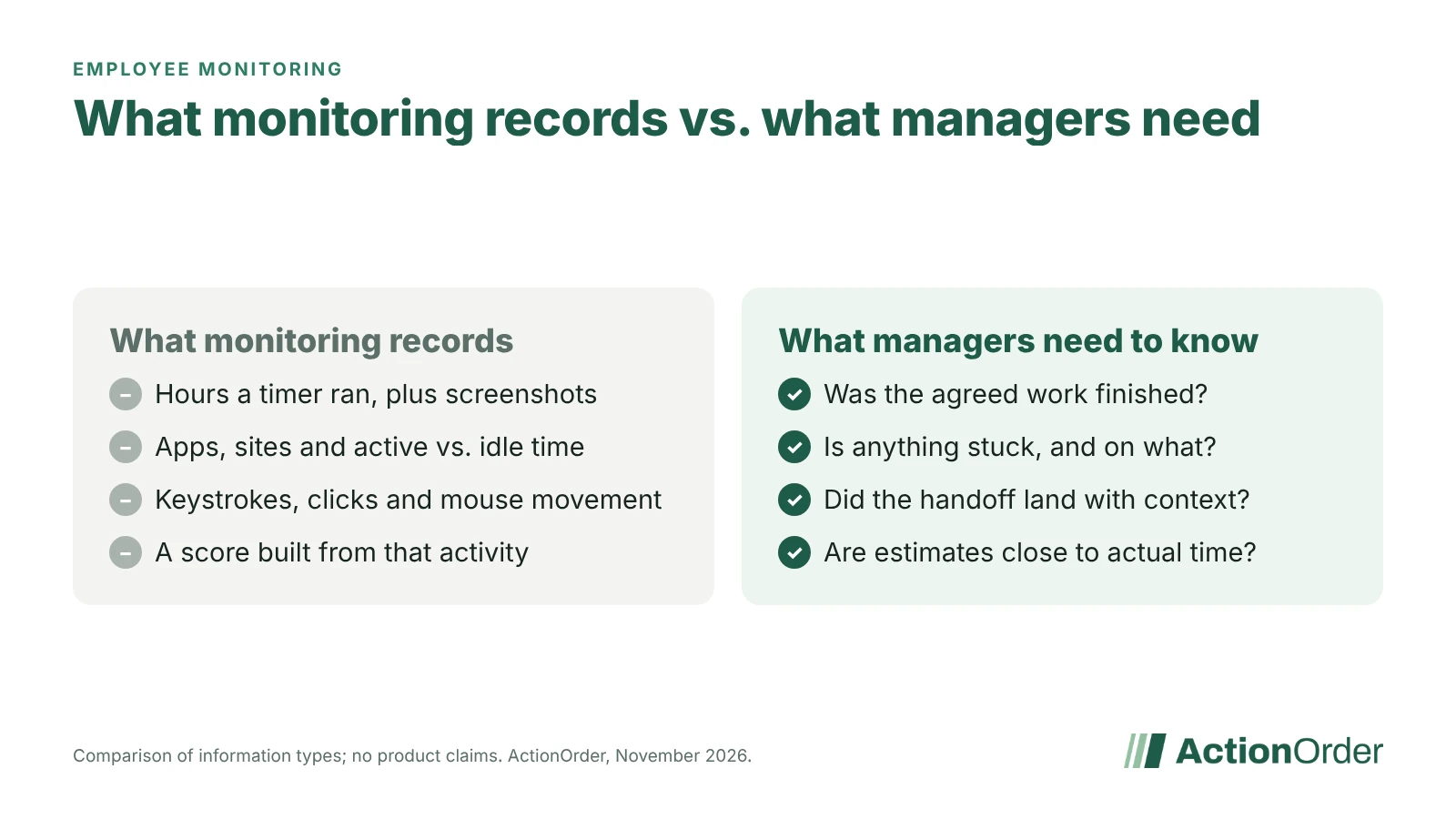
The pattern is the same in every row. The software is good at counting inputs and blind to the things a manager has to decide on: what's done, what's stuck and what needs you.
What can employee monitoring data not tell you?
Monitoring data can't tell you whether work is finished, whether it's right, or what's in the way. Those are the three things a manager of an async team needs every week.
Activity data has two blind spots. First, much real work leaves no trace: reading a spec, thinking through a client problem or talking a teammate through a handoff. Second, busy and productive are different states. Someone can keep a mouse moving all day on the wrong task.
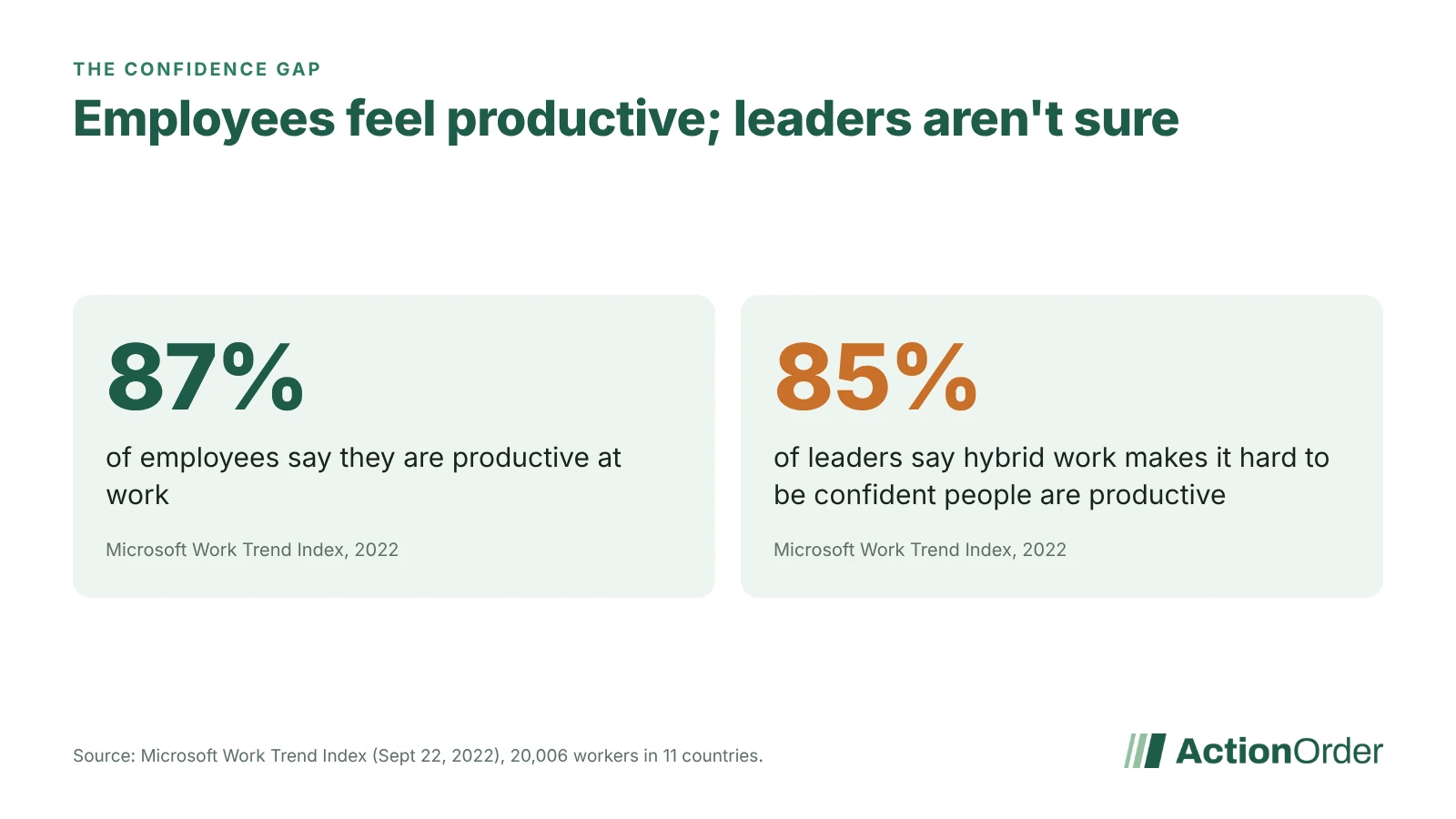
Microsoft's research names the result "productivity paranoia." In its survey of 20,006 knowledge workers in 11 countries, fielded July 7 to August 2, 2022, 87% of employees said they were productive at work, while 85% of leaders said the shift to hybrid work made it challenging to have confidence their employees were productive (Microsoft Work Trend Index, 2022). The same report notes that "some organizations use technology to track activity rather than impact," and says this can undermine trust.
Is employee monitoring legal, and do employers have to tell employees?
In the US, monitoring work systems is broadly legal, but several states require notice first, and federal law limits intercepting communications. Laws vary by state and change, so check the rules where each employee works.
New York. Civil Rights Law §52-c applies to employers with a place of business in the state. They "shall give prior written notice upon hiring to all employees who are subject to electronic monitoring," get an acknowledgment in writing or electronically, and post the notice "in a conspicuous place." It covers telephone, email and internet access or usage, and the attorney general enforces civil penalties (NY Civil Rights Law §52-c).
Connecticut. General Statutes §31-48d already required prior notice of electronic monitoring. Public Act 26-73, effective October 1, 2026, requires employers to name the specific workplace locations where employees may be monitored, post the notice in those locations, and give new hires a written, plain-language statement of which activities are prohibited (Public Act 26-73; Connecticut OLR summary of PA 26-73).
Delaware. Title 19 §705 requires employers to give either an electronic notice each day an employee uses company email or internet access, or a one-time notice the employee acknowledges. It covers telephone, email and internet usage and sets a civil penalty for each violation (Delaware Code Title 19 §705).
Federal. The Electronic Communications Privacy Act of 1986 "applies to email, telephone conversations, and data stored electronically" (Bureau of Justice Assistance). It prohibits intercepting those communications, with exceptions, including where "one of the parties to the communication has given prior consent" (18 U.S.C. §2511).
Two practical points follow. Written, acknowledged notice is the common thread, so give it whether or not your state requires it. And the New York and Delaware laws exclude system-maintenance processes that aren't targeted at a particular person, which is not the same as monitoring one person's activity.
This is general information, not legal advice.
Does employee monitoring improve productivity?
The evidence doesn't show that it does, and one line of research shows a cost. Monitoring can change behavior in the wrong direction.
In two studies reported in Harvard Business Review on June 27, 2022, Chase Thiel and colleagues found that "monitored employees were substantially more likely to break rules," including "cheating on a test, stealing equipment, and purposely working at a slow pace" (Thiel et al., HBR, 2022). The authors trace this to "a shift in employees' sense of agency and personal responsibility." Put simply, people watched by a system start to treat their conduct as the system's job.
Microsoft reached a similar point from another direction. Its advice to leaders was to "create and reinforce a culture that rewards employees' impact, not just activity" (Microsoft Work Trend Index, 2022).
When does employee monitoring make sense?
Monitoring makes sense when the goal is protecting systems or proving a specific fact, not judging how hard someone works. Three uses hold up:
Security. Data-loss and network tools protect client data and company systems. Scope them to systems, not people.
Compliance. Some industries must keep records of communications. Record what the rule requires and say so in the notice.
Billing evidence. Clients billed by the hour may ask for proof. A time entry logged against a specific task, written the same day, usually answers that better than a screenshot does. See billable hours tracking for the entries clients accept.
Before you buy, answer five questions in writing:
What decision will this data help me make?
Is there a less intrusive way to get the same answer?
Who will see the data, and for how long is it kept?
Have we given written notice, and do employees acknowledge it?
How will we explain it to a new hire on day one?
If you can't answer the first question, the tool will produce data nobody uses and distrust everybody feels.
What are the alternatives to employee monitoring software?
The alternative is to make the work itself visible, so you read outcomes instead of activity. In Gallup's survey of 21,648 U.S. adults in August 2026, only 46% of employees strongly agreed they knew what was expected of them at work (Gallup, Oct 28, 2026). Clear expectations fix more than watching does.
Replace each monitoring signal with an outcome signal:
| Instead of | Use |
|---|---|
| Screenshots to prove someone worked | Status written on the task: owner, status, next step |
| Idle-time alerts | People flag stuck work themselves, with what they need |
| A productivity score | Work finished against what was agreed this week |
| Hours from a background timer | Time each person logs against a task and can correct |
| A dashboard checked daily | A written recap once a week: what moved, what's stuck, what needs you |
For the full set of signals and a conversation script for when they look bad, read how to know if remote employees are working. For the argument behind this approach, see accountability without surveillance.
How ActionOrder handles this
ActionOrder, an efficiency and accountability tool for managers of remote teams, gives you the outcome signals without the background capture. It reads the tools your team already uses, read-only, and gives each person one clear next step at a time. Every card has one owner and a status: done, in progress, waiting or stuck, and people set "stuck" themselves. On Pro, the team view shows each card's owner and status, how long it waited in the queue, and logged time against its estimate, plus a Friday recap. It never shows screens, keystrokes, clicks, app activity, anyone's inbox or calendar, or a ranking of people. On Pro and Business, people log their own time against a card and can correct it. Nothing runs in the background. Every logged hour is task time.
Join the waitlist. ActionOrder is in pre-launch.
Questions people ask
Can my employer see my screen when I work from home?
On a company laptop with screenshot or screen-recording software installed, yes. On a personal device, only if monitoring software is installed on it. In New York, Connecticut and Delaware, employers must give notice of electronic monitoring. Ask HR for the written monitoring policy, which should say what is captured and who sees it.
Is keystroke logging legal?
On company-owned devices it is generally legal in the US when the employer meets state notice rules, but laws vary by state and change. Federal law adds limits on intercepting communications. Keystroke logging is also the hardest type to justify to a team, so keep it to narrow security investigations with grounds and notice. This is general information, not legal advice.
Do I need employee monitoring software for a small remote team?
Usually not. A team of 5 to 50 people can see its work directly: one owner per task, status written on the task, stuck work flagged by the person doing it, and a weekly recap. That answers "is the work getting done?" faster than any activity report, and it costs no trust.
How should I tell employees about monitoring?
In writing, before monitoring starts or at hiring, with an acknowledgment. Say what is recorded, on which devices, why, who can see it, and how long it's kept. Post it where people will find it. If you can't explain the reason in one plain sentence, reconsider the tool.
What's the difference between time tracking and employee monitoring?
Time tracking records hours against tasks, ideally logged and corrected by the person doing the work. Employee monitoring records activity on devices, such as apps, screens and keystrokes, usually in the background. Time tracking can support invoicing and estimates; monitoring mainly shows whether someone was active.
Sources
- Monitoring Employees Makes Them More Likely to Break RulesChase Thiel, Julena M. Bonner, John Bush, David Welsh and Niharika Garud. Harvard Business Review, June 27, 2022
- Hybrid Work Is Just Work. Are We Doing It Wrong?Microsoft WorkLab, Work Trend Index, September 22, 2022
- New York Civil Rights Law §52-c, "Employers engaged in electronic monitoring; prior notice required." New York State Senate, revision of May 13, 2022
- Public Act 26-73 (sSB 472), "An Act Concerning the Electronic Surveillance of Employees," public act summary. Connecticut General Assembly, Office of Legislative Research, 2026
- Public Act No. 26-73, "An Act Concerning the Electronic Surveillance of Employees" (amends §31-48d), approved June 4, 2026. Connecticut General Assembly
- Delaware Code Title 19 §705, "Notice of monitoring of telephone transmissions, electronic mail and Internet usage." State of Delaware, accessed Nov 10, 2026
- Electronic Communications Privacy Act of 1986 (ECPA)Bureau of Justice Assistance, U.S. Department of Justice, accessed Nov 10, 2026
- 18 U.S. Code §2511, "Interception and disclosure of wire, oral, or electronic communications prohibited." Legal Information Institute, Cornell Law School, accessed Nov 10, 2026
- U.S. Employee Engagement Below 30% for First Time in 15 YearsJim Harter, Gallup, October 28, 2026