Team Working Agreement Template for Remote Teams
Agree once, in writing, on hours, channels, reply times, meetings and decisions, so nobody on a distributed team has to guess.
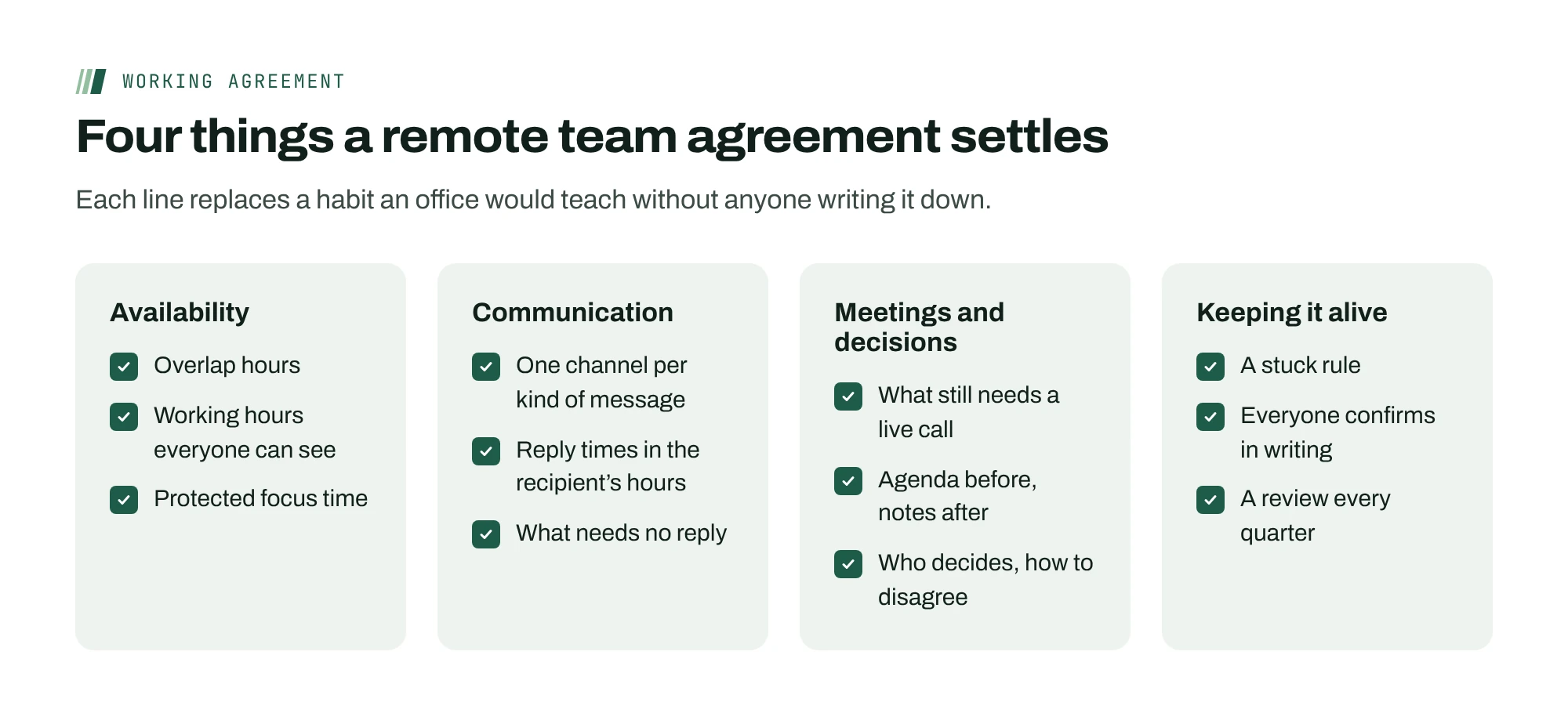
A working agreement is a short document a team writes together to set how it works: when people are available, which channel to use for what, how fast to reply, how decisions get made and what to do when someone is stuck. On a remote team, it replaces the habits an office teaches without anyone writing them down.
Team working agreement template (copy this)
Copy the template into a shared doc or pin it in your team channel. Fill every bracket with a number, a name or a channel.
Team working agreement
Fill in the brackets together. Keep it to one page.
Team working agreement: [team name]
Last reviewed: [date] · Next review: [date]
Hours and time zones
• Overlap hours: [time to time, time zone]. Live calls happen only in this window.
• Everyone keeps their working hours in [profile, calendar or team page].
Channels
• Urgent, needs action today: [channel]
• Work questions: [channel or task comments]
• Updates and FYIs: [channel]
Response times, in the recipient’s working hours
• Urgent: within [time]
• Work questions: within [one working day]
• FYIs: no reply needed
Meetings
• We meet live only for [kinds of meeting]. Everything else starts as a written post.
• Every meeting has an agenda [time] ahead and notes posted after.
Decisions
• [Who] decides and logs it in [where]. Disagree in writing within [time].
When you’re stuck
• Mark the task stuck after [time] blocked, and say what you’re waiting on.
Focus time
• [Hours or days] are for focus. Only urgent messages interrupt.
Changing this agreement
• Propose changes in [channel]. We review it every [quarter].
To fill it in by hand, download the printable team working agreement template (PDF).
What a team working agreement covers
Each section answers a question people on a remote team would otherwise answer by guessing.
| Section | The question it settles |
|---|---|
| Hours and time zones | When can I expect someone to be around? |
| Channels | Where do I post this so the right person sees it? |
| Response times | How long do I wait before I follow up? |
| Meetings | Does this need a call? |
| Decisions | Who decides, and how do I disagree? |
| When you’re stuck | When do I raise my hand? |
| Focus time | When is it fine not to answer? |
Atlassian, which sells collaboration software, defines working agreements as “shared norms for how a team will work together, communicate, and collaborate.” Its version of the exercise is a 60-minute session for 2 to 10 people (Atlassian Team Playbook).
Example: a filled-in working agreement
Example: Morgan, the support lead, drafted this with the team, and Taylor, head of support and operations, approved it.
Example: a support team’s agreement
Filled in by a support team across three time zones.
Team working agreement: Support
Last reviewed: November 2 · Next review: February 1
Hours and time zones
• Overlap hours: 14:00 to 16:00 UTC. Live calls happen only in this window.
• Everyone keeps their working hours in their chat profile.
Channels
• Urgent, needs action today: #support-urgent
• Work questions: comments on the ticket
• Updates and FYIs: #support-team
Response times, in the recipient’s working hours
• Urgent: within 1 hour
• Work questions: within one working day
• FYIs: no reply needed
Meetings
• We meet live only for the monthly retro and incident reviews. Everything else starts as a written post.
• Every meeting has an agenda 24 hours ahead and notes posted after.
Decisions
• Morgan decides queue and process changes and logs them in the support handbook. Disagree in writing within two working days.
When you’re stuck
• Mark the ticket stuck after half a working day blocked, and say what you’re waiting on.
Focus time
• Tuesday and Thursday mornings are for help-center writing. Only urgent messages interrupt.
Changing this agreement
• Propose changes in #support-team. We review it every quarter.
How to write a working agreement async
Write it in a shared doc over a few days, so people in every time zone shape it.
Post the blank template with a deadline. Give people three working days to add proposals as comments.
Draft from the comments. The manager writes one version and marks the rules people disagreed on.
Settle disagreements in writing. If one rule stays stuck, hold a short call for that rule only.
Ask everyone to confirm. A reply of “agreed” from each person turns a draft into an agreement.
Pin it and review it. Link it from onboarding and review it quarterly. Atlassian also suggests revisiting it when new people join, after a reorg, or when an agreement can no longer be upheld (Atlassian).
What makes a working agreement stick?
Specific numbers, the recipient’s working hours and a short length. A vague rule like “reply promptly” can’t be followed or checked.
Write numbers, not adjectives. “Within one working day” beats “promptly.”
Count reply times in the recipient’s hours, so nobody is expected to answer at night. The response-time agreement guide goes deeper.
Say what silence means. If people mark work stuck when they’re blocked, as in the playbook’s status states, silence means on track.
Keep it to one page. Move process detail into linked docs.
For focus rules that still let people reach each other, read chapter 5 of the playbook.
Fill in your working agreement here
Fill in your working agreement
Type in the boxes and the text below fills itself in. Nothing you type is stored or sent anywhere.
Your team working agreement
Updates as you type. Copy it when it looks right.
Turn on JavaScript to fill in the template here, or copy the template above.
Where ActionOrder fits
ActionOrder, an efficiency and accountability tool for managers of remote teams, supports two of these rules directly. Starting a card holds focus: new cards queue behind it, and only items a manager marks urgent and items due today get through, as a small bar. Every card has one owner and a status, and people set “stuck” themselves.
Join the waitlist. ActionOrder is in pre-launch.
Questions people ask
What is the difference between a working agreement and a team charter?
A team charter says why the team exists: its purpose, goals and scope. A working agreement says how the team works day to day. If you keep both, the working agreement is the one you’ll revise more often.
Who should write a team working agreement?
The whole team, with the manager drafting and having the final say on rules that affect clients, pay or legal duties. Rules people helped write are easier to hold each other to.
Is a working agreement the same as a remote work policy?
No. A remote work policy is the employer’s document on eligibility, equipment, expenses and legal duties; start from the remote work policy template. A working agreement is the team’s own set of norms.
Sources
- Working agreementsAtlassian Team Playbook, accessed Nov 22, 2026