How to Onboard New Employees Remotely: A 30-60-90 Day Plan and Checklist
A remote new hire can’t overhear how the team works, so everything they need has to be written down before they start. Here is a 30-60-90 day plan and a checklist you can copy.
Here’s how to onboard new employees remotely: before day one, set up accounts and equipment and write a start-here document. Assign a buddy and have the new hire ship one small task in week one. Then follow a 30-60-90 plan: learn by day 30, own one piece of work by day 60, review at day 90.

What makes remote onboarding different from office onboarding?
Remote onboarding has to put in writing what an office teaches by accident: who to ask, where things live and how decisions get made.
On a remote team that works asynchronously, nobody overhears anything. Every answer has to be written down and findable, or the new hire waits for someone to come online. GitLab’s public handbook (GitLab sells a DevOps platform) says: “Remote onboarding relies heavily on documentation, anticipating the needs of new team members, and a dedication to continuously improving the process based on feedback.”
A Gallup blog post (Gallup sells workplace consulting) reports: “Gallup finds that only 12% of employees strongly agree that their organization does a great job onboarding new employees.” When you plan how to onboard remote employees, the laptop and the welcome call are the easy part; the harder part is the 90 days after. For the wider system, see how to manage a remote team without chasing it.
What should you do before a remote employee’s first day?
Get four things ready before day one: working accounts, equipment that has arrived, a written start-here document and a buddy. The first morning should go to learning, not waiting on logins.
- Accounts and equipment. UC Berkeley’s People & Culture office reminds managers of remote staff that “Tech equipment will need to be shipped to the employee’s remote working location.” Ship it early and test every login before the start date.
- A start-here document. One page linking to everything: who owns what, where work lives, the working agreement, the current priority post and the week-one plan. If priorities only live in a meeting, post a ranked list first: see how to set priorities for a remote team and chapter 2 of the playbook.
- A buddy. Berkeley’s timeline says “The onboarding buddy will meet with the new employee two weeks before they start work and also on the first day.”
- A light calendar. Berkeley advises: “Set up 3-4 meetings per day over the first two weeks instead of a few days with 7-8 meetings.” An async team can go lower by recording what it would otherwise repeat.
What should a remote new hire do in the first week?
In week one, a remote new hire should get set up, learn how the team works and ship one small, real task. Shipping early shows them the whole path from task to done.
Day one: two short calls. A welcome call with you, and a buddy call late in the day. GitLab’s buddy guide suggests “picking a time towards the end of their first day so they have time to digest some of the onboarding issue and can come to the coffee chat with questions.”
Recorded walkthroughs. Record each tour once: the product, the main tools, one client account. Questions go in a team channel, which teaches the async habit on day one.
The agreements. They read the working agreement and the response-time agreement, so they know when silence is normal.
A first task, shipped. GitLab’s handbook notes that “Using tools, even for very small tasks, builds confidence and helps new employees to feel productive and empowered.” Pick a small fix or a short draft and send it through the normal review.
A daily written update. What they did, what’s next and what’s blocking them, as in an async standup.
What is a 30-60-90 day onboarding plan?
A 30-60-90 day onboarding plan splits a new hire’s first three months into three goals: learn how the team works by day 30, own one piece of work by day 60, and work at full pace by day 90. It turns “settle in” into checkpoints you can both see.
Berkeley’s timeline uses the same horizon: “Sharing your insights on what’s going to be high priority over the next 30, 60, 90 days will help new employees organize their approach to successfully navigating their onboarding and probationary periods.”
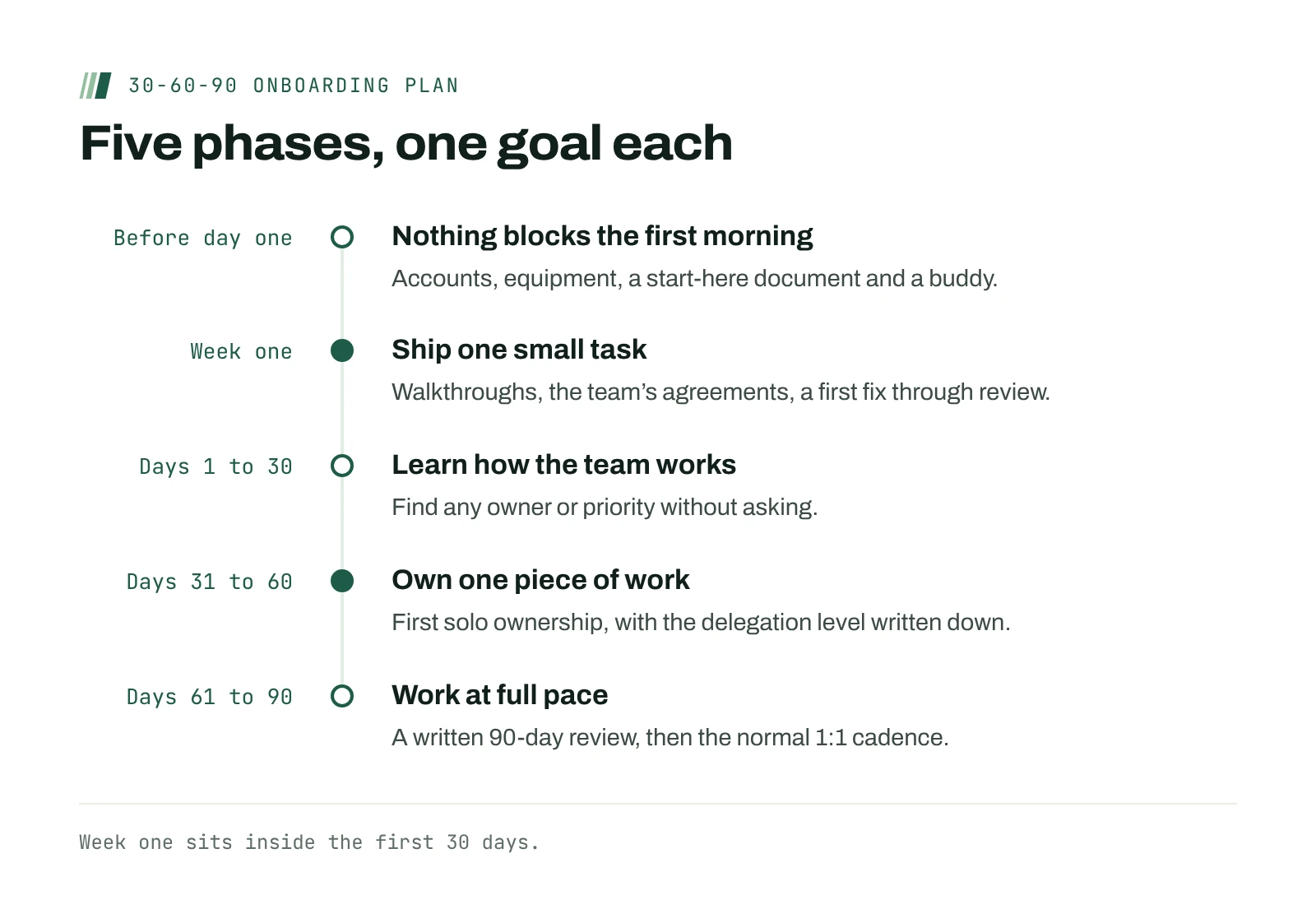
Paste this table into the start-here document so the new hire knows what each checkpoint means.
| Phase | Goal | The new hire | The manager | Done when |
|---|---|---|---|---|
| Before day one | Nothing blocks the first morning | Signs paperwork, meets the buddy | Sets up access, writes the start-here document | Every login works |
| Week one | Ship something small | Watches the walkthroughs, ships one task | Holds two short calls, shares the priority post | The first task is through review |
| Days 1 to 30 | Learn how the team works | Posts daily updates, fixes the start-here document | Holds a weekly 1:1, shares who owns what, names the day-60 area | They find any owner or priority without asking |
| Days 31 to 60 | Own one piece of work | Takes first solo ownership of a small area | Writes down the delegation level, reviews on the work | One deliverable shipped as owner |
| Days 61 to 90 | Work at full pace | Takes on more scope, drafts the 90-day review | Runs the review, moves to the normal 1:1 cadence | Review written, buddy check-ins end |
Example: a new QA engineer’s first 90 days
Example: Alex is adding a QA engineer to the 9-person delivery team. Jordan, the QA lead, records three walkthroughs before the start date, and Sam, whose day overlaps the new hire’s by five hours, is the buddy. In week one, the new hire fixes one flaky test and ships it through Jordan’s review. On day 45, Alex hands over regression testing for Northwind’s monthly release at level 4, decide and inform, one of the five levels of delegation. At day 90, the new hire drafts the review, Alex and Jordan comment, and two stale sections of the start-here document get rewritten.
What goes on a remote onboarding checklist?
A remote onboarding checklist lists what must be true at each phase, from logins that work before day one to a written 90-day review. Copy this one into your start-here document and fill in the brackets.
Before day one
- Accounts created and tested: [email, chat, project tool, docs].
- Equipment arrives [3] working days before the start date.
- Start-here document written.
- Buddy chosen: same team, overlapping hours, not on leave in the first two weeks.
- Week-one calls booked, with gaps between them.
Week one
- Welcome call; buddy call late on day one.
- Walkthroughs of [product, tools, one client] watched; questions posted in [channel].
- Working agreement, response-time agreement and priority post read.
- First small task shipped through the normal review.
Days 1 to 30
- Weekly [30]-minute 1:1 booked, with a shared agenda.
- Who-owns-what list shared.
- Daily written update posted by [end of day].
- Start-here document corrected by the new hire.
- Day-60 area named in writing.
Days 31 to 60
- First solo ownership: [area], at delegation level [level].
- Handoffs into and out of the area use the handoff note.
- Buddy check-ins drop to [every other week].
- Day-60 check: did the owned work ship, and what support is still needed?
Days 61 to 90
- Next scope agreed: [area or project].
- 90-day review written: what they own, what’s next, what to fix in onboarding.
- Normal 1:1 cadence starts.
- Start-here document updated with what this hire had to ask.
If the new hire takes over someone else’s work, add a knowledge transfer plan and the project handoff template. If every question goes to one person, that’s key-person risk, and onboarding is the time to spread it.
How do you choose an onboarding buddy for a remote hire?
Choose a peer on the same team who knows the tools, overlaps the new hire’s hours and is around for the first two weeks. The buddy takes the small questions people hesitate to ask a manager.
GitLab’s buddy guide says a buddy ideally “shares a similar timezone” and is “available during the first two weeks (no major PTO events or leave).” On an async team, overlap matters more than seniority.
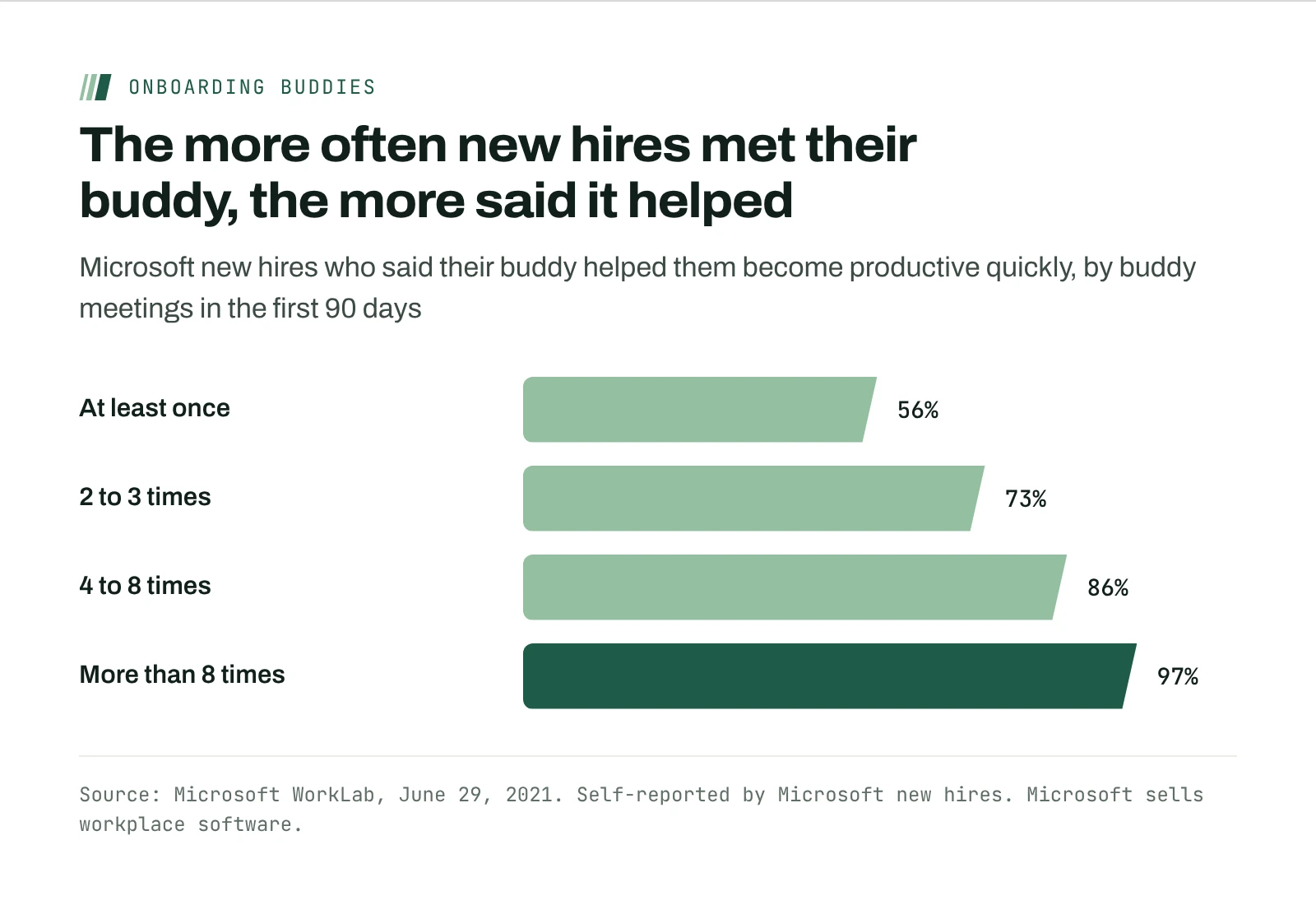
How often they meet matters too. In a Microsoft WorkLab article (Microsoft sells workplace software), Microsoft reports that “56 percent of new hires who met with their onboarding buddy at least once in their first 90 days said their contact helped them to quickly become productive on the job,” rising to “97 percent for those meeting more than eight times.” The answers are self-reported by Microsoft’s own new hires, so treat them as a direction.
Put the calls on the calendar. GitLab asks buddies to “schedule at least two follow-up calls for the week after their start date, and at least one follow-up call for the rest of the first month.” If nobody overlaps, use your core hours for them.
How often should you check in with a remote new hire?
Hold two short calls in week one, then a weekly 1:1 through day 90, with written updates in between. Your involvement matters more than any document.
Microsoft found that “When managers played an active role, new employees were 3.5 times more likely to say they were satisfied with their onboarding experience.” GitLab’s guide gives the cadence: “It’s a good idea to schedule weekly 1-1 meetings to field questions, ask about any challenges, or focus on areas to grow and build trust.” The one-on-one meeting agenda template keeps them short.
At days 30, 60 and 90, the new hire drafts a short written check and you comment. GitLab adds: “Close the loop by asking for regular feedback on the onboarding experience, and be sure to act on that feedback.” Each fix goes into the start-here document.
If you’re new to the team yourself, chapter 7 of the playbook is your version: a 30-day plan for running a remote team async.
How ActionOrder handles this
A new hire’s hardest daily question is usually what to work on next. ActionOrder, an efficiency and accountability tool for managers of remote teams, reads the tools the team already uses and gives each person one clear next step at a time, already prepped with context, analysis, research and a first draft. Every card has one owner and a status: done, in progress, waiting or stuck. People set “stuck” themselves, so a new hire can flag a blocker without waiting for the next 1:1. Delegation hands a card to a teammate with its prep and a note, which suits the first piece of work you hand over around day 60. Join the waitlist. ActionOrder is in pre-launch.
Questions people ask
What is the 30-60-90 onboarding rule?
It’s a common way to structure a new hire’s first three months, with one goal per 30-day block: usually learn by day 30, contribute by day 60 and work independently by day 90. It’s a planning habit, not a standard, so write your own checkpoints down.
What is the best way to onboard a new employee?
Plan it before day one and spread it over months, not days. Have access ready, assign a buddy, give a small first task, set 30-, 60- and 90-day goals and hold regular 1:1s. As Gallup puts it, “The time leading up to and extending beyond the first day on the job is all part of onboarding.”
How long should remote onboarding take?
Plan for about 90 days of structured support. GitLab expects its formal remote onboarding “to take at least two full weeks,” and a guide from SHRM, the HR professional association, says onboarding “should be a strategic process that lasts at least one year.”
How do you onboard a remote employee in a different time zone?
Lean harder on writing. Pick a buddy in the closest time zone, record walkthroughs instead of scheduling them, and save shared hours for the calls that need both of you. End your day with a note the new hire can act on in their morning.
What should a remote employee do on their first day?
Log in, join a short welcome call, read the start-here document and meet the buddy. Keep the day light, with time between calls to read. If every login works and they know who to ask, day one did its job.
Sources
- The complete guide to remote onboarding for new-hiresThe GitLab Handbook, GitLab, last modified November 4, 2026, checked November 22, 2026
- GitLab Onboarding BuddiesThe GitLab Handbook, GitLab, last modified November 4, 2026, checked November 22, 2026
- Why the Onboarding Experience Is Key for RetentionRobert Gabsa, Gallup Blog, May 16, 2018
- Onboarding Timeline and Toolkit for On-campus, Remote and Hybrid EmployeesPeople & Culture, University of California, Berkeley, checked November 22, 2026
- Strategies for Onboarding in a Hybrid WorldWorkLab, Microsoft, June 29, 2021
- New Hire Integration: Start Here When Onboarding a New EmployeeRoy Maurer, SHRM, August 19, 2024