Slack Etiquette for Remote Teams: Channel Norms You Can Copy
Good Slack etiquette is less about manners than about notifications: who gets interrupted, when, and why. These norms keep a remote team’s chat calm, searchable and fair across time zones, and they fit in one pinned post.
Slack etiquette is the set of shared habits that keep team chat useful: one complete message instead of “hi,” public channels by default, replies in threads, and @here or @channel only for urgent news. On a remote team, write the norms down, set reply times by message type, and schedule messages for the recipient’s working hours.

What is Slack etiquette?
Slack etiquette is the set of habits a team agrees on for its chat: where messages go, how they’re written, who gets notified and how fast people reply. The same norms work in any team chat tool.
Most of it comes down to notifications. Slack’s own blog points out that “Every DM results in a notification on the mobile and desktop devices of your recipient.” Interruptions aren’t free. In a lab experiment by Gloria Mark (UC Irvine) with Daniela Gudith and Ulrich Klocke (Humboldt University), 48 people answered emails with and without interruptions by phone or instant message. Interrupted people finished faster with no loss in quality, but “this comes at a price: experiencing more stress, higher frustration, time pressure and effort.” See what context switching costs.
Chat is one channel of asynchronous communication. On a remote team nobody can read the room, so write the norms down as part of managing a remote team without chasing it.
Should you say hello before asking a question?
No. Put the greeting, the context and the question in one message, so the other person can act on it the first time they look.
A bare “hi” sends a notification with nothing in it. Slack’s blog puts it this way: “Getting everything you need into a single direct message means that only one notification is sent to the person.” GitLab’s public handbook (GitLab sells a DevOps platform) agrees: “If you have a quick question, just ask the question directly, and the person will respond asynchronously.”
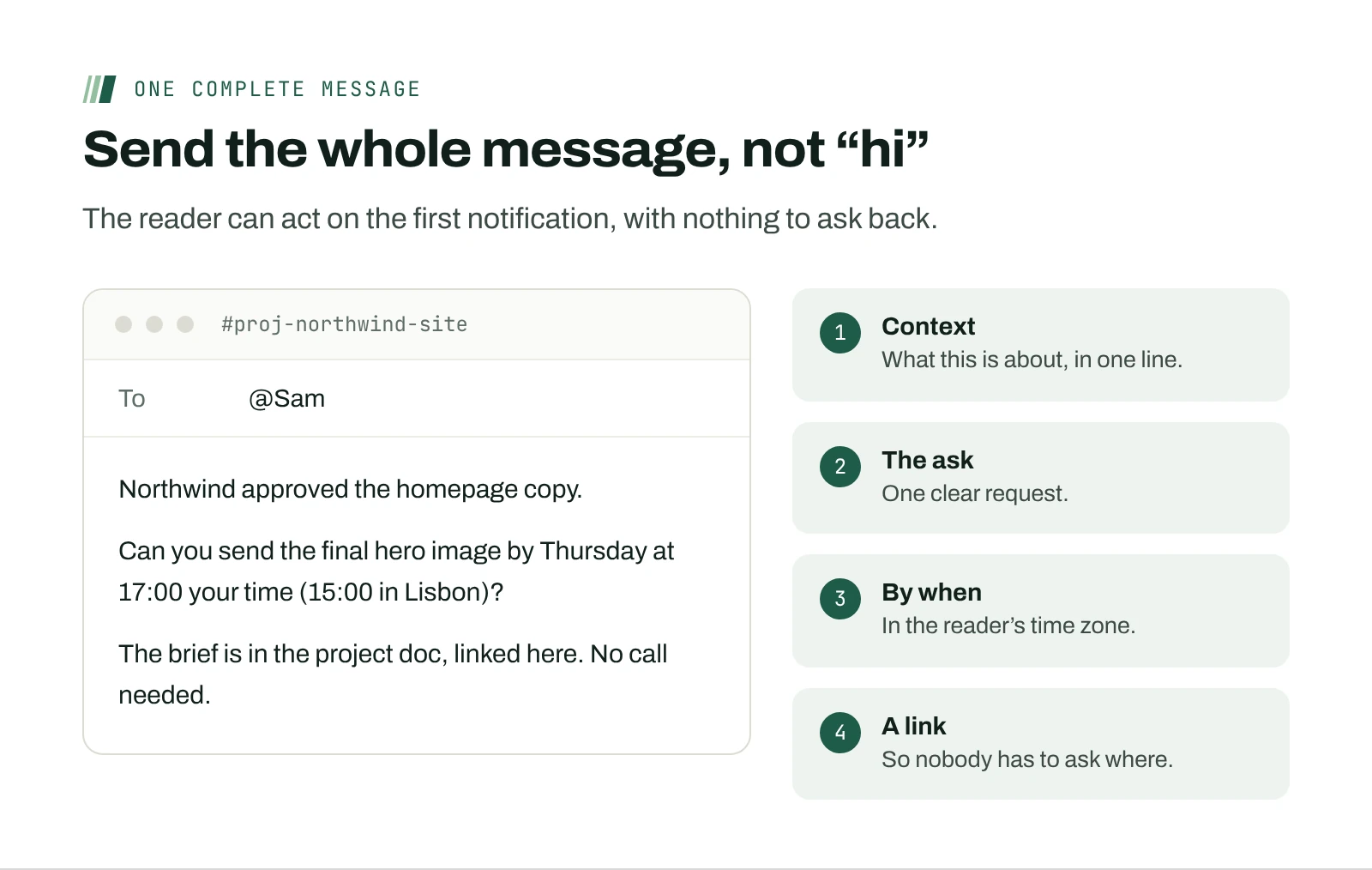
A complete message has four parts: the context in one line, one clear ask, a deadline in the reader’s time zone (or “no reply needed”), and a link.
Example: instead of a direct message that says “Hi Sam, got a sec?”, Priya posts one message in #proj-northwind-site and mentions Sam: “Northwind approved the homepage copy. Can you send the final hero image by Thursday at 17:00 your time (15:00 in Lisbon)? The brief is in the project doc, linked here. No call needed.”
Should work happen in channels or direct messages?
In channels, by default. A question asked in a public channel can be answered by anyone and found later. The same question in a direct message helps one person, once.
Slack’s blog names the problem: “DMs are private. So if someone asks you a question over one, others on your team may do the same later on without knowing you already answered it.” GitLab’s handbook is firmer: “When using Slack for work-related purposes, please avoid direct messages.” Keep direct messages for feedback, personal matters and anything about pay or health.
How should a remote team name its channels?
Start every channel name with a short prefix for the kind of channel, then the team, project or client. People can tell where a message belongs before they open anything.
Slack’s 2022 usage and etiquette guide, a template Slack published for companies to customize, says naming conventions “will help your colleagues search and join the ones that are most relevant to them (i.e. proj-, announce-, team-).” It also suggests an ext- prefix for channels shared with another company. Of all the Slack best practices, naming is the cheapest to fix.
Example: the prefixes Alex’s delivery team uses.
| Prefix | Use it for | Example |
|---|---|---|
| team- | A team’s home: plans, questions, updates | #team-delivery, Alex’s team |
| proj- | One project, archived when the work ships | #proj-northwind-site |
| ask- | Questions for one function, answered in threads | #ask-qa, where Jordan answers |
| announce- | Announcements only; replies go in threads | #announce-ops, Taylor’s updates |
| ext- | Channels shared with a client or partner | #ext-northwind, hosted by Priya |
| social- | Off-topic chat, so work channels stay on topic | #social-delivery |
Give each channel a description that says what belongs there, and pin the norms, the current priorities and the decision log. As Slack’s guide puts it: “Let people quickly know what the channel is about by adding a channel topic and/or description.”
When should you use threads, @here and @channel?
Reply in a thread whenever you’re answering a specific message. Use @here or @channel only when something is both urgent and important to everyone in the channel.
In a thread, Slack’s blog explains, members “can ask for clarification or share ideas freely without tripping the unread indicator for everyone else in the channel.”
Slack’s help center explains that “@channel notifies all members of a channel, and @here notifies only the active members of a channel,” and suggests “using these mentions sparingly.” It also notes that they “won’t notify people when their notifications are paused, or when they’re used in threads,” so post urgent news in the channel itself. GitLab’s handbook sets the bar: channel-wide mentions “should only be used for pings that are both urgent and important, not just important.”
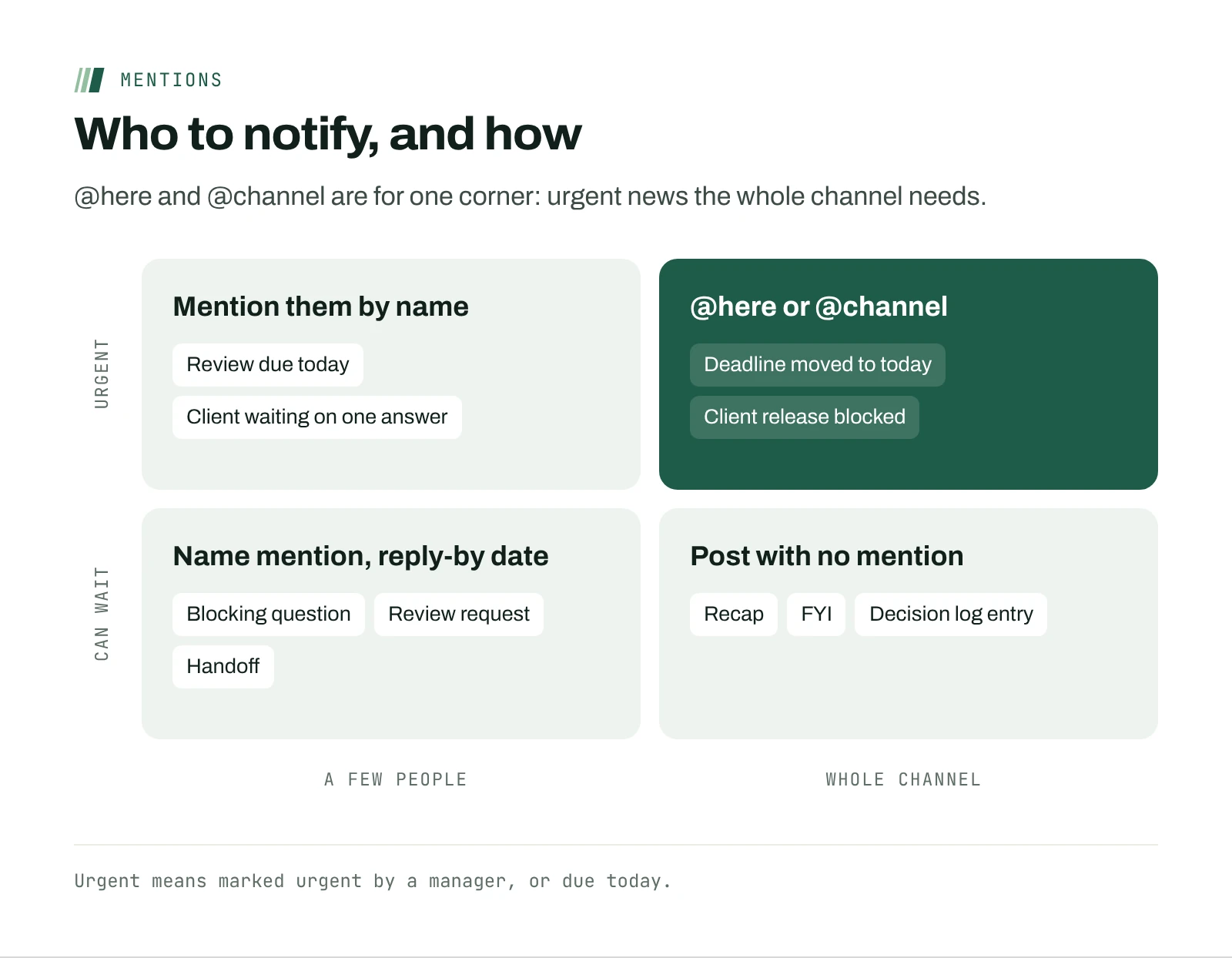
Define urgent narrowly, as your response-time agreement does: marked urgent by a manager, or due today. Everything else gets a name mention or none.
How fast should people reply in team chat?
Set reply times by type of message, counted in the recipient’s working hours, and write them down. Otherwise the unwritten rule becomes “reply right away,” and focus pays for it.
GitLab’s handbook states the principle: “Slack messages should be considered asynchronous communication, and you should not expect an instantaneous response; you have no idea what the other person is doing.” These windows match the response-time agreement:
- Urgent (marked by a manager, or due today): within two working hours.
- A question that blocks someone’s work: within half a working day.
- Work handed to you: a plan back within one working day.
- Review or feedback: within two working days.
- FYI: no reply needed.
Make focus visible. Slack’s help center describes a status as “a message that lets others know what you’re up to,” and Slack’s blog suggests Do Not Disturb “to carve out focus time during your workday.” Agree that a focus status means “reply later.” Chapter 5 of the playbook covers response windows by type, one active task and clustered meetings. For daily habits, see protecting focus on a remote team.
Across time zones, schedule the send
Writing a message at 22:00 is fine. Expecting a reply at 22:00 isn’t. Slack’s help center notes that “You can send messages in real time, or schedule them to send later.” GitLab’s handbook covers the other side: “Do not feel obligated to respond to Slack messages when you are not working.”
Example: Alex finishes a review at 16:00 in Chicago, which for most of the year is midnight in Bucharest. Alex schedules it for 10:00 Bucharest time, when Sam’s day starts. For the hours everyone shares, set core hours.
How do you keep decisions from getting lost in chat?
Treat chat as the place decisions get made, not the place they’re kept. When a thread settles something, add it to your decision log the same day with a link to the thread.
Chat scrolls, and a decision in a three-week-old thread is effectively unwritten for anyone who missed it. GitLab’s handbook asks staff not to rely on a link to a chat thread alone, but to “Copy and paste the relevant parts of the thread into the issue using blockquote formatting.” The decision log template has the fields to fill.
Agree on what reactions mean, too. Slack’s blog suggests an eyes reaction to show you’re reviewing something and a check mark when you’ve finished. GitLab’s handbook cautions that “use and understanding of emoji, like body-language, is not universal.” Write the meanings down in words, and never let a reaction stand in for an approval.
What should your team’s channel norms say?
Your norms should say where messages go, how to write them, when to notify everyone, how fast to reply and where decisions live. Copy this block into a pinned post or your working agreement and fill the brackets.
How we use team chat
- Channels: [team-] for a team’s home, [proj-] for one project, [ask-] for questions to one function, [announce-] for announcements, [ext-] for channels shared with [clients], [social-] for off-topic chat. Every channel has a description.
- Public by default: work questions go in public channels. Direct messages are for [feedback and personal matters]. Sensitive project work goes in a private channel with a named owner.
- Threads: reply in the thread. When a thread settles something, post the result to the channel.
- One complete message: no standalone “hi.” Include the context, the ask, a deadline in the reader’s time zone and a link.
- @here and @channel: only for news that is urgent and important to the whole channel. Urgent means [marked urgent by a manager, or due today]. Otherwise, mention people by name.
- Reply times, in the reader’s working hours: urgent within [2 hours]; blocking questions within [half a day]; handoffs, a plan back within [1 day]; reviews within [2 days]; FYI, no reply. Details: [link to our response-time agreement].
- Status and do-not-disturb: set a status for focus blocks and time off, and turn on do-not-disturb outside your hours. A focus status means “reply later.”
- Time zones: schedule messages for the reader’s working hours. Nobody replies outside their own hours, [managers included].
- Decisions: anything decided in chat goes in [our decision log] the same day, linked to the thread.
- Reactions: an eyes reaction means “I’m looking at it.” A check mark means “done.” A thumbs-up means “seen,” not “approved.” Approvals are written.
- Review: we revisit these norms every [quarter] and when someone joins from a new time zone.
Give the team two days to comment in writing, then pin the final version.
How ActionOrder handles this
Much of the noise in team chat is status-chasing and “is this urgent?” pings. ActionOrder, an efficiency and accountability tool for managers of remote teams, gives each person one clear next step at a time, already prepped. Every card has one owner and a status: done, in progress, waiting or stuck, and people set “stuck” themselves. On Pro, the team view shows each card’s owner and status, so “any update?” doesn’t need a message. Starting a card holds focus: new cards queue behind it, and only items a manager marks urgent and items due today get through, as a small bar. That’s the same narrow definition of urgent as your channel norms. Join the waitlist. ActionOrder is in pre-launch.
Questions people ask
What is good Slack etiquette?
Good Slack etiquette makes each message easy to act on and interrupts as few people as possible: one complete message, public channels, threads, rare broad mentions and agreed reply times. Write the norms down and pin them.
Is it rude to message a coworker after hours?
Not if you don’t expect a reply. Schedule it for their working hours, or label it “no reply needed.” GitLab’s handbook says: “There is no expectation to respond to messages outside of your planned working hours.” Managers set the tone, so schedule yours.
What’s the difference between a channel and a section in Slack?
A channel is a shared space where a conversation happens. A section is a personal folder in your sidebar. On paid plans, Slack’s help center says, you can group channels, DMs and apps into custom sections, and “Your custom sections are only visible to you and won’t affect what your coworkers see.”
Can my boss see my Slack activity?
Some of it. Slack’s help center says that “From the dot next to your name, your coworkers can see whether you’re set to active or away,” and its export guide says “Workspace Owners and Admins can export messages and file links from public channels.” Depending on the plan, owners can apply to export private channels and DMs as well. Treat work chat as a work record. If you manage the team, judge the work, not the dot: see how to know if remote employees are working.
Sources
- Collaborate with kindness: Consider these etiquette tips in SlackMatt Haughey, Slack blog, March 21, 2025
- Notify a channel or workspaceSlack Help Center, checked November 22, 2026
- Send and read messagesSlack Help Center, checked November 22, 2026
- Set your Slack status and availabilitySlack Help Center, checked November 22, 2026
- Organize your sidebar with custom sectionsSlack Help Center, checked November 22, 2026
- Export your workspace dataSlack Help Center, checked November 22, 2026
- Slack usage and etiquette guideSlack, 2022 (PDF template)
- GitLab CommunicationThe GitLab Handbook, GitLab, last modified October 30, 2026
- The Cost of Interrupted Work: More Speed and StressGloria Mark, Daniela Gudith and Ulrich Klocke, CHI 2008