Core Hours: How to Set Overlap Hours Across Time Zones
Core hours give a remote team a short daily window for the conversations that can’t wait, and leave the rest of the day flexible. Here is how to pick them across three time zones and write them down.
Core hours are a short, set window when everyone on a team is available at the same time, while the rest of the day stays flexible. On a remote team that works asynchronously, keep the window to two to four hours and use it for decisions, unblocking and short meetings. Status updates stay in writing.
What are core hours?
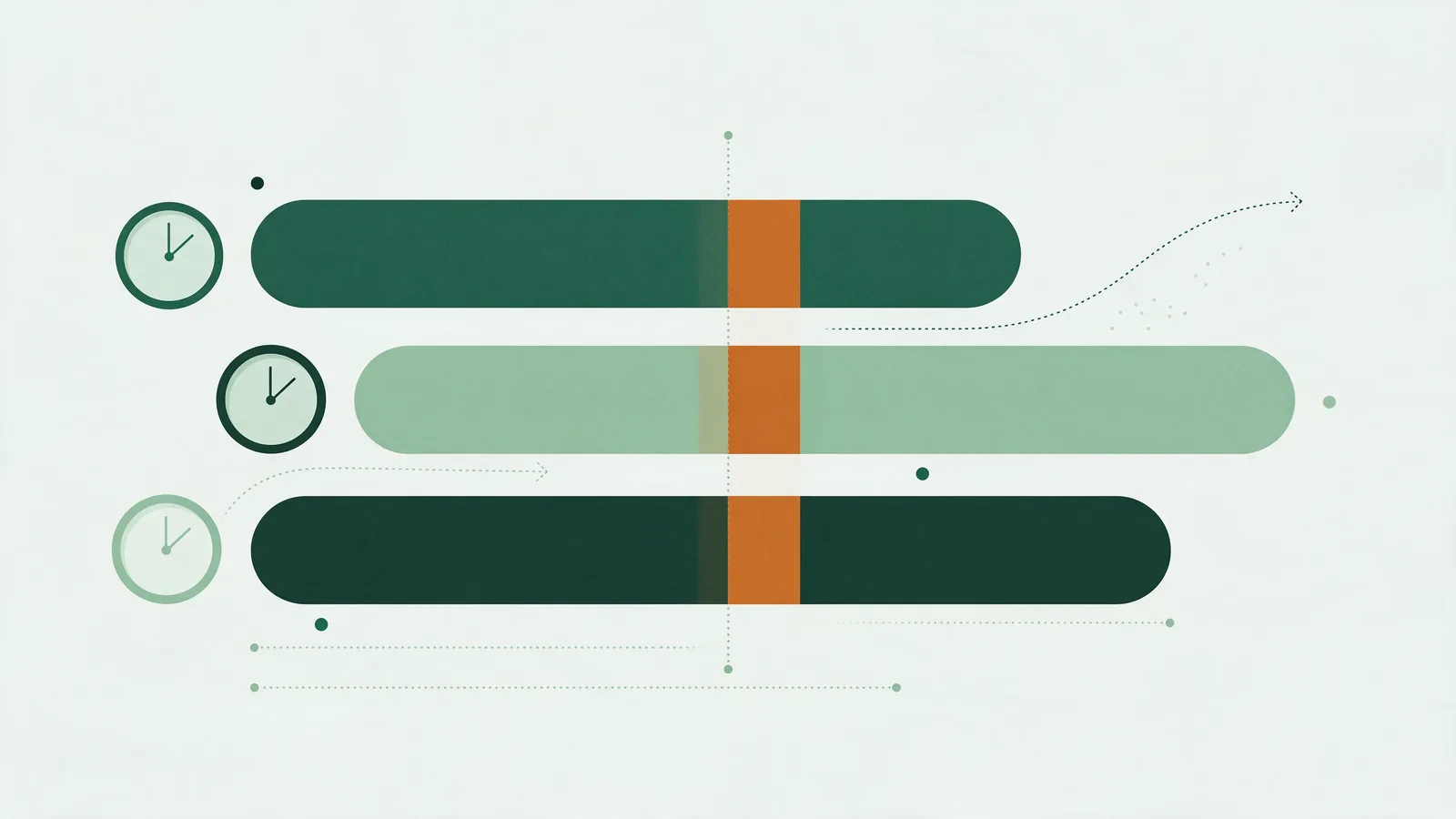
Core hours are a block of time each workday when everyone on a team agrees to be available. Outside that block, people choose when they work.
It’s a trade: each person gives up a few fixed hours and arranges the rest of the day around focus work, family and their own time zone. Future Forum, a research group backed by Slack, which sells workplace messaging software, describes core work hours as “a pre-designated timespan when team members agree to be ‘live’ and available to one another for meetings or feedback.”
Core hours are not the same as overlap. Time zone overlap is every hour when everyone happens to be inside their working day; core hours are the part of it the team commits to. To find your team’s overlap, use the time zone overlap finder.
How does the federal government define core hours?
In U.S. federal agencies, core hours are the fixed part of a flexible work schedule, with flexible time on either side.
The Office of Personnel Management’s fact sheet on flexible work schedules says these schedules “consist of workdays with (1) core hours and (2) flexible hours.”
- Core hours: “the designated period of the day when all employees must be at work.”
- Flexible hours: “the part of the workday when employees may (within limits or ‘bands’) choose their time of arrival and departure.”
On a remote team the structure is the same, but core hours sit wherever the working days overlap, which can be early for one person and late for another.
Why do remote async teams need core hours?
Some work moves faster in a conversation, and without an agreed window that conversation waits for luck. Core hours give it a set place, so everything else can stay async.
An async team does most of its work in writing, and that is the right default. But a decision with three open options can bounce between comment threads for days when a ten-minute call would settle it. Without core hours, people wait for a lucky moment when everyone is online, or message at all hours hoping to catch someone.
Core hours also protect the rest of the day: nobody has to stay half-available from morning to night. As Future Forum puts it, teams “still need pre-set time to work together to collaborate, debate, or tackle complex decisions.” For the wider system, start with how to manage a remote team without chasing it.
What should core hours be used for?
Use core hours for work that needs people at the same time: decisions that need a conversation, unblocking someone who is stuck, and short meetings. Don’t spend them on status updates.
- Decisions that need a conversation. The options are written down, comments have gone back and forth, and a short call will close it.
- Unblocking. Someone is stuck and needs an answer only one person can give.
- Short meetings with an agenda. Planning, a retrospective or a client call, kept to 30 minutes where you can.
Status updates, FYIs, reviews and handoffs work better in writing, where people read them on their own time. See how to stop chasing status updates.
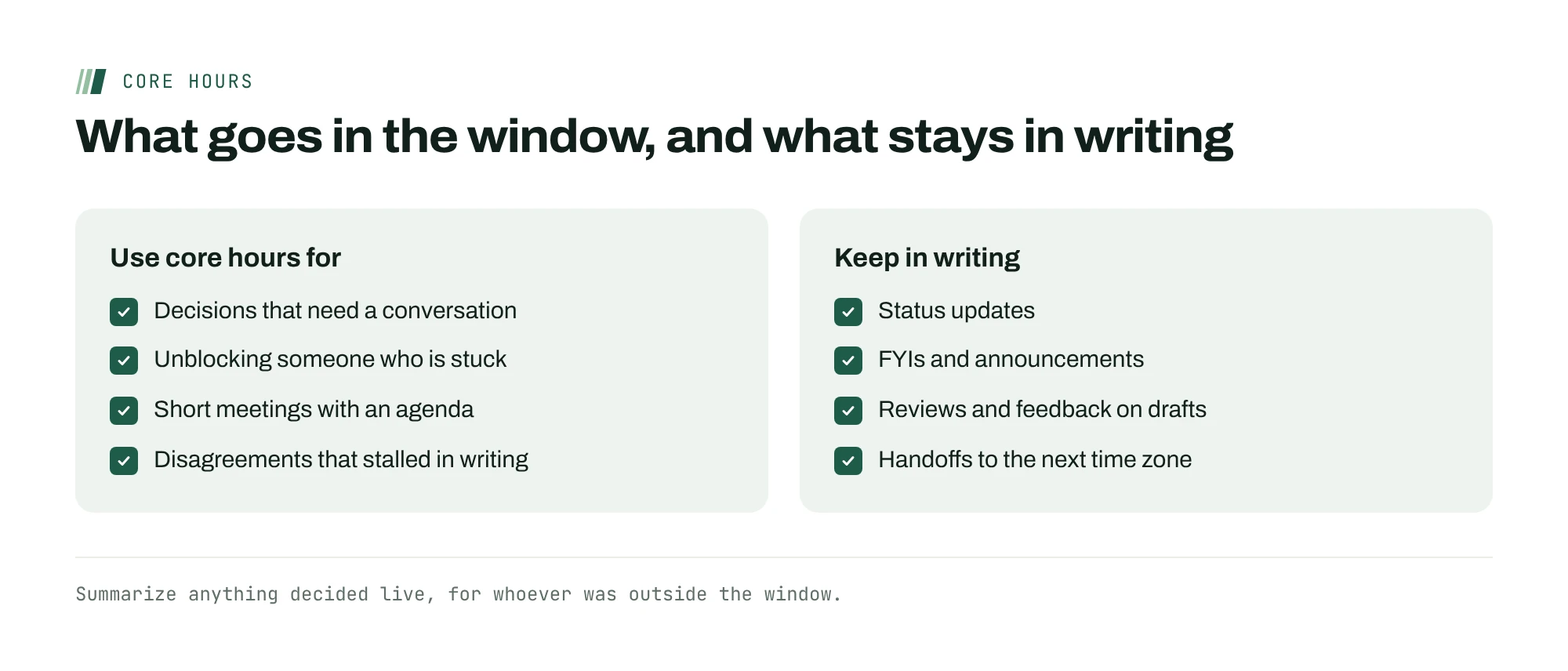
Leave a record for anyone who misses the window. GitLab’s public handbook (GitLab sells a DevOps platform) advises: “For group meetings where there are multiple time zones, consider recording the meeting to allow for async participation.” For a short call, a three-line written summary of what was decided does the same job.
How long should core hours be?
Keep core hours to two to four hours a day. Two hours fits one short meeting and time to unblock people; more than four starts to eat the focus time and flexibility the window exists to protect.
Every core hour is an hour nobody can protect for deep work. A shorter window leaves more of the day for focus time.
Wider spreads leave less shared time. With three or more time zones, a long window pushes someone’s day too early or too late.
The window has to fit inside everyone’s normal day. If it doesn’t, shorten it before you stretch anyone’s hours.
Future Forum’s examples sit at the top of the range. When Dropbox introduced core hours, its window was “9 a.m. to 1 p.m. on the West Coast” “synched with noon to 4 p.m. on the East Coast”: four hours across a three-hour gap. Across eight hours, two may be all you get.
How do you pick core hours across three or more time zones?
Convert everyone’s working day to one clock, find the hours they all share, and place the window inside that stretch. Rotate it if it always lands early or late for the same person, and switch to handoffs if there is no shared stretch.
The shared stretch runs from the latest start to the earliest end, and the overlap finder does the conversion for you.
Example: a core hours grid for Chicago, Lisbon and Bucharest
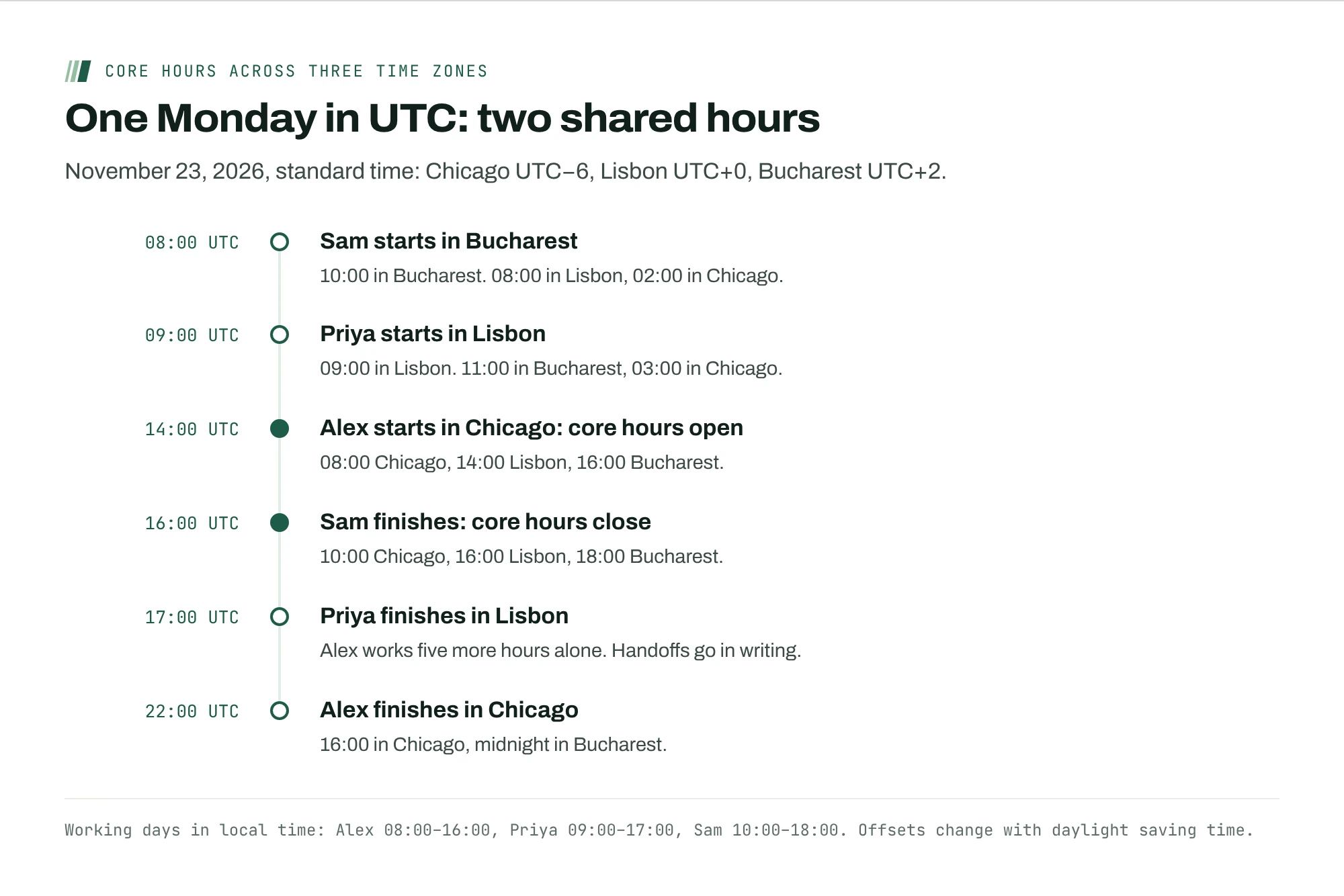
Example: Alex works from Chicago, Priya from Lisbon and Sam from Bucharest. On Monday, November 23, 2026, all three are on standard (winter) time: Chicago is UTC−6, Lisbon UTC+0 and Bucharest UTC+2. Alex works 08:00 to 16:00, Priya 09:00 to 17:00 and Sam 10:00 to 18:00, local time. Each row is the hour starting at that time; “Tue” means the next day.
| Chicago (UTC−6) | Alex | Lisbon (UTC+0) | Priya | Bucharest (UTC+2) | Sam | All three working? |
|---|---|---|---|---|---|---|
| 06:00 | Off | 12:00 | Working | 14:00 | Working | No |
| 07:00 | Off | 13:00 | Working | 15:00 | Working | No |
| 08:00 | Working | 14:00 | Working | 16:00 | Working | Yes: core hours |
| 09:00 | Working | 15:00 | Working | 17:00 | Working | Yes: core hours |
| 10:00 | Working | 16:00 | Working | 18:00 | Off | No |
| 11:00 | Working | 17:00 | Off | 19:00 | Off | No |
| 12:00 | Working | 18:00 | Off | 20:00 | Off | No |
| 13:00 | Working | 19:00 | Off | 21:00 | Off | No |
| 14:00 | Working | 20:00 | Off | 22:00 | Off | No |
| 15:00 | Working | 21:00 | Off | 23:00 | Off | No |
| 16:00 | Off | 22:00 | Off | 00:00 Tue | Off | No |
| 17:00 | Off | 23:00 | Off | 01:00 Tue | Off | No |
The core window is two hours: 08:00 to 10:00 in Chicago, 14:00 to 16:00 in Lisbon and 16:00 to 18:00 in Bucharest. Pairs share more: Priya and Sam overlap for seven hours, so most of their questions never need the window.
If all three worked 09:00 to 17:00, there would be no shared hour: Sam’s day would end at 17:00 in Bucharest, which is 09:00 in Chicago, the minute Alex’s begins. One-hour shifts by Alex and Sam make the room.
Rotate the inconvenience
Someone usually carries the cost of a shared window, so take turns. Three schedules give the example team the same two hours:
| Who shifts | Alex (Chicago) | Priya (Lisbon) | Sam (Bucharest) | Core hours, Chicago time |
|---|---|---|---|---|
| Alex, two hours early | 07:00–15:00 | 09:00–17:00 | 09:00–17:00 | 07:00–09:00 |
| Alex and Sam, one hour each | 08:00–16:00 | 09:00–17:00 | 10:00–18:00 | 08:00–10:00 |
| Sam, two hours late | 09:00–17:00 | 09:00–17:00 | 11:00–19:00 | 09:00–11:00 |
Switch each quarter and write down who carries it. Ask before you move anyone’s day.
When there is no overlap, use handoffs
Sometimes the latest start comes after the earliest end. Don’t force a 06:00 or 22:00 call. Switch to handoffs: each person ends the day with a written note the next time zone can act on without asking anything, and pairs meet where their regions do overlap. GitLab’s handbook puts it this way: “Consider creating meetings that overlap between EMEA/APAC + APAC/AMER + AMER/EMEA.” See the follow-the-sun model and how to delegate across time zones.
Check again when the clocks change
UTC offsets shift when daylight saving time starts and ends, and countries change on different dates. NIST says U.S. daylight saving time begins “at 2:00 a.m. on the second Sunday of March” and ends “at 2:00 a.m. on the first Sunday of November.” The European Commission says EU countries, Portugal and Romania among them, switch “to summer-time on the last Sunday of March” and back “on the last Sunday of October.”
So from March 14 to March 28, 2027, and again from October 31 to November 7, 2027, Chicago is five hours behind Lisbon instead of six, and 08:00 in Chicago becomes 13:00 in Lisbon. Anchor the window to one named time zone and check your dates in the overlap finder.
How do you write core hours into a working agreement?
Write core hours as one short section of your team’s working agreement: the window in one named time zone, everyone’s local times, what it’s for, and who shifts. Copy this into the working agreement template and fill the brackets.
Core hours
- Window: [08:00–10:00 Chicago time], [Monday to Thursday]. Local times: [14:00–16:00 Lisbon, 16:00–18:00 Bucharest].
- In the window: everyone is online and replies within [15 minutes] on [channel].
- Use it for: decisions that need a conversation, unblocking, and meetings of [30 minutes] or less with an agenda. Status updates go in writing.
- Outside the window: people set their own hours, post them in [place], and reply within our response-time agreement.
- Who shifts: [name] starts early and [name] stays late, rotating every [quarter].
- Records: anything decided live is summarized in [place] the same day.
- Clock changes: we recheck the window the week before US or EU clocks change.
Review it each quarter and whenever someone joins from a new time zone.
How do core hours fit with response times and focus time?
They are three parts of one agreement. Core hours say when people are reachable live, the response-time agreement says how fast to answer the rest of the time, and focus time says when it’s fine not to answer at all.
Outside core hours, replies follow your response-time agreement, counted in the recipient’s working hours. Because everyone knows when the fast window is, nobody needs to answer instantly the rest of the day. Cluster meetings inside the window so focus blocks stay long and unbroken. Chapter 5 of the playbook covers response windows and meeting clusters, and protecting focus on a remote team covers the habits that keep those blocks clear.
How ActionOrder handles this
Core hours work best when everything outside them runs in writing. ActionOrder, an efficiency and accountability tool for managers of remote teams, gives each person one clear next step at a time, already prepped. Every card has one owner and a status (done, in progress, waiting or stuck), and people set “stuck” themselves. On Pro, the team view shows each card’s owner and status, so stuck work is easy to bring to the next core window. Delegation hands a card to a teammate with its prep and a note, so work crosses the hours with no overlap. Starting a card holds focus: only items a manager marks urgent and items due today get through, as a small bar. Join the waitlist. ActionOrder is in pre-launch.
Questions people ask
What does core hours mean?
Core hours means the part of the workday when everyone on a team is expected to be available at the same time. The hours around it are flexible: people choose when to start and finish, within limits the team agrees. On a remote team, core hours sit inside the hours when everyone’s working days overlap.
What are core hours in the federal government?
In U.S. federal agencies, core hours are part of a flexible work schedule. OPM’s fact sheet defines them as “the designated period of the day when all employees must be at work.” The rest of the day is flexible hours, when employees may choose their arrival and departure times within set limits, or bands.
What are considered core business hours?
Core business hours are the hours a business commits to being open or reachable for customers, and each company sets its own. A team’s core hours are narrower: the internal window when everyone on the team is reachable live. A support team can serve customers all day and still keep a two-hour core window.
What if my team has no time zone overlap at all?
Don’t force a shared hour with calls at 06:00 or 22:00. Run the work on handoffs: each person ends the day with a written note the next time zone can act on. Meet in pairs where two regions do overlap, summarize those calls in writing, and rotate any early or late slot.
Sources
- Flexible Work SchedulesU.S. Office of Personnel Management, fact sheet, checked November 22, 2026
- What are core work hours?Anna Brown, Future Forum (Slack), June 30, 2022
- All-Remote MeetingsThe GitLab Handbook, GitLab, checked November 22, 2026
- Daylight Saving Time RulesNational Institute of Standards and Technology, updated February 9, 2026
- SummertimeEuropean Commission, Mobility and Transport, checked November 22, 2026