Time Tracking for Remote Employees Without Surveillance
Remote teams need a record of hours for payroll, client work and estimates. You can get one people trust: time logged against tasks by the person who did the work, corrected the same day and used only for what you said.
Time tracking for remote employees works best when people log their own time against the task they worked on, the same day, and can correct it. That gives you payroll records for non-exempt staff, client and project hours, and data for estimates, without software watching screens. Then write down who sees the hours.

What is time tracking for remote employees used for?
Time tracking for remote employees is used for four jobs: paying non-exempt staff correctly, recording client and project time, improving estimates and planning capacity. Each needs a different level of detail.
Payroll. Daily and weekly hours for non-exempt staff, including overtime.
Client and project time. Invoice-ready entries and rounding are covered in billable hours tracking.
Estimates. What similar work took last time. See estimating from logged time.
Capacity. Hours free for new work, the input to a capacity plan.
Logged hours don’t show whether work moved. For that question, see how to know if remote employees are working.
What are the ways to track remote employees’ time?
There are three: people log their own time against tasks, people clock in and out, or software records activity on their device. Each records something different.
| What to compare | Self-reported time against tasks | Clock-in and clock-out timesheets | Activity tracking (screenshots, apps and sites, keyboard and mouse) |
|---|---|---|---|
| What gets recorded | Hours per task or client, with a short note | Start and end times, and breaks | Screenshots, apps and sites used, keyboard and mouse activity, idle time |
| Who enters it | The employee | The employee clocks in and out; a manager approves | Software, automatically |
| What it tells a manager | Where the hours went; estimate against actual | Hours per day and week, and overtime | How active a device was and what was on screen |
| What it misses | Unlogged work; vague entries written from memory | What the time was spent on | Offline work, calls away from the device, and whether work moved |
| What runs on the employee’s device | Only a form, timer or sheet the person opens | A clock button in a web or mobile app, sometimes with a location check | An agent that runs in the background |
| How errors get fixed | The person edits the entry, with a note | A correction request a manager approves | Through an admin, if the setup allows it; the person may not see what was captured |
| What employees are told or notice | Everything: they write each entry | The clock times: they press the button | Only what the employer tells them; some states require written notice |
| What it’s good for | Payroll, billing, estimates and capacity from one record | Payroll for roles with set hours | Specific security or compliance needs, disclosed in writing |
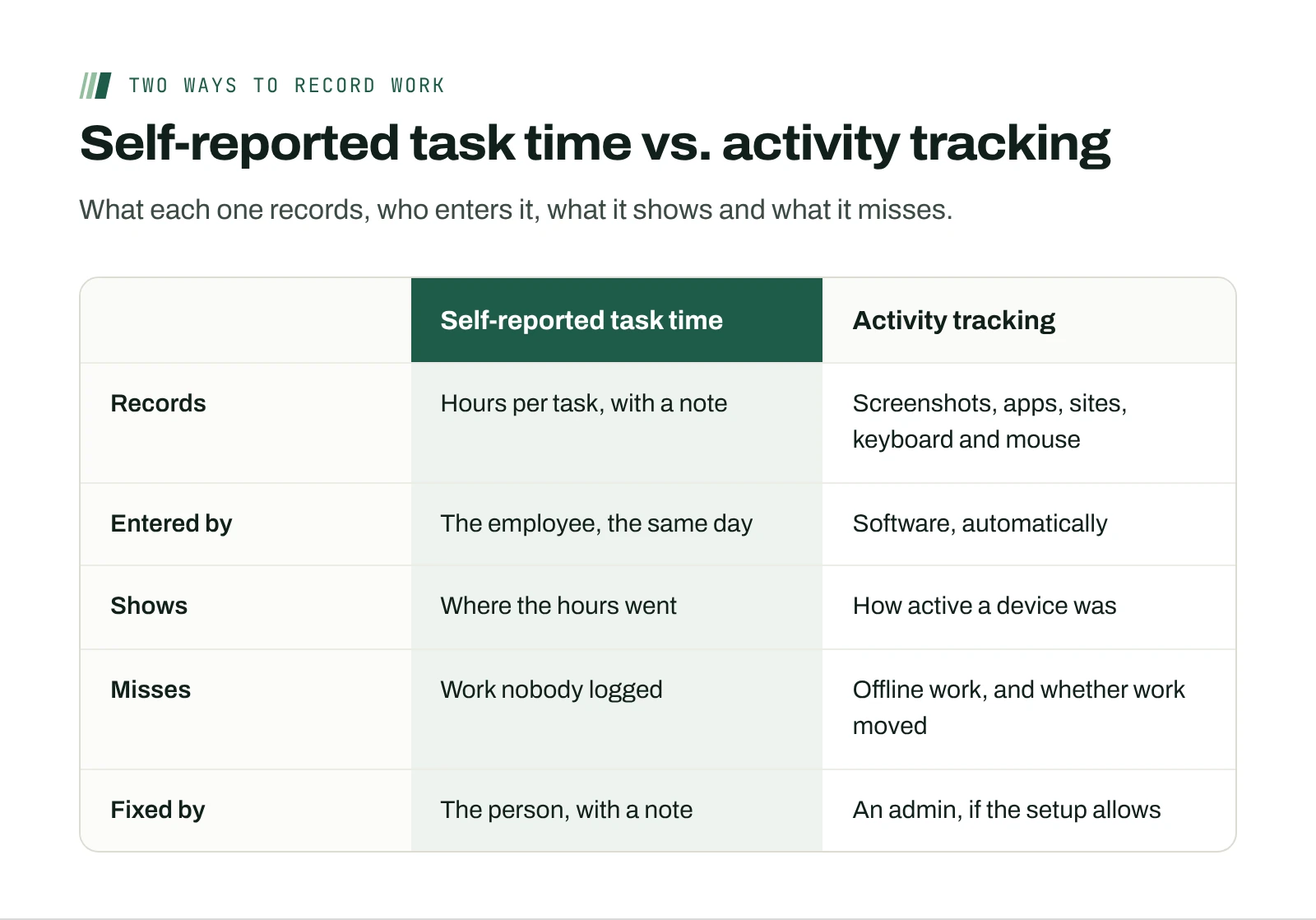
The key difference is who writes the record: the person, or software. What monitoring captures is covered in employee monitoring software, bossware and mouse jiggler detection.
Is self-reported time accurate enough?
Yes, if people log the same day, against a named task, and can fix their own mistakes.
Log the same day. A Friday entry written from memory is a guess.
Name the task. “Northwind checkout fix, 1.5 h” can feed an estimate; “Development, 8 h” can’t. Keep a few standing tasks, such as team meetings and admin, for work with no ticket.
Log all working time, including the unscheduled hour at 9 p.m.
Let people correct their own entries, with a note.
Example: Sam, a designer on Alex’s team, sees a design review logged twice, deletes one entry and adds a note before stopping. Friday’s total is right without anyone asking.
A time audit is a different tool: a one-week check on where your own hours go.
What does US law require when you track remote employees’ hours?
Federal law requires accurate records of hours worked for non-exempt employees, wherever they work, and lets employers choose the method. The Department of Labor’s Fact Sheet #21 says: “Every covered employer must keep certain records for each non-exempt worker,” including “Hours worked each day” and “Total hours worked each workweek.” Employers may “tell their workers to write their own times on the records,” and “Any timekeeping plan is acceptable as long as it is complete and accurate.”
For remote work, the Wage and Hour Division’s Field Assistance Bulletin No. 2020-5 (August 24, 2020) covers “Employers’ obligation to exercise reasonable diligence in tracking teleworking employees’ hours of work.” It was written during COVID-19, but “it also applies to other telework or remote work arrangements.” Three passages matter:
“An employer is required to pay its employees for all hours worked, including work not requested but suffered or permitted, including work performed at home.”
“One way an employer may exercise such diligence is by providing a reasonable reporting procedure for nonscheduled time and then compensating employees for all reported hours of work, even hours not requested by the employer.” The employer “cannot implicitly or overtly discourage or impede accurate reporting”.
Even with records of employees using work devices outside reported hours, “reasonable diligence generally does not require the employer to undertake impractical efforts such as sorting through this information”.
The core, then, is a clear way to report every hour and a team where reporting is safe.
If you use activity tracking, some states require notice. New York’s Civil Rights Law §52-c covers monitoring of “telephone conversations or transmissions, electronic mail or transmissions, or internet access or usage.” Employers “shall give prior written notice upon hiring to all employees who are subject to electronic monitoring,” and post it. Connecticut already required written notice of electronic monitoring; Public Act 26-73, effective October 1, 2026, expands what that notice must include, according to the legislature’s summary.
Laws vary by state and country, and they change. This is general information, not legal advice.
Does activity tracking make remote employees more productive?
The research doesn’t show a gain. A 2022 peer-reviewed meta-analysis in Computers in Human Behavior Reports pooled “70 independent samples and 233 effect sizes” and “found no relationship between electronic monitoring and performance”. Monitoring “slightly increases stress”.
In the American Psychological Association’s 2023 Work in America survey, run online by The Harris Poll among 2,515 employed US adults in April 2023, monitored workers were more likely than others to report feeling micromanaged (51% vs. 33%) and emotional exhaustion at work in the past month (39% vs. 22%). That is a link, not proof of cause.
The Government Accountability Office’s 2025 report on digital surveillance found its effects on workers’ mental health “can depend on employers’ practices, including how transparent they are about what information they collect.” Self-reported time is transparent by design. See accountability without surveillance; more figures are on our research page.
How do you roll out time tracking on a remote team?
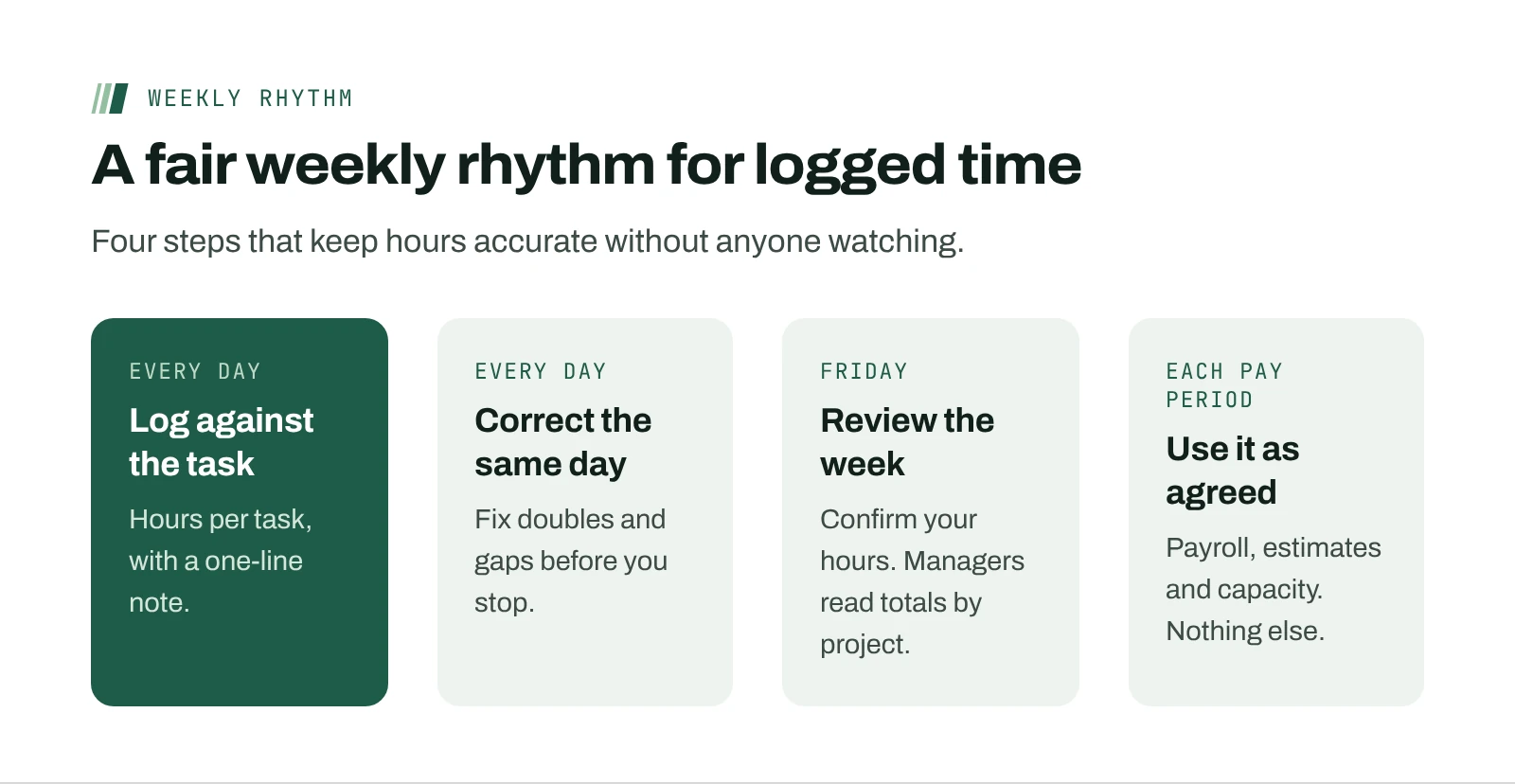
Write the policy first, share it before anyone logs an hour, run a two-week trial, then keep a weekly rhythm.
Name the purpose. Payroll needs daily totals; estimates need task-level entries.
Choose the method. For most async teams, task time covers payroll, billing and estimates in one record.
Share the policy below, and answer questions in writing.
Run a two-week trial, fix the task list, then use the numbers. For a printable sheet, use our weekly timesheet template.
Remote team time-tracking policy
Fill in the brackets. A starting point to review against your state's rules, not legal advice.
Time-tracking policy: [team name], effective [date]
Owner: [name] · Applies to: [everyone / non-exempt staff] · Workweek starts: [day, time, time zone]
1. Why we log time
[Payroll for non-exempt staff] · [client billing] · [estimates] · [capacity planning]. Nothing else.
2. What to log
All working time, including meetings, admin and unscheduled hours. One entry per task: task · project or client · hours in decimals (1.25, not 1:15) · one-line note.
3. When to log
The same day, before you stop. If you miss a day, add it the next morning with a note.
4. What to log against
A named task in [tool]. Work without a task: [Team meetings] · [Admin] · [Support] · [Training]. Unpaid meal breaks aren’t logged.
5. Extra and unscheduled hours
Report every hour you work; non-exempt staff are paid for all reported hours. If overtime needs approval, ask [name] first, and report the time either way. Nobody is criticized for reporting accurately.
6. Corrections
Edit your own entries until [payroll cutoff]. After that, send [name] the correction and a one-line reason. A manager who changes your hours tells you why.
7. Weekly review
[Friday]: confirm your week. [Manager] reads totals by project and task and approves payroll hours by [time, time zone].
8. Who sees hours
You · your manager · [payroll and billing admins]. Clients see: [task totals on invoices / nothing].
9. What logged time is never used for
Ranking or comparing people · checking when someone is online · reading screens, keystrokes, apps or sites · judging performance on hours alone · [add your own]
10. Tools and changes
[Tool] records only what you enter. Policy changes get [two weeks’] notice.
Questions: [name, channel] · Acknowledged: [employee name, date]
How should managers use logged time?
Use it for the jobs the policy names, read it by project and task rather than by person, and start every conversation with the work. Compare estimates with logged hours monthly, approve payroll on a fixed day, and never rank people by hours: more hours can mean a harder task or a blocker.
Example: Alex sees 14 hours logged against a 5-hour estimate for “Northwind data import”. Jordan’s notes say the test data arrived two days late. The fix is in how the client hands over data, not in Jordan’s hours.
Chapter 6 of the playbook, Hold the team accountable without watching it, covers those conversations, and how to manage a remote team covers the rhythm around them.
How ActionOrder handles this
ActionOrder, an efficiency and accountability tool for managers of remote teams, gives each person one clear next step at a time, already prepped. People log their own time against the card they’re working and can correct it. Time can only be logged against a card. Every logged hour is task time. Nothing runs in the background. Hours are visible to the person, their managers and admins with a payroll or billing role, and logged time exports to CSV. Estimates are suggested from logged time on similar cards, and the person or manager can change them. Time logging is on Pro and Business. The team view, on Pro, shows logged time against estimate. Join the waitlist. ActionOrder is in pre-launch.
Questions people ask
How do remote jobs track hours?
Most use one of three methods: employees log time against tasks in a timesheet or app, clock in and out through a web or mobile app, or the employer runs activity-tracking software on work devices. Non-exempt roles need daily and weekly totals for payroll.
How do you track employees working remotely without monitoring software?
Track hours and progress separately. For hours, people log their own time against tasks the same day and confirm the week on Friday. For progress, look at what was finished and what’s stuck in the team’s own tools. Neither needs software that records screens.
Is there a free time tracking app for employees?
Yes. A shared spreadsheet or a printable weekly timesheet works for a small team, and many time tracking apps have free plans. Check what any tool records, whether it installs anything that captures activity, who can see the hours, and whether people can correct their own entries.
What is the best way to track employee time off?
Record time off where you record hours, as its own entry type such as vacation, sick or holiday, so payroll and capacity plans see both. The federal FLSA doesn’t require pay for time not worked, such as vacations; the Department of Labor calls these benefits “matters of agreement between an employer and an employee”. State and local laws vary. This is general information, not legal advice.
Do exempt employees need to track their time?
The federal hours records apply to non-exempt workers: “Every covered employer must keep certain records for each non-exempt worker,” says the Department of Labor. Many teams still ask exempt staff to log task time for billing or estimates. If you do, say why in the policy. This is general information, not legal advice.
Sources
- Fact Sheet #21: Recordkeeping Requirements under the Fair Labor Standards Act (FLSA)Wage and Hour Division, U.S. Department of Labor, revised July 2008
- Field Assistance Bulletin No. 2020-5: Employers’ obligation to exercise reasonable diligence in tracking teleworking employees’ hours of workWage and Hour Division, U.S. Department of Labor, August 24, 2020
- Vacation LeaveU.S. Department of Labor, no date shown, checked November 22, 2026
- New York Civil Rights Law §52-c: Employers engaged in electronic monitoring; prior notice requiredNew York State Senate, revision of May 13, 2022
- PA 26-73 (sSB 472) public act summaryOffice of Legislative Research, Connecticut General Assembly, effective October 1, 2026, no publication date shown, checked November 22, 2026
- Worries about artificial intelligence, surveillance at work may be connected to poor mental healthAmerican Psychological Association (2023 Work in America survey, conducted by The Harris Poll), September 7, 2023
- The impact of electronic monitoring on employees’ job satisfaction, stress, performance, and counterproductive work behavior: A meta-analysisRudolf Siegel, Cornelius J. König and Veronika Lazar, Computers in Human Behavior Reports, volume 8, 2022 (peer-reviewed; copy hosted by Saarland University)
- Digital Surveillance: Potential Effects on Workers and Roles of Federal Agencies (GAO-25-107126)U.S. Government Accountability Office, September 2, 2025, reissued December 10, 2025