Bossware: What It Tracks and Why It Backfires
Bossware records keystrokes, screens and location, not finished work: what it collects, what the research finds, where the law draws lines and what to use instead.
Bossware is software that records what employees do on work devices: keystrokes, screenshots, webcam images, apps, sites and location. It shows activity, not finished work. Research links it to higher stress and finds no evidence it improves performance, so most managers of remote teams get better answers from a written status, a stuck flag and a handoff note.
What is bossware?
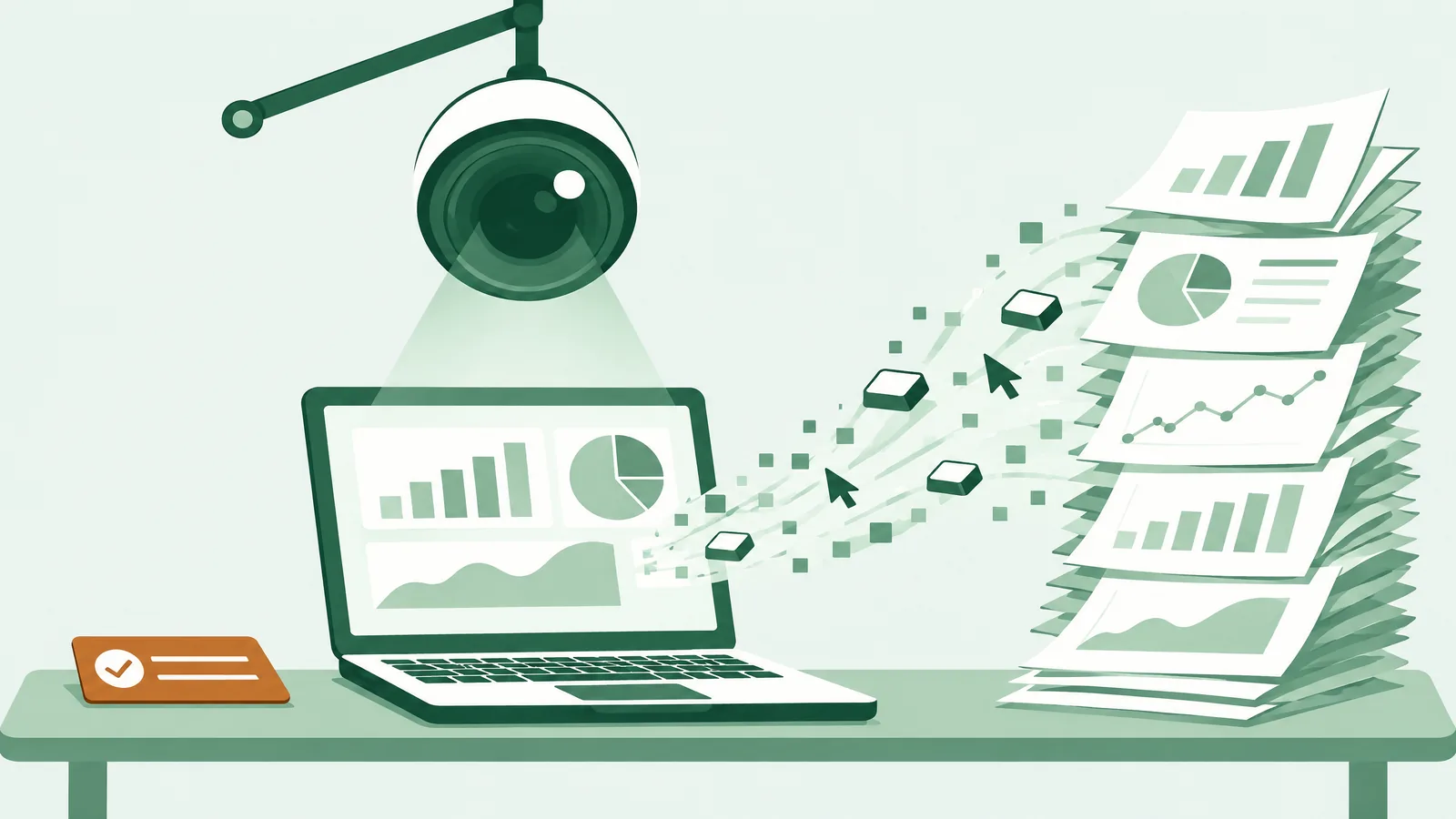
Bossware is a nickname for employee monitoring software that records what people do on work devices, often continuously and sometimes invisibly. The name carries a judgment: the software watches the person, not the work.
The Electronic Frontier Foundation (EFF), a digital rights nonprofit, used the term in a June 30, 2020 article: “We’ll call these tools, collectively, ‘bossware.’” Its review found that “9 of the 10 companies we looked at offered ‘silent’ or ‘invisible’ monitoring software.”
The U.S. Government Accountability Office (GAO) now describes tools “sometimes referred to as ‘bossware,’” including “cameras, microphones, computer monitoring software, geolocation trackers, phone applications, and devices worn by workers” (GAO-25-107126). A UC Berkeley Labor Center report from October 8, 2026 says these tools “combine electronic monitoring with algorithmic management,” so they may score or schedule people, not just record them.
For tool types and legitimate uses, see our guide to employee monitoring software. This article covers the activity data itself.
What does bossware track?
Bossware tracks inputs: keys, clicks, screens, faces, apps, idle minutes, location and messages. None of them tells you whether the work is done, right or blocked.
The EFF found that “Every product we looked at has the ability to take frequent screenshots of each worker’s device,” and that some log “every keystroke a worker makes, including unsent emails and private passwords.” The table below sets each feature against what a manager actually needs to know. Copy it and add a row for anything your company’s software records.
| Bossware feature | What it records | What it tells you | What a manager actually needs to know | A better source |
|---|---|---|---|---|
| Keystrokes | Keys pressed, sometimes the text itself, including unsent drafts | That someone typed | Whether the deliverable is finished and right | The linked draft or file, with a written status |
| Mouse activity and clicks | Movement and clicks per interval | That a device moved | Whether the task is moving | A status on every task: done, in progress, waiting or stuck |
| Screenshots and screen recording | Screen images at set intervals | What was on screen at one moment | What got finished and what’s next | A two-line written status: done, next, blocked |
| Webcam and microphone | Images or audio of the person and the room | That someone was at the desk | Whether the person has what they need | A stuck flag the person sets, saying what they need |
| App and URL logs | Apps and sites open, and for how long | Where attention went, not why | Whether time went to the agreed priority | One ranked top priority per person, and time logged against the task |
| Idle time | Minutes with no keyboard or mouse input | That nobody touched the machine | Whether work is waiting, and on whom | How long the task has waited, and a stuck flag naming the blocker |
| Location | Where the device is | Where the person is | Whether coverage and handoffs hold across time zones | A handoff note: owner, state, next step |
| Email and chat content | Message text, recipients and attachments | What was said, and to whom | Which decisions were made and who owns them | A decision log, and a weekly recap of decisions |
| Productivity score | A number built from the inputs above | How active someone looked | Which work matters and what’s blocked | A Friday recap: what moved, what’s stuck, what needs you |
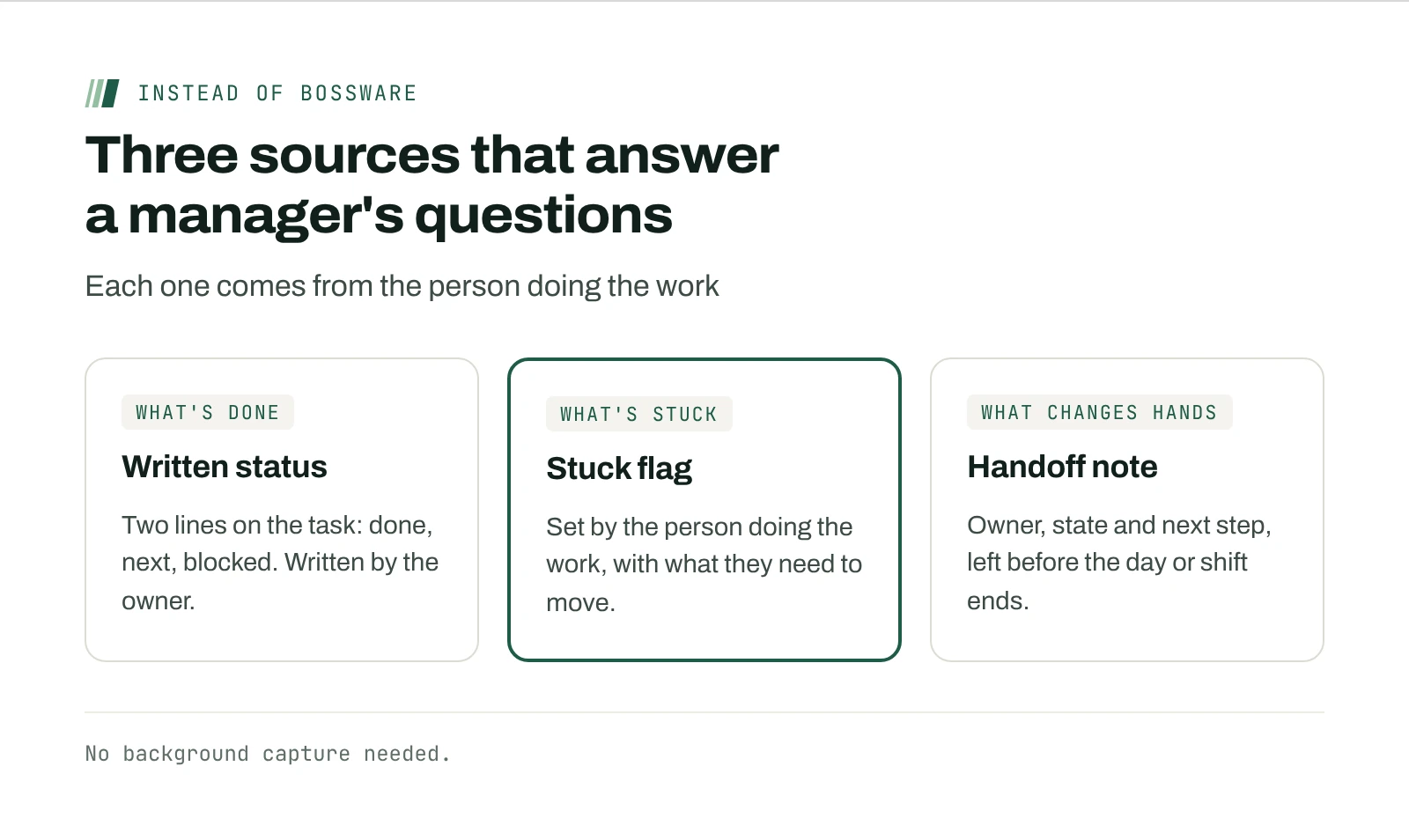
Read down the fourth column and three questions keep coming back: what’s done, what’s stuck and what needs you. A written status, a stuck flag and a handoff note answer them. For formats, see the end-of-day report template and the handover document template.
Why does bossware backfire?
Bossware backfires because it measures the wrong thing and changes behavior while it does. Stress goes up, and the problems that slow work down stay hidden.
The strongest evidence is a 2023 meta-analysis of electronic performance monitoring in Personnel Psychology by Ravid, Behrend and colleagues. As the American Psychological Association’s Monitor on Psychology summarized it in November 2026, the analysis “found no evidence it improved worker performance and consistently linked it to increased worker stress.”
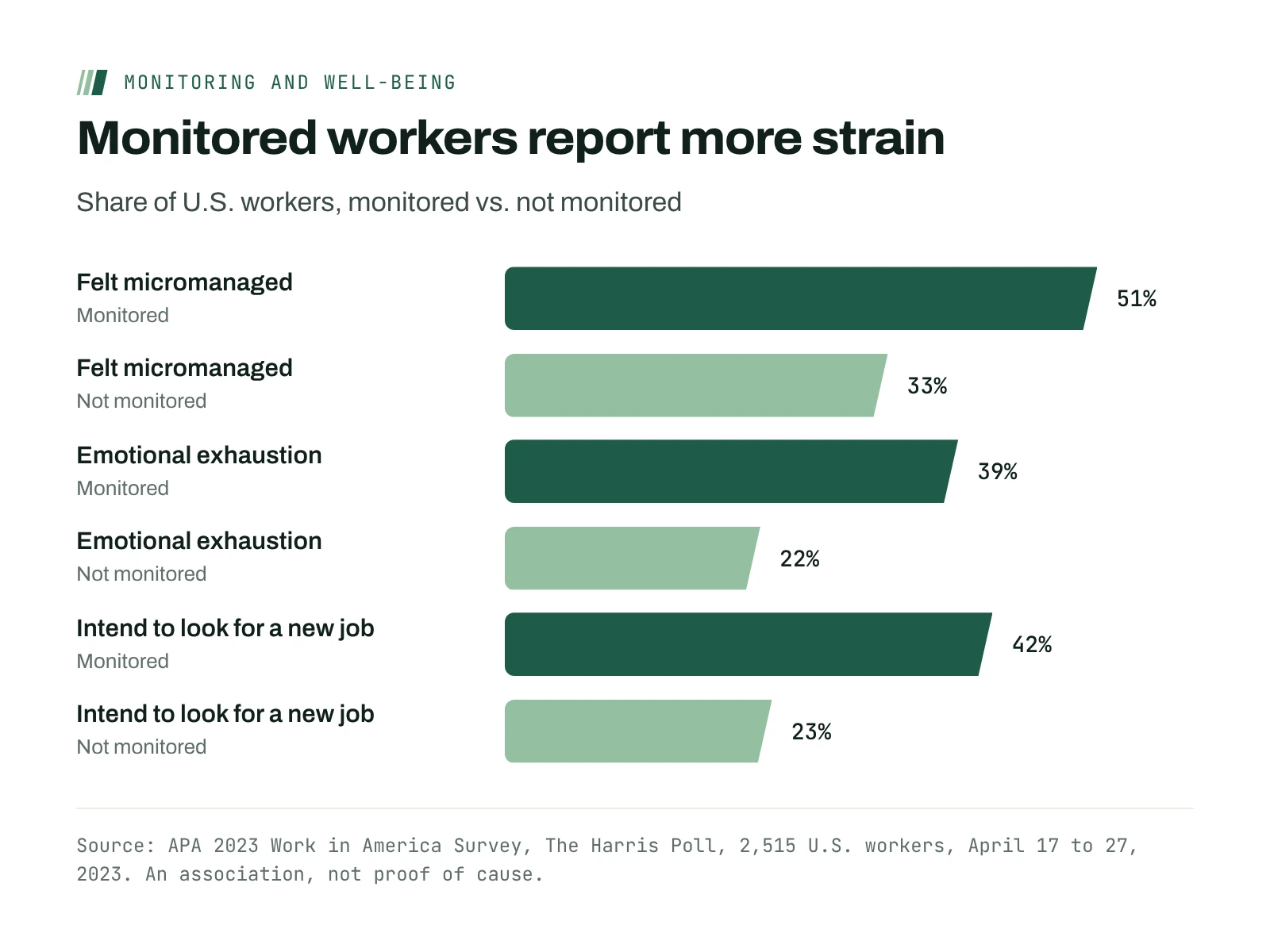
Surveys point the same way. In the APA’s 2023 Work in America survey, conducted by The Harris Poll with 2,515 employed U.S. adults in April 2023, monitored workers were more likely than others to report feeling micromanaged (51% vs. 33%), emotional exhaustion (39% vs. 22%) and an intent to look for a new job within a year (42% vs. 23%). That is an association, not proof of cause.
In practice, three things go wrong:
The count becomes the job. When the measure is keys and clicks, people produce keys and clicks.
Blocked work looks like idle work. Someone waiting on a client file and someone who has checked out leave the same idle-time line.
It can put off candidates. In a survey of 1,012 UK adults commissioned by the Information Commissioner’s Office (ICO) and run by Survation in August 2023, 57% said they would feel uncomfortable taking a job knowing the employer would monitor them (ICO, October 3, 2023).
For more figures on monitoring and trust, see our remote work research and statistics.
Is bossware legal?
In many places it can be, with conditions that depend on where each person works. Some US states require notice, federal law limits intercepting communications, and UK and EU rules restrict intrusive monitoring.
US federal law. The federal interception statute covers anyone who “intentionally intercepts” or tries to intercept “any wire, oral, or electronic communication,” with exceptions, including where “one of the parties to the communication has given prior consent to such interception,” unless the interception is for a criminal or tortious purpose (18 U.S.C. §2511).
New York. Employers “shall give prior written notice upon hiring to all employees who are subject to electronic monitoring,” acknowledged in writing or electronically and posted. It covers phone, email and internet use (NY Civil Rights Law §52-c).
Connecticut. Section 31-48d requires prior written notice of electronic monitoring, defined as “the collection of information on an employer’s premises concerning employees’ activities or communications by any means other than direct observation.” From October 1, 2026, the notice must also name where monitoring may occur, and new hires get a plain-language statement (Public Act 26-73).
Delaware. Before monitoring phone, email or internet use, employers must give a daily electronic notice or a one-time notice the employee acknowledges (Delaware Code Title 19 §705).
United Kingdom. The ICO says monitoring “must be necessary, proportionate and respect the rights of workers” (ICO, October 3, 2023), and its monitoring guidance says employers are “particularly unlikely to be able to justify capturing webcam shots or footage.” Because of the Data (Use and Access) Act, that guidance “is under review and may be subject to change.”
European Union. The AI Act prohibits using AI systems to “infer emotions of a natural person in the areas of workplace and education institutions,” except for medical or safety reasons (AI Act, Article 5).
US federal guidance is shifting too. The GAO reports that several federal agencies had given employers guidance or resources on digital surveillance, “but in 2025 these agencies have either rescinded these prior efforts or are reassessing their alignment with the current administration’s priorities” (GAO-25-107126).
Laws vary by state and country, and they change. Check the rules where each person on your team works, confirm that any guidance you rely on is still in force, and give written notice that people acknowledge.
This is general information, not legal advice.
What should you use instead of bossware?
Use signals that come from the work: an owner and a status on every task, a stuck flag the person sets, a short written status and a handoff note. None of them needs software watching anyone.
Name the question. Write down what you want to learn. If it’s in the table’s fourth column, use the fifth.
Give every task one owner and a status. Done, in progress, waiting or stuck, written where anyone can read it.
Let people raise the stuck flag. Agree on a rule, such as half a day blocked, and ask for what they need in the same note.
Write status and handoffs down. Two lines a day: done, next, blocked. At the end of a shift, a handoff note with owner, state and next step.
Publish what you collect. Say what’s tracked, who sees it and what’s never collected. As the APA Monitor puts it, “workers should know exactly what data are being collected and why.”
Example: Alex manages a 9-person delivery team. Sam’s design task for Northwind hasn’t moved in two days. An activity log would show Sam busy in a design app. Sam’s stuck flag says more: the task is waiting on brand files from Northwind, and Priya, the account lead, hasn’t seen the request. Alex asks Priya to chase the files, and the task moves the next morning.
Chapter 6 of the playbook, Hold the team accountable without watching it, shows how to set this up. Also see how to manage a remote team and how to know if remote employees are working. If your company already runs monitoring software, accountability without surveillance covers moving off it.
How ActionOrder handles this
ActionOrder, an efficiency and accountability tool for managers of remote teams, reads the tools your team already uses, read-only, and gives each person one clear next step at a time. Every card has one owner and a status: done, in progress, waiting or stuck. People set “stuck” themselves. On Pro, the team view shows each card’s owner and status, queue time, how long a priority has sat at the top, skips, logged time against the estimate and a Friday recap; time logging is on Pro and Business. It never shows screens, keystrokes, clicks, app activity, anyone’s inbox or calendar, or a ranking of people. Nothing runs in the background. Join the waitlist. ActionOrder is in pre-launch.
Questions people ask
What does “bossware” mean?
Bossware is a nickname for employee monitoring software, especially tools that record keystrokes, screens, webcam images or location. The Electronic Frontier Foundation used the term in a 2020 review of monitoring products, and the U.S. Government Accountability Office now uses it too.
How do you know if your employer is monitoring your computer?
Ask for the written monitoring policy and check your handbook. New York, Connecticut and Delaware require employers to give notice of electronic monitoring. Don’t rely on a visible icon: the EFF found that 9 of the 10 companies it looked at offered silent or invisible monitoring software.
Can my employer monitor my keystrokes?
Keystroke logging is a standard bossware feature. Whether it’s lawful depends on where you work, whose device it is and the notice you were given, and laws vary by state and country. The UK regulator notes that keystroke data can count as behavioral biometric data when a worker is identifiable by their typing rhythm.
Can my employer watch me on camera all day?
It depends on where you work and what you were told. The UK regulator says employers are “particularly unlikely to be able to justify capturing webcam shots or footage,” and the EU AI Act bans AI that infers emotions at work, except for medical or safety reasons. In the US, rules vary by state. This is general information, not legal advice.
Is bossware a good way to catch overemployment?
It’s a poor one. Activity logs show that a device was busy, not that the agreed work arrived on time. Missed commitments and handoffs are the signal that matters. See our article on overemployment.
Sources
- Inside the Invasive, Secretive “Bossware” Tracking WorkersBennett Cyphers and Karen Gullo, Electronic Frontier Foundation, June 30, 2020
- Digital Surveillance: Potential Effects on Workers and Roles of Federal Agencies (GAO-25-107126)U.S. Government Accountability Office, September 2, 2025, reissued December 10, 2025
- Bossware Comes to California: The Impact of New Management Technologies on Workers and the Case for Policy RegulationUC Berkeley Labor Center, October 8, 2026
- The hidden costs of workplace surveillanceEfua Andoh, Monitor on Psychology, American Psychological Association, November 1, 2026
- 2023 Work in America Survey: Artificial intelligence, monitoring technology, and psychological well-beingAmerican Psychological Association and The Harris Poll, September 2023
- ICO publishes guidance to ensure lawful monitoring in the workplaceInformation Commissioner’s Office, October 3, 2023
- Specific data protection considerations for different ways or methods of monitoring workersInformation Commissioner’s Office, guidance under review, checked November 22, 2026
- 18 U.S. Code §2511Legal Information Institute, Cornell Law School, checked November 22, 2026
- New York Civil Rights Law §52-cNew York State Senate, revision of May 13, 2022
- Public Act No. 26-73 (amends §31-48d)Connecticut General Assembly, approved June 4, 2026
- Delaware Code Title 19 §705State of Delaware, checked November 22, 2026
- AI Act, Article 5: Prohibited AI practicesAI Act Service Desk, European Commission, checked November 22, 2026