Weekly Status Report Template (With Examples for Remote Teams)
Copy a weekly status report template with five fields, three filled examples for remote teams, and a four-step way to write it from your task list.
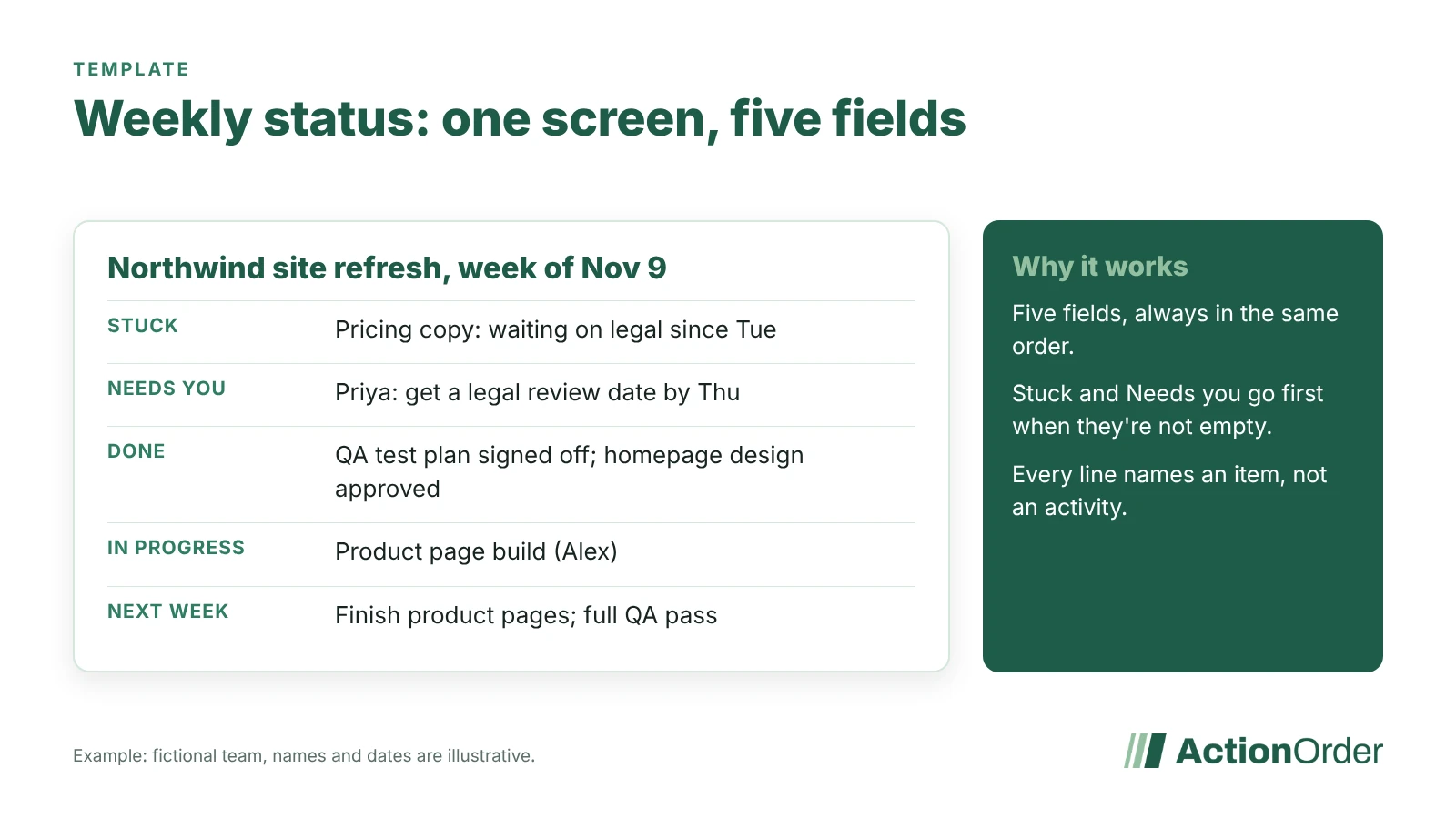
A weekly status report template is a fixed set of fields a team fills in once a week so the manager can see progress without a meeting. The best format has five fields in a fixed order: Done, In progress, Stuck, Next week and Needs you. Move Stuck and Needs you to the top when they aren't empty.

What should a weekly status report include?
A weekly status report should include five things: what got done, what is in progress, what is stuck, what happens next week, and what the reader needs to decide or provide. Anything else belongs in the task list or a linked document.
Each field answers one question the reader would otherwise ask in a message:
| Field | The question it answers | What to write |
|---|---|---|
| Done | What moved this week? | Finished items, each linked to its task |
| In progress | What's underway, and how far along? | Item, owner and a plain measure of progress |
| Stuck | What can't move, and why? | The item, since when, and what or who it's waiting on |
| Next week | What will we finish next? | Three to five items you expect to close |
| Needs you | What does the reader have to do? | A decision, an approval or an input, with a date |
The order matters. Readers skim, and the fields that ask for action are the ones they most need to see. When Stuck or Needs you has anything in it, put those two fields first and say so in the opening line.
A written weekly report also replaces a stream of small check-ins. In Microsoft's analysis of anonymized Microsoft 365 signals through February 15, 2025, the average worker received 153 Teams messages per weekday and 117 emails a day (Microsoft WorkLab, June 17, 2025). One predictable report a week is one less reason to add to that count.
Weekly status report template (copy this)
Copy the template below into a doc, a team thread or the description of a recurring task. Keep the field names exactly as they are, so every report on the team reads the same way.
| Field | Your update |
|---|---|
| Report | Weekly status: [project or team], week of [date] |
| Overall | Green, amber or red, plus one sentence on why |
| Stuck | [Item], waiting on [person or thing] since [day]. Leave empty if nothing is stuck. |
| Needs you | [Decision or input] by [date]. Leave empty if nothing is needed. |
| Done | [Item, linked]; [item, linked] |
| In progress | [Item] ([owner], [how far along]) |
| Next week | [Item]; [item]; [item] |
Three rules keep it useful:
Every line names an item, not an activity. "Homepage copy approved" beats "worked on homepage copy."
Every Stuck line says what it's waiting on. A blocker without a cause can't be cleared.
Every Needs you line has a date. Without one, the reader can't tell a request from an FYI.
For a shorter weekly version built from the same four parts, copy the Friday recap template from The Async Manager’s Playbook.
How do you write a weekly status report?
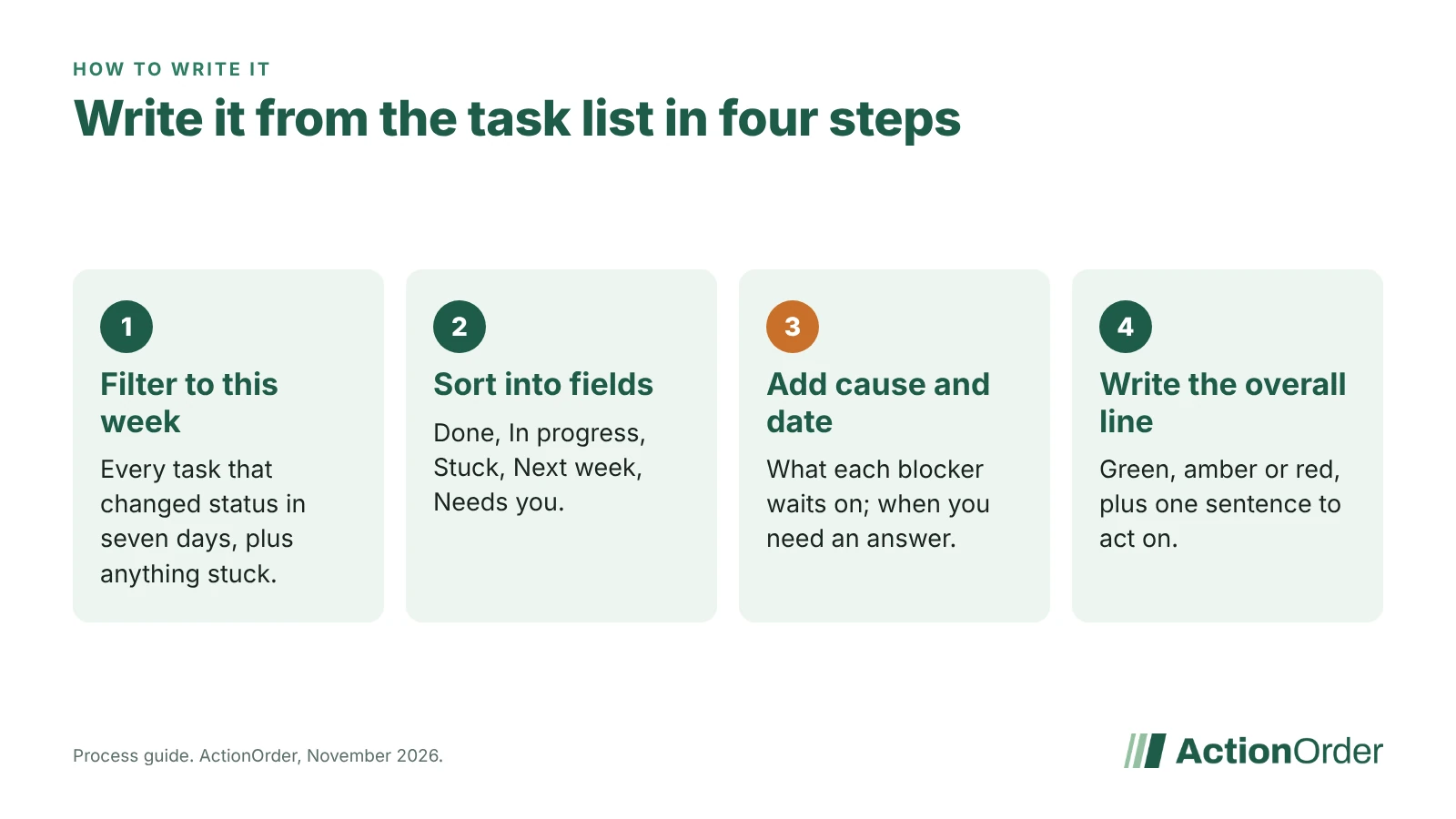
Write a weekly status report from the task list, not from memory, in four steps. Memory favors whatever happened on Thursday and forgets the thing that has quietly waited since Monday.
Filter the task list to this week. Pull every task that changed status in the last seven days, plus anything still marked stuck or waiting.
Sort each task into a field. Finished tasks go to Done, open tasks to In progress, blocked tasks to Stuck. Anything that needs the reader's decision goes to Needs you.
Add the cause and the date. For each Stuck item, write what it's waiting on and since when. For each Needs you item, write the date you need an answer.
Write the overall line last. Once the fields are filled, choose green, amber or red and write one sentence that a reader could act on.
This also cuts down the time people spend hunting. Atlassian's survey of 12,000 knowledge workers and 200 executives found that "leaders and teams waste 25% of their time just searching for answers" (Atlassian, State of Teams 2025). A report whose every line links to its task gives readers the answer and the place to find more.
Weekly status report examples for three remote teams
The three examples below use the same template on three kinds of team. All three are fictional and labeled as examples.
Example: an agency client team. Alex manages a 9-person delivery team. Priya is the account lead for the client, Northwind.
| Field | Update |
|---|---|
| Report | Weekly status: Northwind site refresh, week of Nov 9 |
| Overall | Amber: the pricing page is waiting on Northwind's legal review, which could push the release by three days. |
| Stuck | Pricing page copy, waiting on Northwind legal since Tuesday. |
| Needs you | Priya: ask Northwind for a legal review date by Thursday. |
| Done | QA test plan signed off (Jordan); homepage design approved (Sam). |
| In progress | Product page build (Alex, 4 of 6 templates done). |
| Next week | Finish product pages; full QA pass; send the staging link to Northwind. |
Example: a product and engineering team. Jordan, the QA lead, writes the report for a squad shipping a new onboarding flow.
| Field | Update |
|---|---|
| Report | Weekly status: onboarding flow, week of Nov 9 |
| Overall | Green: on plan for the release candidate on Nov 18. |
| Stuck | Nothing stuck. |
| Needs you | Nothing needed this week. |
| Done | Sign-up screens merged; 42 test cases written. |
| In progress | Email verification (backend, in review); empty-state designs (Sam, first draft). |
| Next week | Release candidate build; regression run; accessibility check. |
Example: a support team. Morgan, the support lead, reports to Taylor, the head of support and operations.
| Field | Update |
|---|---|
| Report | Weekly status: support queue, week of Nov 9 |
| Overall | Red: the refund backlog has grown two weeks running and needs a staffing decision. |
| Stuck | Refund requests over the agent approval limit, waiting on finance since Monday. |
| Needs you | Taylor: decide by Friday whether to raise the agent approval limit or add a finance reviewer. |
| Done | New macro set live; weekend coverage rota agreed. |
| In progress | Help-center rewrite (5 of 12 articles). |
| Next week | Finish 4 more help-center articles; train two agents on refunds. |
Notice what the red report does well. It doesn't explain the whole week. It names the problem, the cause and the decision, and it puts them first.
How long should a weekly status report be, and who should get it?
A weekly status report should fit on one screen: about 150 to 300 words, or five fields with one to five lines each. It goes to the people who act on it, usually the manager and any stakeholder who owns a decision in Needs you.
Length is a sign of what the report is for. The reader needs something short: what changed, what's at risk and what they have to do. Put detail behind links to the tasks.
For the recipient list, use three tiers:
Gets it every week: the manager and the team. They act on Stuck and Needs you.
Gets it when they're named: a client, an executive or another team, when a Needs you line is addressed to them.
Can find it: everyone else. Post the report somewhere searchable instead of copying more people.
Send it on the same day each week. Thursday afternoon or Friday morning gives the reader time to answer before the week ends.
Red, amber, green: how do you mark project status?
Red, amber and green (often called RAG status) is a one-word summary of whether the work is on plan. Define each color once, in writing, so everyone uses it the same way.
| Status | Meaning | What the report must include |
|---|---|---|
| Green | On plan. No help needed. | Nothing extra |
| Amber | At risk. The team has a plan to recover. | The risk, the recovery plan and when you'll know |
| Red | Off plan. The team can't recover without help. | The decision or resource needed, and by when |
Two habits keep the colors honest. First, amber is not a softer red: if you need help, say red. Second, a project should rarely jump from green to red. If it does, ask what the report missed the week before.
How should a manager read and reply to a status report?
A manager should read Stuck and Needs you first, reply to each item within one working day, and say nothing about the rest unless something looks wrong. The reply is what makes people keep writing honest reports.
Use this order when a report arrives:
Stuck: clear the blocker or name who will, with a date.
Needs you: make the decision, or say when you will.
Overall: if the color doesn't match the fields, ask about it.
Done: a short acknowledgment is enough.
Trust is the bigger reason to reply. In Microsoft's survey of 20,006 knowledge workers in 11 countries in July and August 2022, 87% of employees said they were productive at work, while 85% of leaders said hybrid work made it challenging to have confidence that employees were productive (Microsoft Work Trend Index, Sept 22, 2022). A good weekly report closes some of that gap with facts instead of more check-ins. For the wider approach, see how to stop chasing status updates on a remote team.
Common mistakes to avoid:
Listing activity instead of outcomes. "Had three calls with the client" says nothing about what moved.
Hiding stuck work in In progress. If it hasn't moved in three days and can't, it's stuck.
Writing a different format every week. A fixed template lets readers find the same field in the same place.
Reporting what the reader already saw. Link to the task; don't repeat it.
Never getting a reply. If Stuck items sit unanswered, the team stops raising them.
How ActionOrder handles this
ActionOrder, an efficiency and accountability tool for managers of remote teams, keeps weekly status on the cards people already work. It reads the tools your team already uses and gives each person one clear next step at a time. Every card has one owner and a status: done, in progress, waiting or stuck, and people set "stuck" themselves. On Pro, the team view shows each card's owner and status and how long it waited in the queue, and a Friday recap shows what moved, what's stuck and what needs the manager. Those are the Done, Stuck and Needs you fields, filled from the cards. Nothing runs in the background.
Join the waitlist. ActionOrder is in pre-launch.
Questions people ask
What is the difference between a status report and a progress report?
A status report is a snapshot of where the work stands now: done, in progress, stuck and what's needed. A progress report measures movement toward a goal over a period, such as percent complete against a plan. Many teams combine them by adding one progress line to the Overall field of the weekly status report. Keep the five fields either way, so readers still find blockers first.
Who should write the weekly status report?
The person closest to the work should write it: the project lead, the team lead or each individual for their own work. The manager should read and reply, not write it for the team. On a small team, one combined report works. On a larger team, have each sub-team write its own and the lead combine the Stuck and Needs you fields.
How long should it take to write a weekly status report?
If the task list is up to date, writing the report should take minutes rather than an hour, because you're sorting existing tasks into fields. If it takes much longer, that usually means status lives in people's heads instead of on the tasks. Fix that first, and the report gets faster every week.
Should a weekly status report include hours worked?
Usually not. A status report is about what moved and what's blocked, not how much time was spent. If your team bills clients or pays contractors by the hour, keep logged time in a separate time report tied to tasks, and reference it only when hours explain a risk, such as a task running well over its estimate.
What if nothing changed this week?
Say so in one line and explain why. "No change: waiting on Northwind's legal review since Tuesday" is useful, because it tells the reader exactly where the work is blocked. A week with nothing in Done is the week a status report matters most, since it is often the first sign that something needs the manager.
Sources
- Breaking down the infinite workdayMicrosoft WorkLab, Work Trend Index, June 17, 2025
- State of Teams 2025Jay Hoffmann, Atlassian, accessed Nov 11, 2026 (the page shows no publication date)
- Hybrid Work Is Just Work. Are We Doing It Wrong?Microsoft WorkLab, Work Trend Index, Sept 22, 2022