Project Status Report: What to Include, With Three Examples
A project status report tells sponsors, stakeholders and clients whether a project will land as planned. Here is what to include, how to define green, amber and red, a template to copy and three filled examples.
A project status report is a short, regular summary that tells sponsors, stakeholders and clients whether a project is on track against its plan. Lead with one overall status (green, amber or red) and the reason, then show milestones, risks and issues with owners, decisions needed by a date, and what changed since the last report.

What is a project status report?
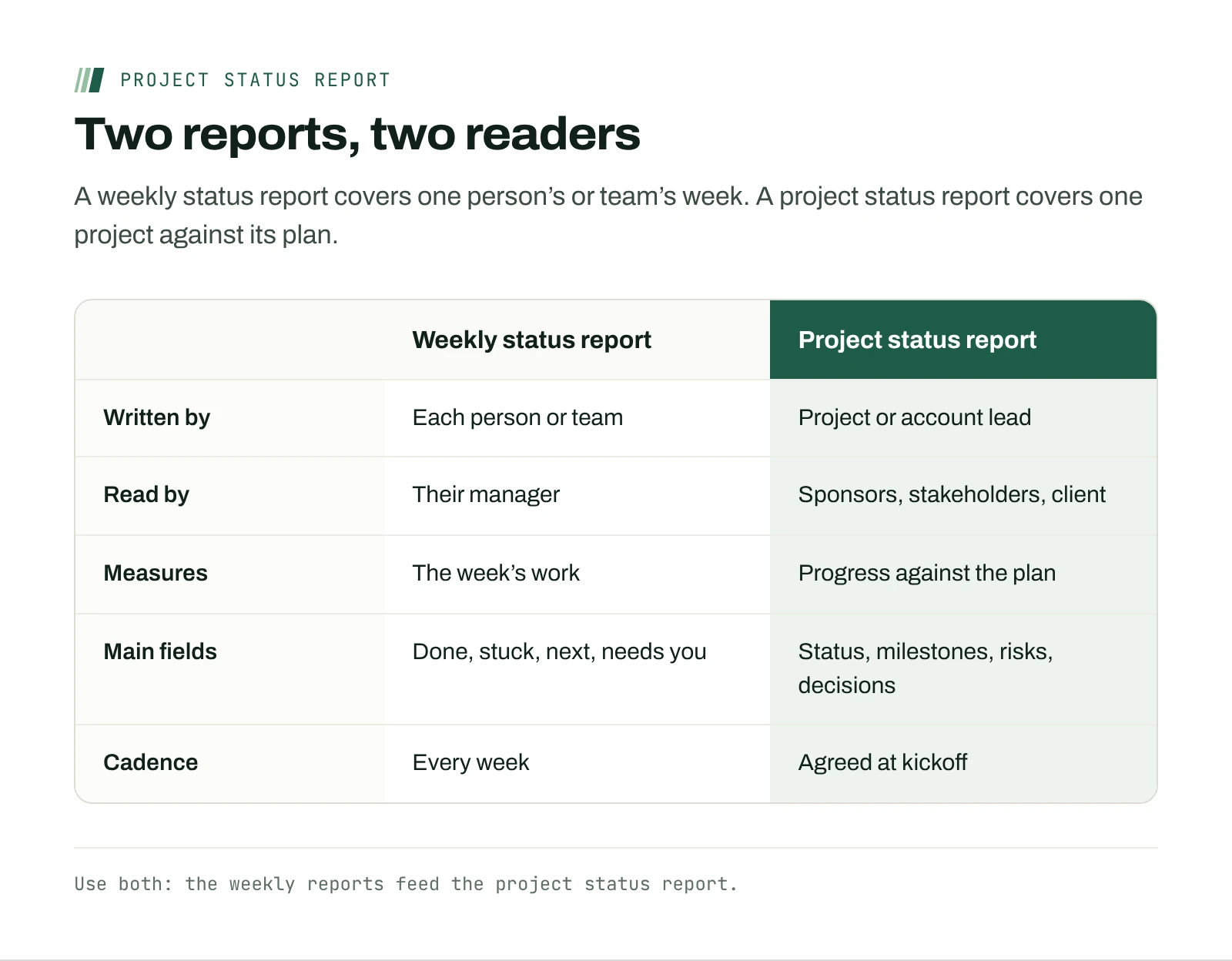
A project status report is a regular written summary of where one project stands against its plan. The project or account lead writes it for the people who sponsor the project or depend on it.
Some organizations call it a highlight report. Oxford Brookes University’s project management toolkit says a highlight report “provides the board (and other key stakeholders, as appropriate) with a high-level summary of key information on the project set at a specified time period.”
For the weekly update each person sends their manager, use the weekly status report template. A project status report rolls that work up into one view of the project, for readers who don’t see the daily work.
What should a project status report include?
A project status report should include eight parts: overall status, a summary, decisions needed, milestones, risks and issues, changes since the last report, scope and effort, and what comes next. Keep this order, so the lines the reader acts on sit near the top.
| Part | What to write |
|---|---|
| Overall status | Green, amber or red, and why |
| Summary | Two or three sentences, main reason first |
| Decisions needed | The decision, who decides, by when, what slips if late |
| Milestones | Planned date, forecast date and state |
| Risks and issues | Impact, owner, next step and date |
| Changes since last report | Status, dates, scope, new risks, decisions made |
| Scope and effort | Approved changes; hours against plan, or “within plan” |
| Next | Deliverables due and the next report date |
Show planned and forecast dates side by side, so a slip shows without anyone announcing it.
How do you define green, amber and red?
Define each color as a trigger tied to milestone dates, in writing, before the first report. Green means on track, amber means at risk but recoverable, and red means off track without outside help.
The UK government’s National Infrastructure and Service Transformation Authority (NISTA) uses the same three colors for major projects and defines them in its annual report:
- Green: “Successful delivery of the project on time, budget and quality appears highly likely.”
- Amber: “Successful delivery appears feasible but significant issues already exist, requiring management attention.”
- Red: “Successful delivery of the project appears to be unachievable.”
Red is a call for action, not a verdict. NISTA’s 2025-26 report notes that “a red delivery confidence assessment does not mean a project will fail.” For a team project, turn the colors into triggers anyone can check:
| Status | Trigger | What the report adds |
|---|---|---|
| Green | Every milestone forecast is on or before its planned date. | Nothing extra |
| Amber | A milestone is at risk, and the team can recover it with its own plan. | The risk, the recovery plan and when you’ll know |
| Red | A milestone slips, or scope changes, unless someone outside the team acts. | The options, who decides and by when |
Agree the triggers at the project kickoff meeting, so nobody debates the color mid-slip.
Project status report template (copy this)
Copy this into a doc, a channel or an email, and keep the fields in this order.
Project status report: [project], [date]
- From [author] to [sponsor, stakeholders, client]. Next report: [date].
- Overall status: [Green, amber or red]. [Why, in one sentence.]
- Summary: [Two or three sentences against the plan, main reason first.]
- Decisions needed: [Decision], from [person], by [date]. If late: [what slips]. Or “None.”
- Milestones: [Milestone], planned [date], forecast [date], [done, on track, at risk or late].
- Risks and issues: [Item]. Impact: [what it affects]. Owner: [name]. Next step: [action] by [date].
- Changes since last report: [Status, dates, scope, new risks, decisions made.]
- Scope and effort: [Unchanged, or approved changes]. [Hours used] of [planned hours], or “within plan.”
- Next: [What’s due before the next report.]
- Links: [plan], [risk and issue log], [decision log].
To email it to a client, use the status update email template.
Project status report examples: green, amber and red
Example: these three reports follow one fictional project, a Northwind customer portal, from on track to at risk to blocked. Priya, the account lead, writes them for Northwind’s sponsor and copies Alex, who manages the 9-person delivery team. Jordan is the QA lead; Sam is the designer.
Green: on track
Example: Project status report, Northwind customer portal, October 23, 2026
- From Priya to Northwind’s sponsor; copy Alex. Next report: November 6.
- Overall status: Green. All four milestones are forecast on their planned dates.
- Summary: Design was signed off a day early; the test build reaches staging on October 30. One risk: user testing needs single sign-on (SSO) test accounts from Northwind IT by November 6.
- Decisions needed: None.
- Milestones: Design sign-off, planned Oct 9, done Oct 8. Test build on staging, Oct 30, on track. User testing complete, Nov 27, on track. Go-live, Dec 11, on track.
- Risks and issues: Risk: SSO accounts arrive late. Owner: Priya. Next step: confirm a handover date with Northwind IT by Oct 28.
- Changes since last report: Design signed off. No date or scope changes.
- Scope and effort: Unchanged. 168 of 480 planned hours logged.
- Next: Test build on staging; test plan ready (Jordan, Nov 4).
Amber: at risk
Example: Project status report, Northwind customer portal, November 6, 2026
- From Priya to Northwind’s sponsor; copy Alex. Next report: November 20.
- Overall status: Amber. The SSO test accounts haven’t arrived. Testing still finishes November 27 if they arrive by November 11.
- Summary: The test build reached staging on October 30, as planned. The SSO accounts were due today, so last report’s risk is now an issue. Jordan has moved tests that don’t need sign-in to the front.
- Decisions needed: From Northwind IT, through the sponsor: SSO test accounts by Wednesday, November 11. If later, testing and go-live slip.
- Milestones: Design sign-off, done Oct 8. Test build on staging, done Oct 30. User testing complete, Nov 27, at risk. Go-live, Dec 11, on track if testing holds.
- Risks and issues: Issue: SSO accounts not received. Impact: 18 of 64 test cases can’t run. Owner: Priya. Next step: a date from Northwind’s IT lead by Nov 9. Risk: accessibility fixes run long. Owner: Sam. Next step: estimate by Nov 10.
- Changes since last report: Green to amber. Test build on staging done. The SSO risk became an issue.
- Scope and effort: Unchanged. 312 of 480 planned hours logged.
- Next: User testing starts Nov 11; accessibility fixes (Sam).
Red: blocked
Example: Project status report, Northwind customer portal, November 20, 2026
- From Priya to Northwind’s sponsor; copy Alex. Next report: November 25, then weekly until go-live.
- Overall status: Red. Testing can’t finish by November 27, and the December 11 go-live slips unless the sponsor picks an option below by Tuesday, November 24.
- Summary: The SSO accounts are two weeks late. All 46 tests that don’t need sign-in have passed; the 18 sign-in tests are blocked, and the team can’t unblock them alone.
- Decisions needed: The sponsor, by November 24. Option A: keep SSO and move go-live to December 18, if accounts arrive by November 25. Option B: go live December 11 with email sign-in and add SSO in a follow-up release. We recommend B.
- Milestones: Design sign-off, done Oct 8. Test build on staging, done Oct 30. User testing complete, planned Nov 27, forecast Dec 4 (A) or Nov 27 (B). Go-live, planned Dec 11, forecast Dec 18 (A) or Dec 11 (B).
- Risks and issues: Issue: SSO accounts 14 days late. Owner: Northwind IT; Priya follows up daily. Risk: under option A, later accounts move go-live again. Owner: Priya.
- Changes since last report: Amber to red. Non-sign-in tests passed. Accessibility fixes done (Sam).
- Scope and effort: Unchanged until the decision. 401 of 480 planned hours logged. Option A adds about 30 hours; option B about 12.
- Next: The decision, then the plan for the chosen option.
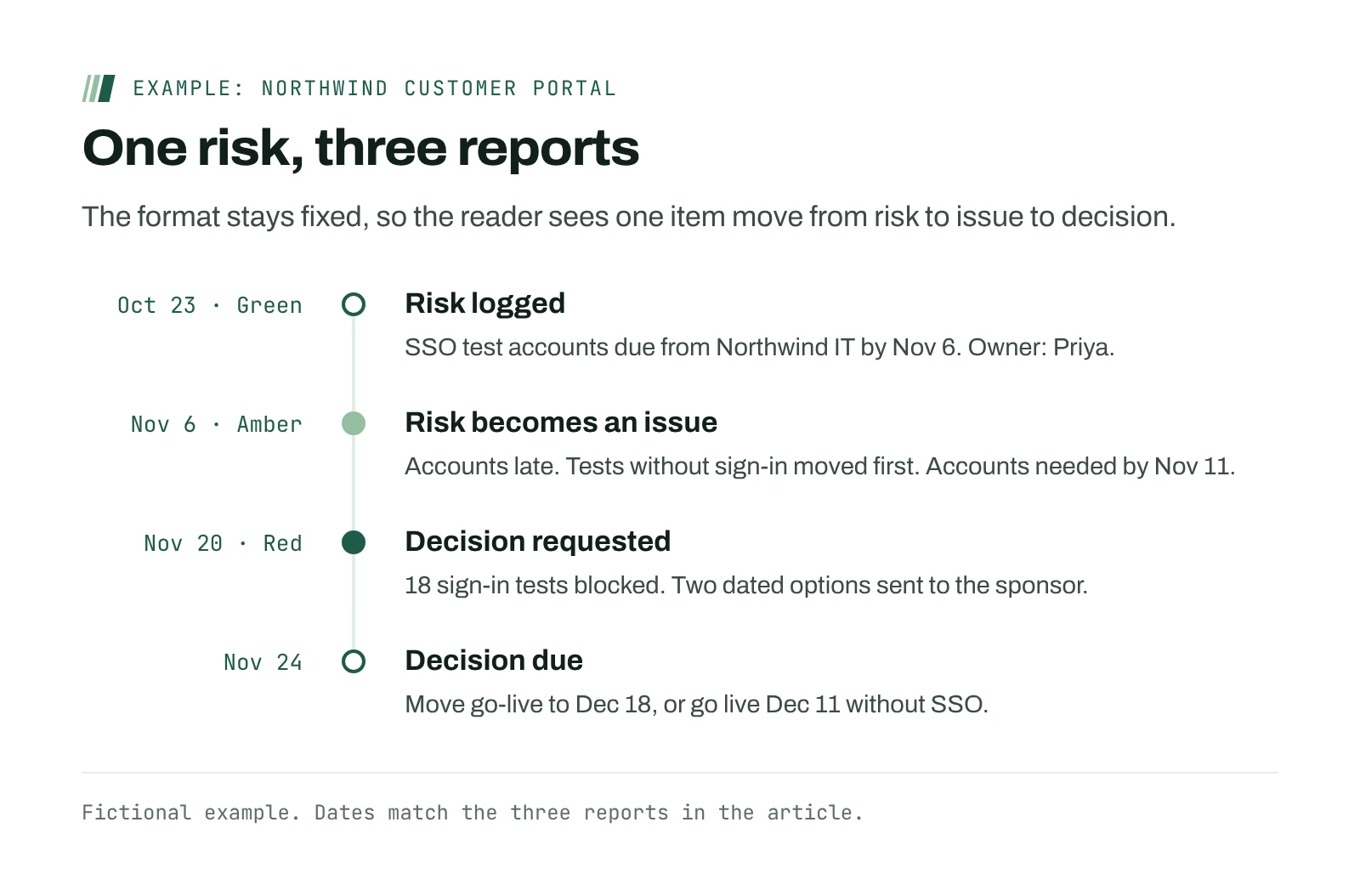
The format never changes, and the red report doesn’t explain the whole project. It names the block, gives two dated options and recommends one.
Client projects often stall on inputs like these. See how to keep client work moving.
Who gets a project status report, how often, and how long should it be?
Send a project status report to the people who sponsor the project or depend on it, on a cadence agreed at kickoff: weekly or every two weeks for an active project, monthly for a steering group, and the same day when it turns red. Keep it to one screen.
A guide from ProjectManager, which sells project management software, notes that “Stakeholders such as clients and sponsors want to know the big picture.” Send it to the sponsor, the client lead and anyone named under Decisions needed, and copy the delivery team so nobody hears the status first from the client.
On cadence, Oxford Brookes says of its highlight report: “The regularity of the reports should be agreed with the board and the project manager, but normally it is produced on a monthly basis.” To roll several projects up for leadership, use a monthly report.
How do you write a project status report async, from the work?
Write it from the records the project already keeps: the plan, the risk and issue log and the decision log. When those are current, the report needs no status meeting.
Update milestone forecasts from the tasks. Use each task’s owner, state and dates, not answers from asking around. That is how you make status come from the work.
Update risks and issues. The University of Waterloo’s project management office describes a risk log that records “triggers, probability, impact, mitigation, owner.” Every entry needs an owner and a dated next step.
Pull open items from the decision log. Each becomes a Decisions needed line with a date.
Compare with the last report and list what changed.
Set the color last, by the trigger, then write the summary.
Post it in the same place and ask for answers in writing. Meet only when a decision stalls. See how to replace a status meeting.
A surprise red usually starts as stuck work nobody flagged: see how to spot stuck work early and how to stop chasing status updates. For the wider system, read how to manage a remote team without chasing it.
How ActionOrder handles this
ActionOrder, an efficiency and accountability tool for managers of remote teams, reads the tools your team already uses and gives each person one clear next step at a time, already prepped. Every card has one owner and a status: done, in progress, waiting or stuck, and people set “stuck” themselves. On Pro, the team view shows each card’s owner and status, how long it waited in the queue, and a Friday recap: the facts behind the milestone, risk and decision lines. Join the waitlist. ActionOrder is in pre-launch.
Questions people ask
How do I write a project status report?
Write it from the plan and your logs, not from memory. Update milestone forecasts, update risks and issues with owners and dates, and list decisions needed with deadlines. Note what changed, set the color by your triggers, then write a short summary.
Can you provide an example of a project status report?
The three examples above are complete reports for one fictional project at green, amber and red. Read them in order to watch one risk become an issue, then a dated decision request.
What are examples of project statuses?
The most common project statuses are green (on track), amber or yellow (at risk but recoverable) and red (off track without intervention). Many teams add on hold, complete and cancelled. Individual tasks need simpler states, such as done, in progress, waiting and stuck.
What should be included in a status report?
A status report should include the overall status and why, a short summary, decisions needed with dates, milestones with planned and forecast dates, risks and issues with owners, what changed, scope and effort, and what comes next.
What is the difference between a risk and an issue?
A risk might happen; an issue already has. Oxford Brookes University’s toolkit defines a risk as “an uncertain event, that should it occur, will have an effect on the project and its deliverables” and an issue as “an event that has happened, that was not planned, and requires management action.”
Sources
- NISTA Annual Report 2024-25National Infrastructure and Service Transformation Authority, GOV.UK, August 11, 2025
- NISTA Major Projects Annual Report 2025-26NISTA, GOV.UK, July 13, 2026
- Highlight reportOxford Brookes University, project management toolkit, checked November 22, 2026
- Risk and issue registerOxford Brookes University, project management toolkit, checked November 22, 2026
- RAID LogUniversity of Waterloo, VPAF Project Management Office, checked November 22, 2026
- Project Status Reports (Example & Template Included)ProjectManager (sells project management software), checked November 22, 2026