Monthly Report Template for Team Leads (With Example)
A one-page monthly report template: what was delivered, progress on goals, risks, what you need from leadership and next month's plan.
A monthly report template is a fixed set of sections a team lead fills in once a month to tell leadership what was delivered, how the team is tracking against its goals, what is at risk and what it needs. Keep it to one page and write it from your weekly reports, not from memory.
Monthly report template
One page. Send it in the first three working days of the month.
Monthly report: [team or project], [month and year]
Summary
[Three sentences: the month in one line, the biggest risk, the one thing you need]
Delivered this month
[Outcome, linked] · [Outcome, linked]
Goals and progress
[Goal]: [on track, at risk or off track], [where it stands against the plan]
Risks and issues
[Risk], [likely effect], [what we're doing about it]
Decisions or help needed
[Decision or resource] from [person] by [date]
Next month
[Three to five outcomes we expect to deliver]
Team notes
[Hires, departures, time off or changes in how we work]
What should a monthly report include?
A monthly report should include seven sections: a summary, what was delivered, progress on each goal, risks, decisions or help needed, next month's plan and team notes. A monthly management report for leadership uses all seven. A client version usually drops the team notes.
Two sections do most of the work. Goals and progress says whether the month moved the team toward what it promised: on track, at risk or off track. Decisions or help needed tells the reader what to do, with a name and a date on every line.
How do you write a monthly report and share it async?
Write the monthly report from the month's weekly reports, group the work by goal, and post it in one place on the same day each month. The weekly status report template already holds most of what you need.
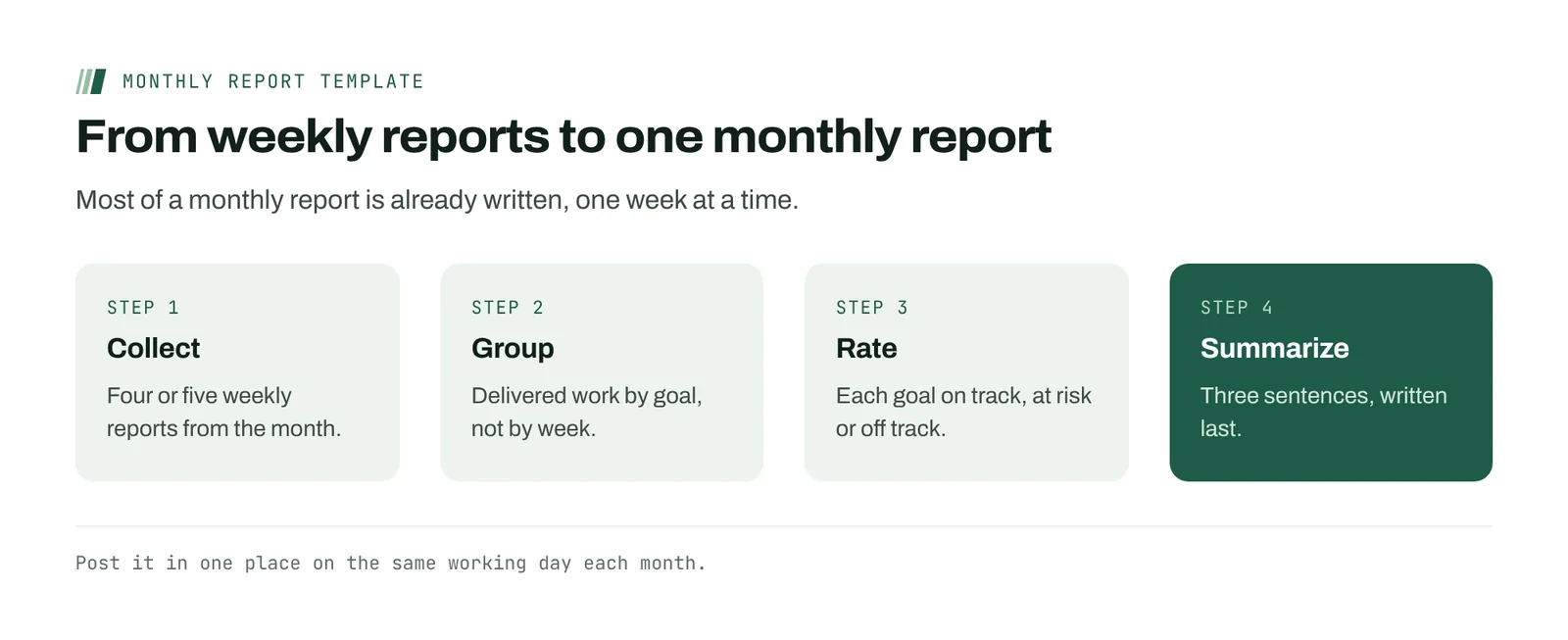
Collect the month's weekly reports. Four or five of them already hold the Done, Stuck and Next fields.
Group delivered work by goal, not by week. Leadership reads by goal.
Rate each goal. On track, at risk or off track, with one line on why.
Carry forward only open risks. Closed ones go in Delivered or drop out.
Write the summary last, in three sentences. Then post the report in one place, by the same working day each month, and ask readers to reply in the thread by a date.
A filled monthly report example
Example: Priya is the account lead for Northwind, a client of Alex's delivery team. This is her monthly report to Northwind and to Alex.
Example: Northwind site refresh, November
Sent on the second working day of December
Monthly report: Northwind site refresh, November
Summary
The new homepage and six product pages are live. The plans page is two weeks late because of a legal review. We need the help center go-live date confirmed by Dec 4.
Delivered this month
Homepage live · Six product pages live · QA test plan signed off
Goals and progress
Site refresh: at risk, 9 of 11 pages live, plans page waiting on Northwind legal.
Page speed: on track, every new page meets the agreed limit.
Risks and issues
The legal review could push the plans page past the December code freeze. Priya has asked Northwind for a review date.
Decisions or help needed
Confirm the help center go-live date, from Northwind, by Dec 4.
Next month
Plans page live · Help center designs · Analytics review with Northwind
Team notes
Sam is out for the last two weeks of December; Jordan covers design QA.
Fill in the monthly report online
Type in the fields and the report builds below as you type. Copy it into an email, a doc or your team channel. Nothing you type is stored or sent anywhere.
Your monthly report
Builds as you type. Nothing is stored or sent.
Your filled-in template appears here as you type.
How ActionOrder handles this
ActionOrder, an efficiency and accountability tool for managers of remote teams, keeps the raw material for a monthly report on the work itself. Every card has one owner and a status: done, in progress, waiting or stuck. On Pro, the team view shows how long a priority has sat at the top and logged time against estimate, and a Friday recap shows what moved and what's stuck each week. Four of those recaps are most of a monthly report. Nothing runs in the background.
Join the waitlist. ActionOrder is in pre-launch.
Questions people ask
How long should a monthly report be?
One page. Put detail behind links to the work, the weekly reports or a dashboard, so the summary and decisions stay on top.
What is the difference between a monthly report and a weekly status report?
A weekly status report shows where the work stands now: done, in progress, stuck and next. A monthly report steps back to progress against goals, open risks and what leadership needs to decide. The monthly report is built from the weekly ones.
When should you send a monthly report?
In the first three working days of the next month, on the same day each month, so readers know when to expect it. Late reports describe a month nobody remembers.
Should a monthly report include metrics?
Yes, but only the few tied to your goals, each with last month's figure beside it so the reader sees the direction. Link a dashboard for the rest.