Capacity Planning Template for Remote Teams
A capacity planning template that works out each person's available hours and compares them with the work planned, before the period starts.
A capacity planning template compares the hours a team actually has in a period with the hours of work planned for it. For each person, start with working days, take out time off and meetings, keep a buffer, then add up the planned estimates. If planned work is higher than capacity, move something before the period starts.
Capacity planning template
One row per person, for a sprint or a two-week period.
Capacity plan: [team], [period]
Buffer for reviews, questions and unplanned work: [20]%
Name · Working days · Hours per day · Time off (h) · Meetings (h) · Available (h) · Planned (h) · Difference
[name] · [10] · [8] · [0] · [6] · [available] · [sum of estimates] · [available minus planned]
[name] · [10] · [8] · [0] · [6] · [available] · [sum of estimates] · [available minus planned]
Available hours
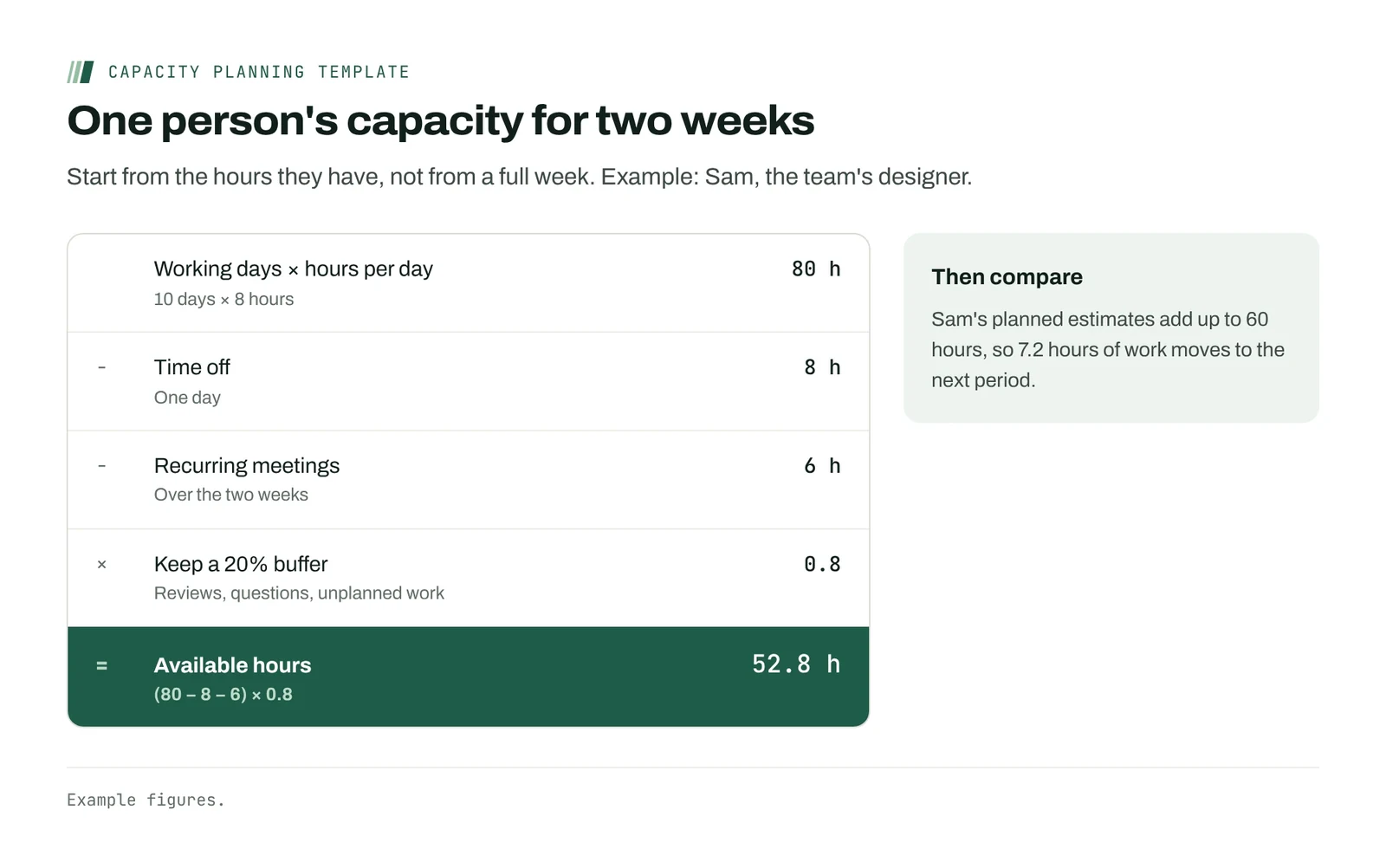
(Working days × hours per day − time off − meetings) × (1 − buffer)
Team totals
Available: [hours] · Planned: [hours] · Difference: [hours]
If planned is higher than available
[What moves out, who decided, and by when]
How do you calculate team capacity?
Calculate capacity person by person: working days times hours per day, minus time off and recurring meetings, then keep a buffer for reviews, questions and work nobody planned. Add the results for the team and compare them with the sum of planned estimates.
Start with a buffer of 15 to 25 percent and adjust it from what actually happened. If work spills into the next period every time, raise it. Plan from the hours people have, not from a full week: meetings and time off are real, and a plan that ignores them is late on day one.
A filled capacity plan example
Example: Alex plans the next two weeks for part of the delivery team, with a 20 percent buffer.
| Person | Days × hours | Time off | Meetings | Available | Planned | Difference |
|---|---|---|---|---|---|---|
| Sam (design) | 10 × 8 | 8 | 6 | 52.8 | 60 | −7.2 |
| Jordan (QA) | 10 × 8 | 0 | 8 | 57.6 | 48 | +9.6 |
| Priya (account lead) | 10 × 8 | 16 | 12 | 41.6 | 40 | +1.6 |
| Alex (manager) | 10 × 8 | 0 | 20 | 48.0 | 30 | +18.0 |
| Team | 200.0 | 178 | +22.0 |
The team has room, but Sam doesn't. Alex moves the empty-state designs to the next period rather than letting Sam's two weeks run over, and writes that decision on the plan.
How do you run capacity planning async?
Have each person fill in their own row, pull planned hours from the estimates on the work, and settle anything over capacity in writing.
Ask for rows by a set day. Each person knows their own time off and meetings better than you do.
Pull planned hours from the estimates on the tasks. Not from a guess in the planning call.
Post the plan with the differences marked. Anyone over capacity is the first thing readers should see.
Resolve overloads in writing. Name what moves, who decided and when.
Compare plan with actual at the end. Use the gap to set the next buffer. See better estimates from logged time.
Fill in the capacity plan online
Enter each person's days, time off, meetings and planned hours. Available hours and the difference work themselves out as you type. Nothing you type is stored or sent anywhere.
Your capacity plan
Builds as you type. Nothing is stored or sent.
Your filled-in template appears here as you type.
How ActionOrder handles this
ActionOrder, an efficiency and accountability tool for managers of remote teams, fills in the planned half of this from the work. Estimates are suggested from logged time on similar cards, and the person or manager can change them. On Pro, the team view shows logged time against estimate on each card, so you can see where plans and actuals drift apart. Time logging is on Pro and Business.
Join the waitlist. ActionOrder is in pre-launch.
Questions people ask
What is capacity planning?
Capacity planning is working out how much work a team can take on in a period, based on the hours people actually have, and comparing it with the work planned. Do it before the period starts, so you can move work instead of missing dates.
How do you calculate capacity for a team?
For each person, take working days times hours per day, subtract time off and recurring meetings, and multiply by one minus your buffer. Add the results for the team, then compare the total with the sum of planned estimates.
What buffer should a capacity plan use?
Start between 15 and 25 percent for reviews, questions and unplanned work. After a few periods, compare planned with actual: if work regularly spills over, raise the buffer, and if people often run out of planned work, lower it.
What is the difference between capacity planning and resource planning?
Capacity planning asks how many hours the team has. Resource planning decides who works on what. Most teams work out capacity first, then assign the work.