Decision Log Template for Remote Teams
Record what was decided, why, who owns it and when to revisit it, so nobody reopens a settled question across time zones.
A decision log template is a short, fixed format for recording each team decision: what was decided, why, who decided, the options you turned down and when to revisit it. Keep one log per team or project, add the entry the day the decision is made, and never delete old entries. Mark them superseded instead.
Decision log template (copy this)
Copy the entry below into a shared doc, a wiki page or a pinned thread. Number entries in order and put the newest at the top, so the log reads like a history of the project.
Decision log entry
Copy one entry per decision. Newest at the top.
Decision log: [team or project]
Entry #[number]: [the decision in a short phrase]
Date decided: [date]
Status: [Proposed, decided, or superseded by #number]
Decision
We will [the decision, in one or two full sentences].
Why
[The problem, the constraints at the time, and what made this option win]
Options we didn’t choose
[Option], because [reason]
Owner
[The one person who made the call and answers questions about it]
Who this affects
[People or teams, and what changes for each]
Revisit
[A date, or the event that would reopen it]
Discussion
[Link to the thread, doc or task where it was discussed]
To fill it in by hand, download the printable decision log template (PDF).
What goes in each field
Each field answers a question someone would otherwise ask you in a message, weeks later.
| Field | What to write | Why it matters |
|---|---|---|
| Decision | One or two sentences that start with “We will” | Someone in another time zone can act on it without asking |
| Why | The problem and the constraints at the time | The next person can judge whether those reasons still hold |
| Options we didn’t choose | Each alternative and the reason it lost | It answers “did anyone think of X?” before it’s asked |
| Owner | One name | Questions and changes go to one person |
| Revisit | A date or a trigger | There’s a fair way to reopen it, so it isn’t argued in every thread |
| Status | Proposed, decided or superseded | Old entries stay readable but can’t pass for current |
The format borrows from architecture decision records, which software engineer Michael Nygard proposed in 2011. His records hold a title, context, decision, status and consequences. Without the reasoning, he wrote, a later team can only “Blindly accept the decision” or “Blindly change it” (Nygard, Cognitect, Nov 15, 2011). He kept reversed decisions in place, marked superseded. Microsoft’s engineering playbook makes the practical case: it is “easier to find the design decision in a log than having to read a large document” (Microsoft Code-With Engineering Playbook).
Example: a filled-in decision log entry
Example: Alex manages a 9-person delivery team building a site for the client Northwind. The team agreed on a new release day in a thread, and Alex logged it that afternoon.
Example: Northwind release day
A filled entry for a 9-person delivery team.
Decision log: Northwind site refresh
Entry #14: Release to Northwind on Wednesdays
Date decided: November 18
Status: Decided
Decision
We will ship releases to Northwind’s staging site every Wednesday by 15:00 UTC, starting November 25.
Why
Friday releases left QA issues open over the weekend. Wednesday leaves two working days in every time zone for fixes.
Options we didn’t choose
Monday releases, because Northwind reviews on Mondays and needs changes in place before then. Releases on demand, because Jordan can’t plan QA passes around them.
Owner
Alex
Who this affects
Jordan: QA passes move to Tuesdays. Sam: design handoffs are due Mondays. Priya: tells Northwind about the new release day on Thursday.
Revisit
After four releases, or sooner if two in a row slip.
Discussion
Release cadence thread, Nov 16 to 18
The thread keeps the back-and-forth. The log keeps the outcome and the reasons.
Which decisions belong in the log?
Log any decision that changes how other people work, takes real time to undo, or will be questioned later. Skip choices one person can reverse in a few minutes.
Priorities and scope: what’s in or out of a release, a deadline that moved.
How the team works: a new tool, a process change, a response-time rule.
Commitments: anything promised to a client or another team.
Anything that took more than one thread to settle. If a question comes up twice, log the answer the second time.
How to keep a decision log async
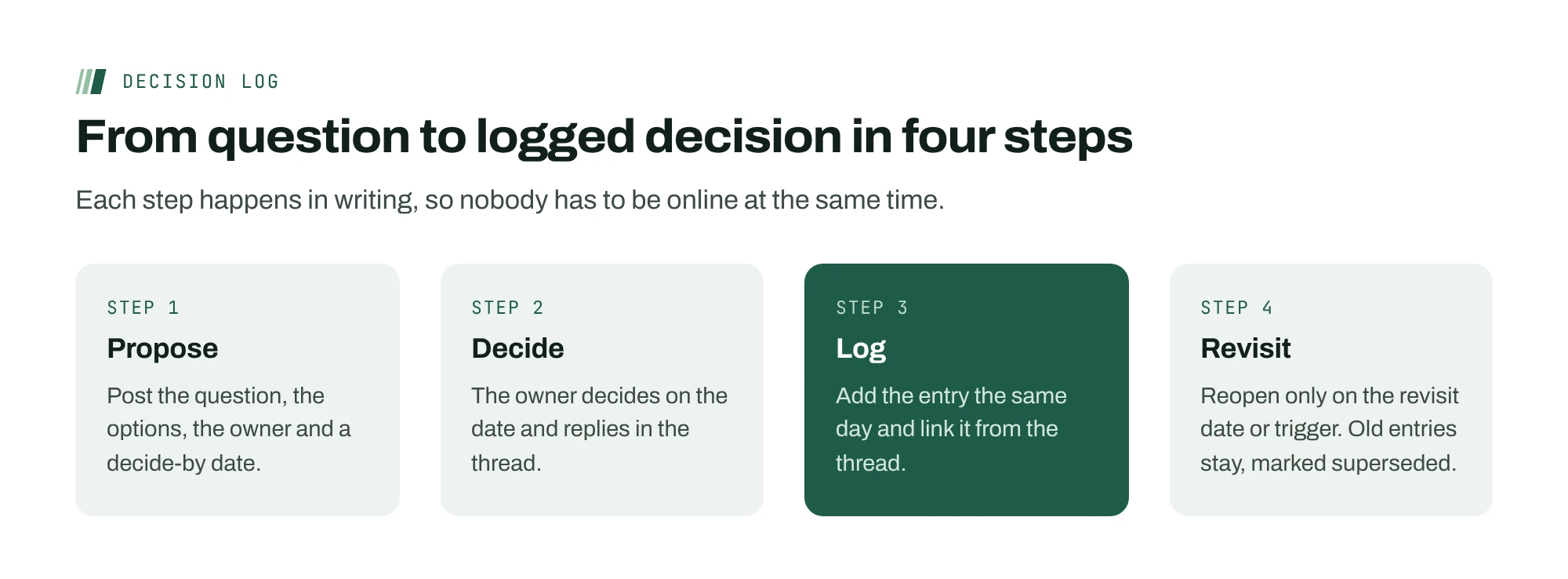
A decision log works across time zones when every step happens in writing and each decision has a date.
Propose in writing. Post the question, the options, the owner and a decide-by date. The decision limits template in the playbook says which calls people can make without you.
Decide on the date. The owner decides even if not everyone replied, and says so in the thread.
Log it the same day. Add the entry and link it from the thread, so the thread ends with the answer.
Point to the log. When the question comes back, reply with the entry number instead of reopening the debate.
Check revisit dates once a month. Confirm each one, or write a new entry that supersedes it.
For the wider habit, read chapter 4 of the playbook: decisions that live in writing don’t need you awake.
Fill in your decision log entry here
Fill in a decision log entry
Type in the boxes and the text below fills itself in. Nothing you type is stored or sent anywhere.
Your decision log entry
Updates as you type. Copy it when it looks right.
Turn on JavaScript to fill in the template here, or copy the template above.
Where ActionOrder fits
ActionOrder, an efficiency and accountability tool for managers of remote teams, reads the tools your team already uses and gives each person one clear next step at a time, already prepped with context, analysis, research and a first draft. Every card has one owner and a status: done, in progress, waiting or stuck. People set “stuck” themselves, so work that waits on a decision shows up instead of going quiet.
Join the waitlist. ActionOrder is in pre-launch.
Questions people ask
What is the difference between a decision log and meeting minutes?
Meeting minutes record what happened in one meeting. A decision log records only outcomes, from every meeting and thread, in one place. Link the minutes from the entry if someone needs the full discussion.
Who should keep the decision log?
The owner of each decision writes its entry. One person, usually the manager or project lead, checks each week that new decisions were logged with an owner and a revisit date.
Can you change a decision after it’s logged?
Yes. Write a new entry, mark the old one “Superseded by #” with the new number, and link the two. Don’t edit the old entry’s reasoning: the point is to keep what was known when the decision was made.
Sources
- Documenting Architecture DecisionsMichael Nygard, Cognitect, Nov 15, 2011
- Design Decision LogMicrosoft Code-With Engineering Playbook, accessed Nov 22, 2026