Daily Standup Template for Remote and Async Teams
Four short prompts each person posts at the start of their own day, so nobody has to join a call at dawn or midnight to say what they’re working on.
A daily standup template is a short set of prompts each person answers at the start of their day: what moved since the last update, what they’ll do today, what’s blocking them and what they need from someone. On a remote team, post it in writing instead of meeting live, and keep it to four lines.
Daily standup template (copy this)
Copy the template into your team’s standup channel or thread. Start one thread per day so each day’s posts stay together.
Daily standup
Post at the start of your own day. Four lines.
Standup: [name], [date]
Since last update: [what moved, with links]
Today: [one to three items, most important first]
Blocked: [what, waiting on whom, since when] or “Nothing.”
Need: [@person: what, by when] or “Nothing.”
To fill it in by hand, download the printable daily standup template (PDF).
Why four prompts instead of the classic three questions?
The fourth prompt, Need, turns a blocker into a request someone can act on while you’re offline. The other three cover the familiar ground.
| Prompt | Write | Skip |
|---|---|---|
| Since last update | What moved, linked to the task | A list of meetings you attended |
| Today | One to three items, in order | Everything on your list |
| Blocked | What, waiting on whom, since when | “A few things are slow” |
| Need | A named person, a request and a date | “Can someone look at this?” |
A written standup isn’t a Daily Scrum, and it doesn’t need to be. The Scrum Guide describes the Daily Scrum as “a 15-minute event for the Developers of the Scrum Team,” held at the same time and place each working day. Even there, it says the Developers “can select whatever structure and techniques they want” (The 2020 Scrum Guide). The 2020 revision also removed the Daily Scrum questions earlier versions suggested (Scrum Guide revisions).
Example: a written standup thread
Example: Alex’s 9-person delivery team posts standups in one thread per day. Jordan, the QA lead, starts work in Europe; Sam, the designer, starts hours later.
Example: two posts in one day’s thread
From a 9-person delivery team working for the client Northwind.
Standup: Jordan, Tuesday Nov 17
Since last update: regression suite passed on staging; 6 bugs filed (link).
Today: retest the checkout fixes; write test cases for the new terms page.
Blocked: terms page tests, waiting on final copy from Northwind since Friday.
Need: @Priya: a date for the final terms copy, by Thursday.
Standup: Sam, Tuesday Nov 17
Since last update: product page layouts 3 and 4 handed off (link).
Today: empty-state designs; review Jordan’s bug list for design issues.
Blocked: Nothing.
Need: Nothing.
Jordan’s Need line reaches Priya before her day starts. By the time Jordan is back online, the answer can be waiting.
How to run a daily standup async
An async standup works when everyone posts at the start of their day and someone answers what’s blocked.
Open one thread per day, started by a scheduled post or the first person online.
Post at the start of your own day, not at a shared time.
Answer Need lines the same working day. The manager reads Blocked and Need first and can skim the rest.
Move blockers onto the task. Mark it stuck, as in the playbook’s stuck rule, so it doesn’t live only in chat.
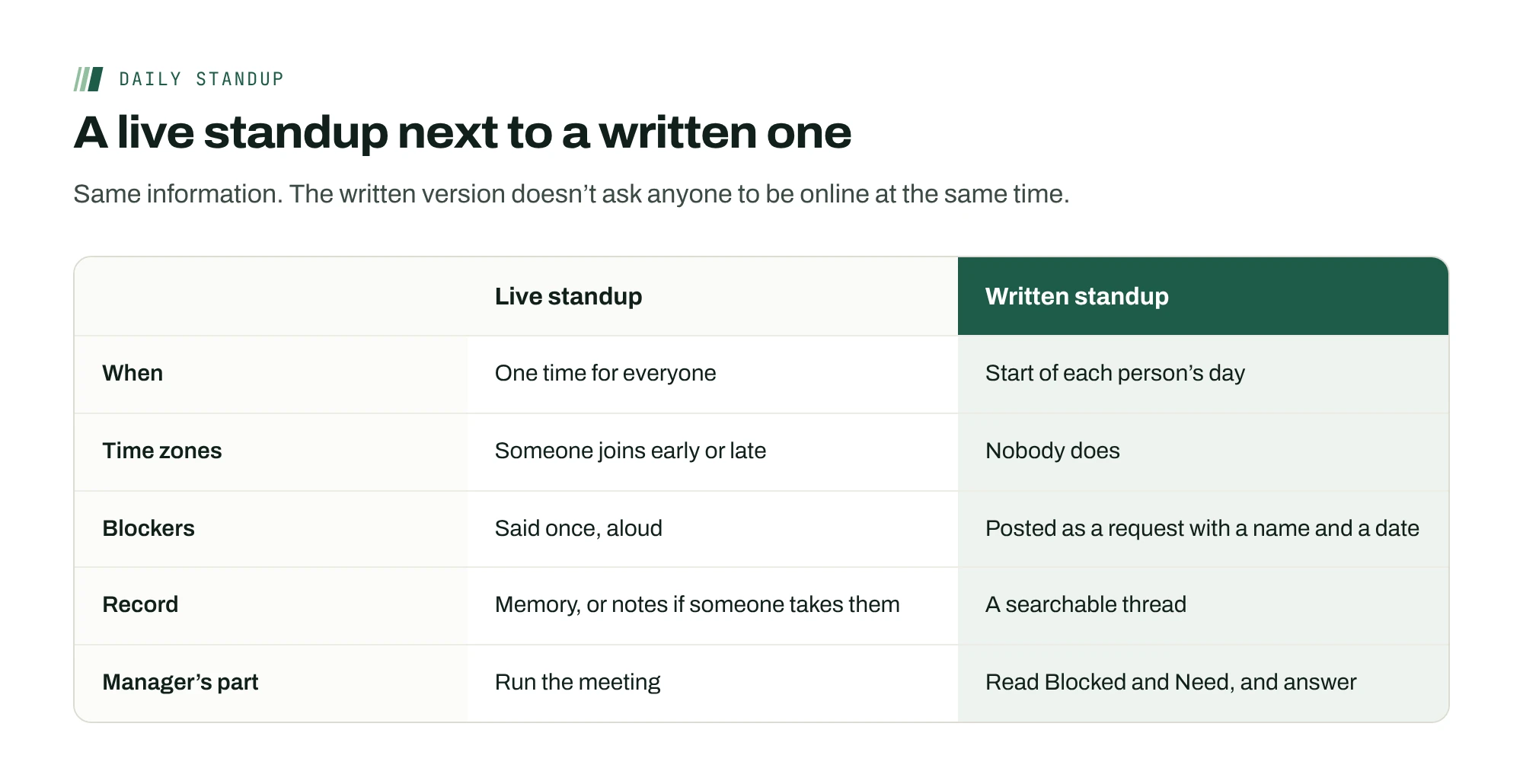
Keep live calls for what writing can’t settle, and make them weekly, not daily.
Daily standup or end-of-day report?
A standup plans the day ahead; an end-of-day report hands the day over to the next time zone. You usually need one, not both. Choose the standup when people start at different times and need answers early, and the end-of-day report when work passes from one region to the next overnight. Chapter 3 of the playbook covers status that comes from the work itself.
Fill in today’s standup here
Fill in today’s standup
Type in the boxes and the text below fills itself in. Nothing you type is stored or sent anywhere.
Your standup
Updates as you type. Copy it when it looks right.
Turn on JavaScript to fill in the template here, or copy the template above.
Where ActionOrder fits
ActionOrder, an efficiency and accountability tool for managers of remote teams, fills the top of each person’s Today line. Its run feed shows one card at a time, ranked across the team’s tools by urgency, impact, shared priorities, effort and what it unblocks. Every card has one owner and a status: done, in progress, waiting or stuck. People set “stuck” themselves, and on Pro the team view shows each card’s owner and status, so Blocked shows up without a meeting.
Join the waitlist. ActionOrder is in pre-launch.
Questions people ask
What are the three standup questions?
The classic three ask what you did yesterday, what you’ll do today and what’s in your way. Earlier Scrum Guides suggested a version of them; the 2020 guide removed them and leaves the format to the team. This template keeps the three and adds a fourth: what you need, from whom, by when.
How long should a daily standup take?
A live Daily Scrum is set at 15 minutes in the Scrum Guide. A written standup takes a couple of minutes to write and less to read, because each post is four lines.
What if people stop posting their standups?
Check whether anyone answers the Need lines. A standup nobody reads stops being written. If replies are fast and posting still drops, try three days a week instead of five.
Sources
- The 2020 Scrum GuideKen Schwaber and Jeff Sutherland, November 2020
- Scrum Guide revisionsScrumGuides.org, accessed Nov 22, 2026