One-on-One Meeting Agenda Template (With Example)
A six-part one-on-one meeting agenda you can copy, fill in online or print, with a filled example and a way to run it across time zones.
A one-on-one meeting agenda is a short, shared list of topics for a private meeting between a manager and one team member. The best agendas put the team member's topics first, then stuck work, priorities, feedback both ways and growth, and end with written next steps. Both people add to it before the meeting.
One-on-one meeting agenda template
Keep it in a shared doc that both people add to before the meeting. 30 minutes.
One-on-one: [team member] and [manager], [date]
1. Their topics
[What the team member wants to talk about, added before the meeting]
2. Wins since last time
[What moved, and what they're proud of]
3. Stuck or slowing down
[What's blocked, what it's waiting on, and since when]
4. Priorities for the next two weeks
[The top three, and anything that should wait]
5. Feedback, both ways
[One thing to keep doing, one thing to change. The manager asks: what should I do differently?]
6. Growth
[A skill, a project or a goal they're working toward]
Next steps
[Action] · Owner: [name] · By: [date]
What should a one-on-one meeting agenda include?
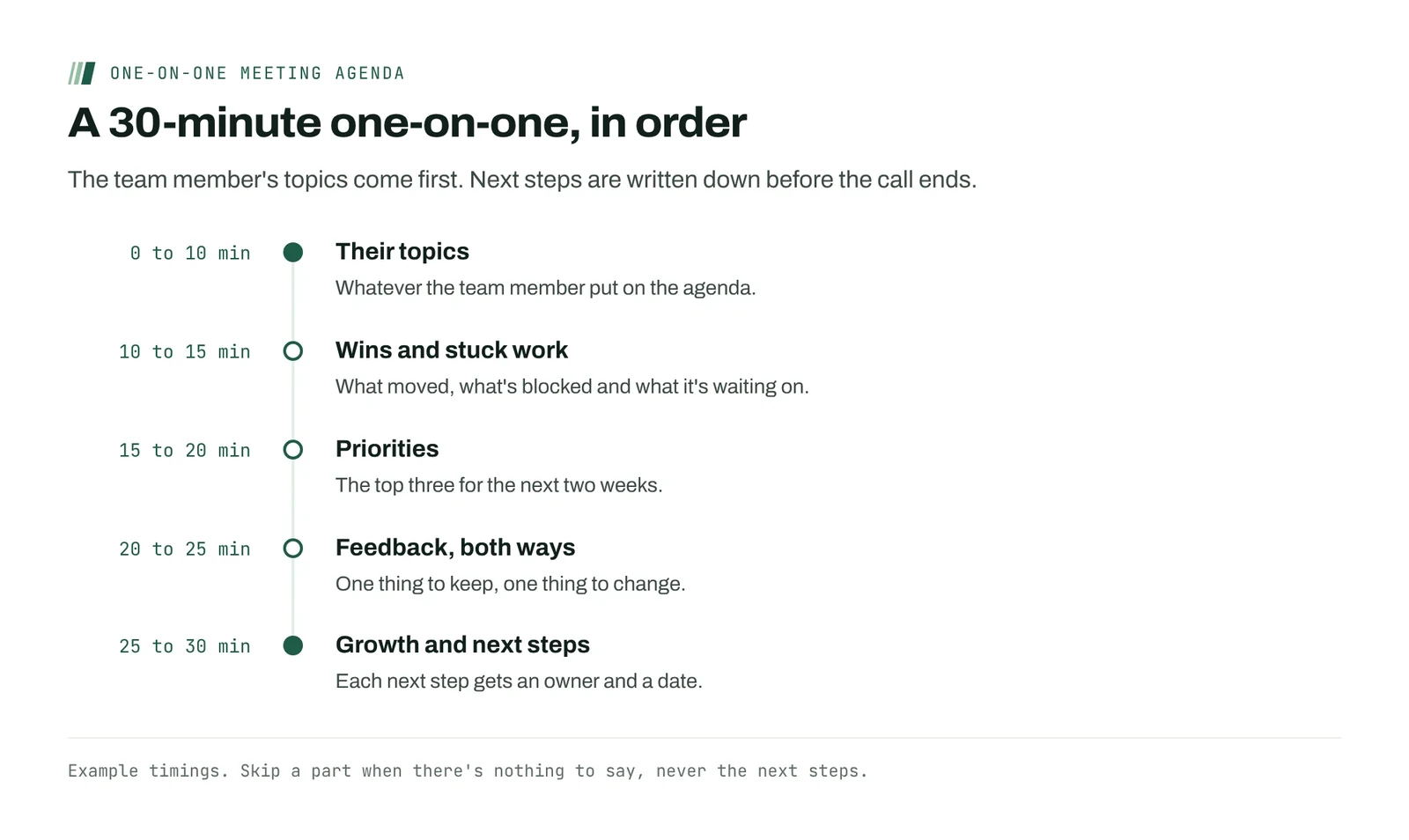
A one-on-one meeting agenda should include six parts in a fixed order, starting with the team member's own topics. The order matters more than the list: whatever comes first gets the most time and the most attention.
Their topics come first. It's their meeting, so their questions shouldn't get the last two minutes.
Stuck work comes before priorities. A blocker cleared today beats a plan for next week.
Feedback runs both ways. Ask what you should do differently, and write it down.
Next steps are written before you leave. Each gets an owner and a date.
Status updates don't belong here; move them to writing. The team meeting agenda template covers the group version.
A filled one-on-one agenda example
Example: Alex manages a 9-person delivery team. This is Alex's 30-minute one-on-one with Sam, the team's designer, written in their shared doc.
Example: Alex and Sam, 30-minute one-on-one
Shared doc, newest meeting at the top
One-on-one: Sam and Alex, Tuesday
1. Their topics
Wants to lead the design review for Northwind's next release.
Asks whether Friday afternoons can stay meeting-free.
2. Wins since last time
Homepage design approved by Northwind on the first pass.
3. Stuck or slowing down
Icon set, waiting on brand files from Northwind since Tuesday. Priya is chasing.
4. Priorities for the next two weeks
Product page designs; empty states for onboarding; design review prep.
5. Feedback, both ways
Keep: annotating designs before handoff. Change: flag scope changes the day they happen.
Sam to Alex: copy decisions arrive too late. Decide by Wednesday.
6. Growth
Lead the next design review, with Alex in the room as backup.
Next steps
Alex: confirm meeting-free Friday afternoons with the team · By: Thursday
Sam: draft the design review agenda · By: next one-on-one
How do you run one-on-ones async across time zones?
Keep the agenda in one shared doc, have both people add to it during the week, and use the call only for the topics that need a conversation.
Keep one running doc per person. Newest meeting at the top, so last time's next steps are one scroll away.
Add topics as they come up. Both people write in the doc during the week instead of saving things up.
Answer the routine parts in writing. Wins and priorities can be filled in a day before the call.
Keep the call for the hard parts. Feedback, growth and anything sensitive deserve a live call. With little overlap, meet every two weeks rather than skip.
Close in writing. Write the next steps in the doc before the call ends, each with an owner and a date.
Fill in the one-on-one agenda online
Type in the fields and your agenda builds below. Copy it into your doc or chat. Nothing you type is stored or sent anywhere.
Your one-on-one agenda
Builds as you type. Nothing is stored or sent.
Your filled-in template appears here as you type.
How ActionOrder handles this
ActionOrder, an efficiency and accountability tool for managers of remote teams, keeps status out of the one-on-one. It reads the tools your team already uses and gives each person one clear next step at a time, already prepped. Every card has one owner and a status, and people set "stuck" themselves, so stuck work shows up before the meeting. On Pro, the team view shows each card's owner and status, with a Friday recap. That leaves the one-on-one for feedback and growth.
Join the waitlist. ActionOrder is in pre-launch.
Questions people ask
What is a one-on-one meeting?
A one-on-one is a regular private meeting between a manager and one person on their team. It belongs to the team member: their questions, blockers, feedback and growth, not a status report.
How long should a one-on-one be?
Thirty minutes every week or two works for most teams. Go to 45 minutes when someone is new, changing roles or working through something hard.
What should I bring to a one-on-one with my manager?
Bring your own topics: a decision you need, something blocking you, feedback on how you're managed, or a goal. Add them to the agenda a day ahead so your manager can prepare.
Should you cancel a one-on-one when there's nothing to discuss?
Shorten it instead. A ten-minute check on stuck work and next steps keeps the habit, and repeated cancellations tell the team member their time is the first to go.