Time Blocking: What It Is and How to Use It on a Remote Team
What time blocking is, where the method comes from, how it differs from timeboxing, and what a time-blocked day looks like on a remote team.
Time blocking is a way of planning your day by dividing your working hours into blocks of time and giving each block a specific task or type of work, instead of working from a to-do list.
A to-do list says what needs doing. A time-blocked schedule also says when, and how much time you’re willing to give it. A block can hold one hard task, a batch of small ones, or an hour set aside for replies.
Time blocking isn’t the same as timeboxing. Time blocking plans the whole day. Timeboxing sets a fixed time limit for one piece of work and lets its scope flex to fit.
Where the term comes from
Author Cal Newport wrote about the method under this name in a December 2013 post on his blog. He divided each workday into labeled blocks and wrote: “I call this planning method time blocking.” He described spending “ten to twenty minutes every evening” building the next day’s schedule, and leaving “some extra room” next to his blocks to “make corrections as needed if the day unfolds in an unexpected way.” Reactive work fits too: “periods of open-ended reactivity can be blocked off like any other type of obligation.”
In November 2020 he announced The Time-Block Planner, a daily planner built on the method. The publisher’s page sums up the idea: “a task list is not enough to make the most of your limited time,” so you “partition your working hours into blocks assigned to specific activities.”
Time blocking on a remote async team
On a remote team, an invite from someone eight hours away can land on top of a block, so time blocking works best with a few shared habits:
Block the overlap first: put meetings, decisions and handoffs inside your core hours, and block deep work outside them.
Make blocks visible: label them on the shared calendar, so teammates know when a reply will come.
Block reactive work too: one or two blocks a day for messages keeps chat from leaking into every hour.
Redraw, don’t abandon: when something urgent lands, move the remaining blocks and carry on.
Plan tomorrow before you stop: a few minutes at the end of the day means the morning starts on the first block.
For the team rules that protect blocks, see focus time for remote teams and how to manage a remote team.
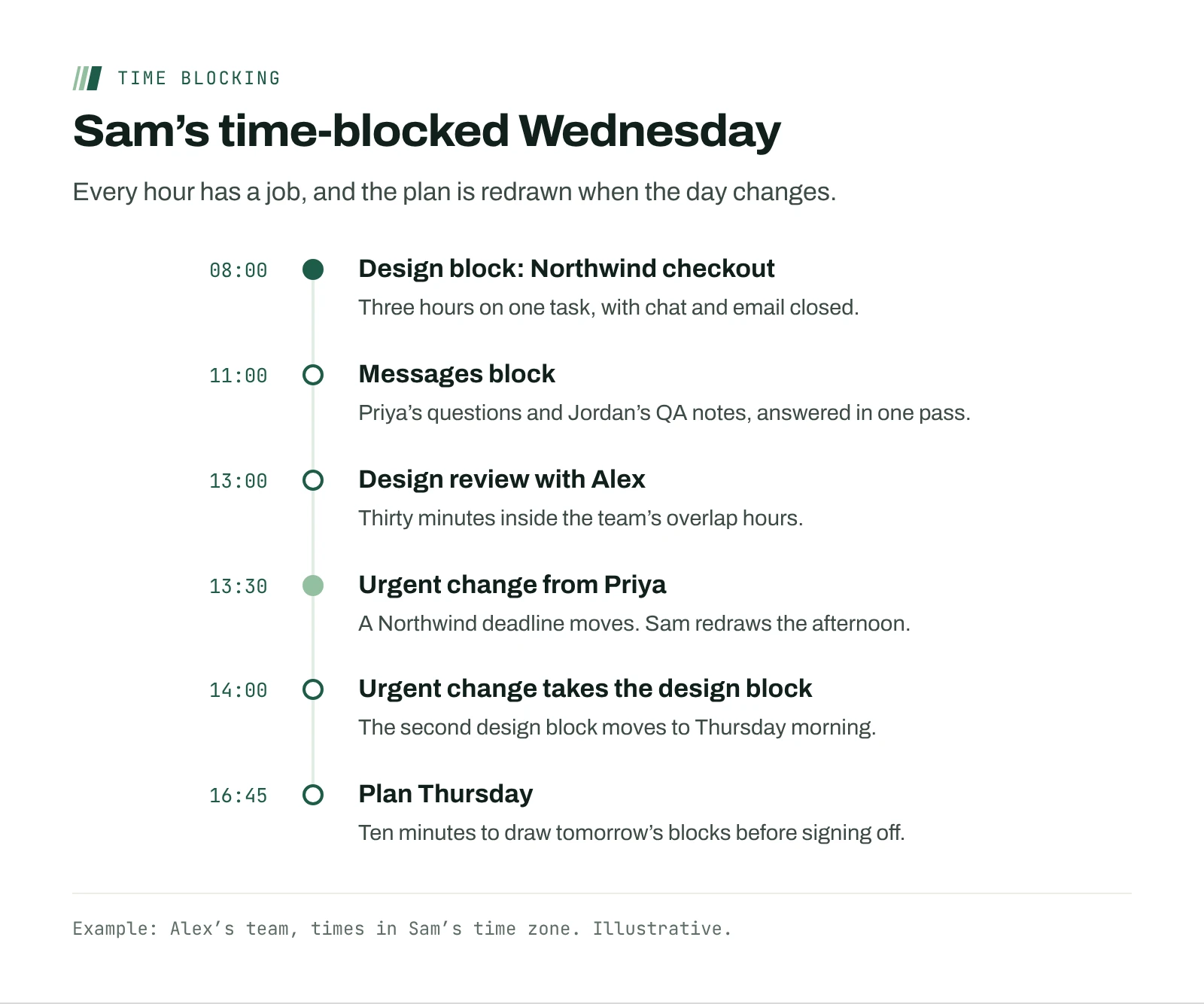
Example: Sam’s time-blocked Wednesday
Example: Sam, the designer on Alex’s nine-person delivery team, plans each day at the end of the one before. Wednesday opens with a three-hour block for Northwind’s checkout screens, then a block for messages, where Sam answers Priya’s questions and Jordan’s QA notes in one pass. After lunch comes a short design review with Alex inside the team’s overlap hours, then a second design block at 14:00. At 13:30 Priya flags an urgent change to a Northwind deadline. Sam doesn’t drop the plan: the urgent change takes the second design block’s place, that block moves to Thursday morning, and the rest of the day holds.
Related terms
Timeboxing: a fixed time limit for one piece of work, where the scope flexes; a time block can hold part of a timebox.
Deep work: the focused work that time blocks are most often built to protect.
Maker’s schedule, manager’s schedule: why meetings belong in a few grouped blocks, not scattered across a maker’s day.
Context switching: why a block that holds one task beats a block shared among several.
Where ActionOrder fits
ActionOrder, an efficiency and accountability tool for managers of remote teams, helps fill each block with the right work. Its run feed shows each person one card at a time, ranked across the team’s tools by urgency, impact, shared priorities, effort and what it unblocks. Starting a card holds focus. New cards queue behind it, and only items a manager marks urgent and items due today get through, as a small bar.
Join the waitlist. ActionOrder is in pre-launch.
Sources
- Deep Habits: The Importance of Planning Every Minute of Your Work DayCal Newport, calnewport.com, December 21, 2013
- The Time Blocking Revolution Begins…Cal Newport, calnewport.com, November 10, 2020
- The Time-Block Planner by Cal NewportPenguin Random House, checked November 22, 2026