Meeting Fatigue: Why It Happens and How Remote Teams Cut It
Meeting fatigue comes from how many meetings you hold, how they run on video and the missing gaps between them. Here is what the research shows, and a meeting audit sheet to copy.
Meeting fatigue is the tiredness, irritability and loss of focus that build up over a day of meetings, especially video calls with no gap between them. Research ties it to how many meetings people attend, to cameras-on time and to back-to-back scheduling. Remote teams cut it with fewer meetings, written status, camera-optional calls and real breaks.
What is meeting fatigue?
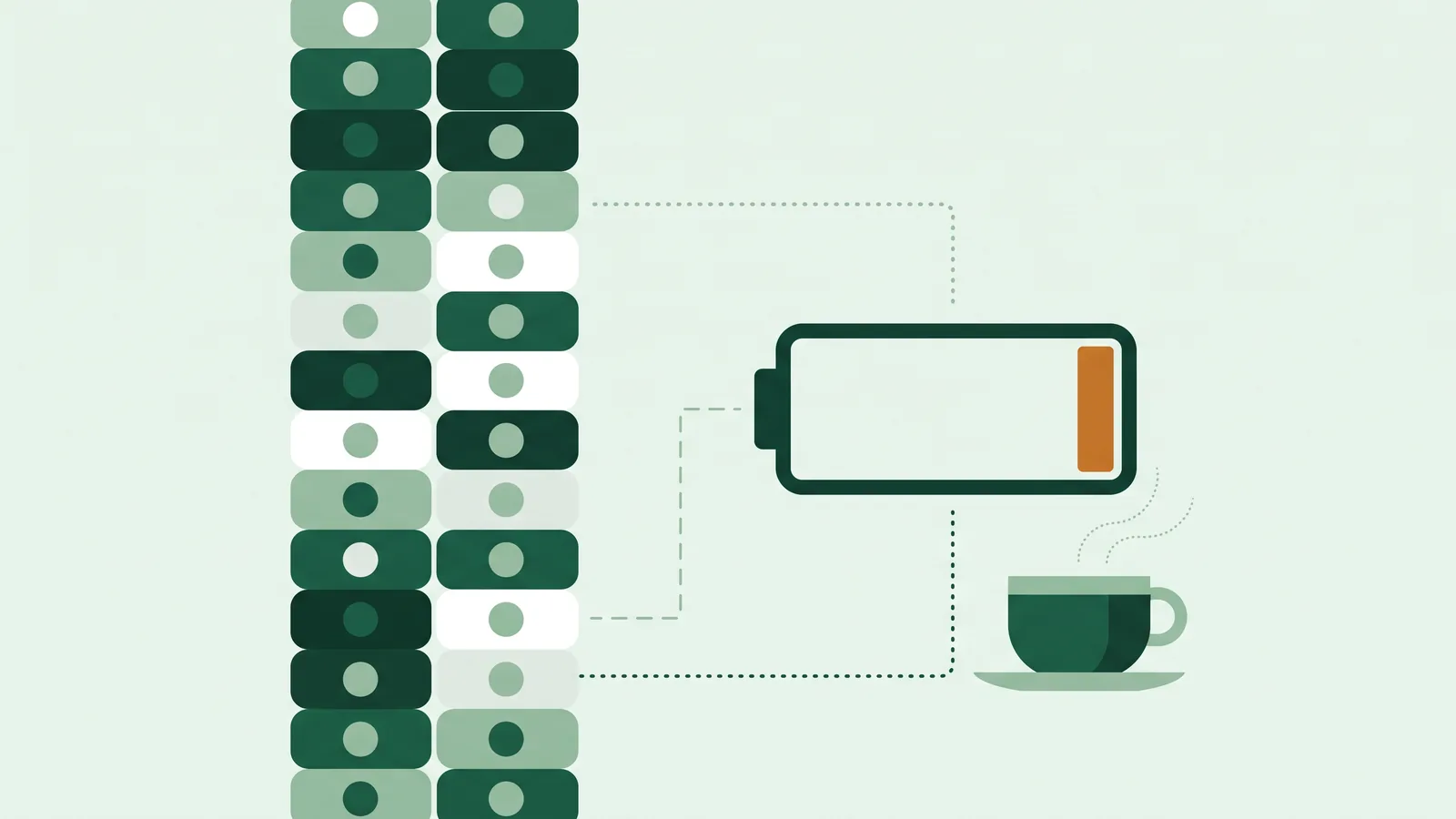
Meeting fatigue is the drained, foggy state that builds up across a day or week of meetings, until the work between them gets harder to start. It is not a medical diagnosis. Each call takes a little energy, and the gaps that would give it back are missing.
The best-tested symptom list comes from video calls. A team of researchers, most of them at Stanford, built the Zoom Exhaustion & Fatigue (ZEF) Scale, a 15-item questionnaire published in July 2021, and found "five dimensions of fatigue: general, social, emotional, visual, and motivational fatigue". One item from each makes a self-check:
General. "How mentally drained do you feel after video conferencing?"
Visual. "How irritated do your eyes feel after video conferencing?"
Social. "How much do you want to be alone after video conferencing?"
Motivational. "How often do you feel too tired to do other things after video conferencing?"
Emotional. "How irritable do you feel after video conferencing?"
What causes meeting fatigue on video calls?
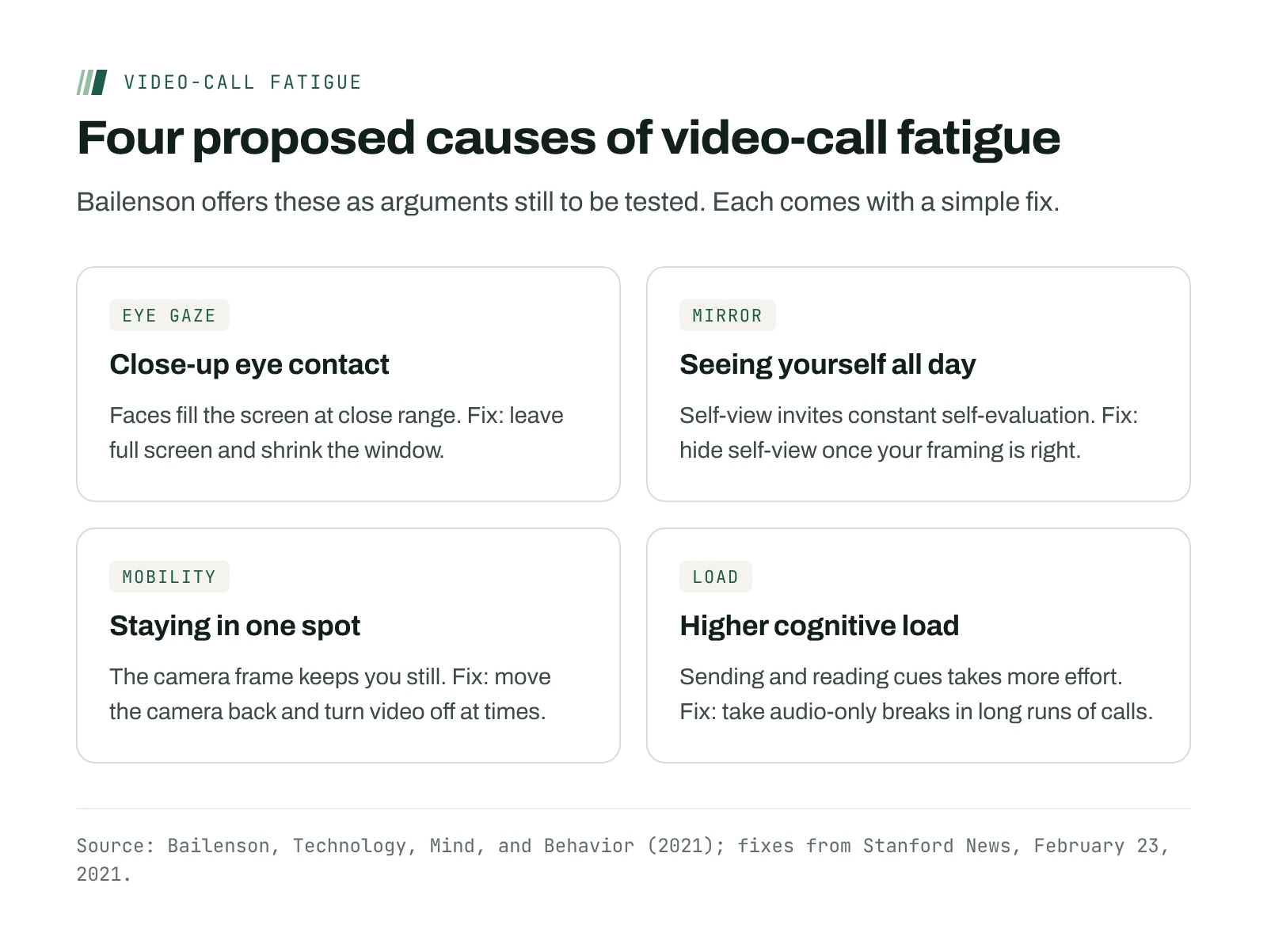
On video calls, the leading explanation is nonverbal overload: sending and reading signals on a call takes more effort than in a room. Stanford's Jeremy Bailenson set out four causes in "Nonverbal Overload: A Theoretical Argument for the Causes of Zoom Fatigue", published in Technology, Mind, and Behavior in 2021: "Excessive amounts of close-up eye gaze, cognitive load, increased self-evaluation from staring at video of oneself, and constraints on physical mobility."
He calls these "arguments, not yet scientific findings." Stanford's news release adds fixes, such as "taking Zoom out of the full-screen option" and, "During long stretches of meetings, give yourself an ‘audio only’ break."
Later data support the self-view argument. A 2023 paper by Géraldine Fauville and colleagues, with "an online convenience sample of 9787 participants", found more fatigue with calls held "more frequently, for longer, and with fewer breaks", and with "mirror anxiety from seeing their self-image". Women reported more Zoom fatigue than men.
Do cameras make meeting fatigue worse?
Yes, according to a field experiment that switched cameras on and off for the same people. Kristen Shockley and colleagues (Journal of Applied Psychology, 2021) collected "1,408 daily observations from 103 employees" of "an Arizona-based health care services company" over four weeks. Half started with cameras on, half off. "After two weeks, the groups switched."
"Our study revealed that there's something about the camera being on that causes people to feel drained and lack energy," Shockley told UGA Today. The effects "were stronger in women and people who were newer to the organization", and the fatigue lowered how much people spoke up in meetings.
"We're not advocating for cameras off all the time," she said, but for "allowing people autonomy". For a remote team, that means camera-optional by default, with cameras on where faces help, such as a hard conversation.
Why do back-to-back meetings drain people more?
Back-to-back meetings drain people more because strain carries from one call into the next, and nobody gets the minutes needed to recover and switch back to work.
In a small vendor study published April 20, 2021, Microsoft's Human Factors Lab recorded the brain activity of 14 volunteers in four half-hour video meetings, once back to back and once "interspersed with 10-minute breaks". Microsoft, which sells Teams and Outlook, reported that "Breaks between meetings allow the brain to ‘reset,’ reducing a cumulative buildup of stress across meetings." A sample of 14 is a hint, not proof.
In one study, meeting count mattered more than length. In a 2005 diary study by Luong and Rogelberg, 37 full-time employees "working in a university-based setting" recorded five days of meetings. The authors found "a significant positive relationship between number of meetings attended and daily fatigue", while time spent in meetings "was not found to be related to any of the measures of daily well-being".
Recovery is the other half. Joseph Allen and colleagues define meeting recovery as "the time spent by an individual after group and team meetings recovering and transitioning to the next task/meeting." Their 2022 study of 195 full-time US employees, surveyed online in April 2020, concludes that "Virtual meeting fatigue appears to exist even when the meetings being attended are considered necessary". A 2013 paper by Shanock, Rogelberg and colleagues describes "meeting recovery syndrome", "or time spent cooling off due to frustration", which "may be pronounced if the meeting was perceived as ineffective." More figures like these are on our research page.
How do remote teams cut meeting fatigue?
Remote teams cut meeting fatigue by holding fewer meetings, keeping the rest short, and protecting the gaps between them.
Hold fewer meetings. Count matters, so remove whole meetings before you trim minutes. The audit below shows which ones.
Put status in writing. Our guide to async meetings shows how to swap a status call for a written thread, and our guide to async standups covers the daily version.
Build in breaks. Allen and colleagues suggest teams "adjust all meetings to end five to ten minutes earlier than originally scheduled." Microsoft's page notes that Outlook can "shave five, 10, or 15 minutes off Microsoft Teams meetings".
Make cameras optional. Default to camera-optional, hide self-view, and go audio-only during long runs of calls.
Protect meeting-free time. In a survey of 76 companies with more than 1,000 employees each, reported by MIT Sloan Management Review (undated), "When one no-meeting day per week was introduced, autonomy, communication, engagement, and satisfaction all improved". For smaller focus blocks, see focus time for remote teams, playbook chapter 5, Protect focus without going dark, and our guide to context switching.
Require an agenda. Each meeting names the decision it needs, sent ahead. No agenda, no meeting. Use the team meeting agenda template and the one-on-one agenda template.
Across time zones, rotate the slots you keep and hold them inside agreed core hours. Our guide to how to manage a remote team covers the wider rhythm.
How do you audit your team’s meetings?
List every recurring meeting, work out its person-hours a month, note what it decided last time, and give it one verdict: keep, shorten, make async, merge or cut. Use last month's calendar and count only your own team. To see your own week first, run a time audit.
The sheet counts 4 weeks a month, the same 48 working weeks a year the meeting cost calculator assumes.
Meeting audit sheet
One line per recurring meeting. Fill it from last month's calendar.
Meeting audit: [team], month of [month]
Meetings a month: every workday 20 · weekly 4 · every two weeks 2 · monthly 1
Person-hours a month = attendees × minutes ÷ 60 × meetings a month
Meeting · Owner · Cadence · Length (minutes) · Attendees · Person-hours a month · What it decided last time · Could it be written? (Y/N) · Verdict
[Weekly planning] · [name] · [weekly] · [60] · [9] · [36] · [what changed, or "nothing"] · [Y/N] · [keep, shorten, make async, merge or cut]
Decision rule: go in order, stop at the first that fits
1. Decided nothing last month, and nobody would miss it: cut.
2. Mostly status or information that could be written: make async.
3. Same topic and mostly the same people as another meeting: merge.
4. Runs past its agenda, or has people who only listen: shorten the time or the list.
5. Otherwise: keep, with an agenda, ending 5 to 10 minutes early.
Totals
Person-hours a month before: [ ] · after: [ ] · back to the team: [ ]
Changes, owner and start date: 1. [ ] 2. [ ] 3. [ ]
Review again on: [date, four weeks out]
A filled audit
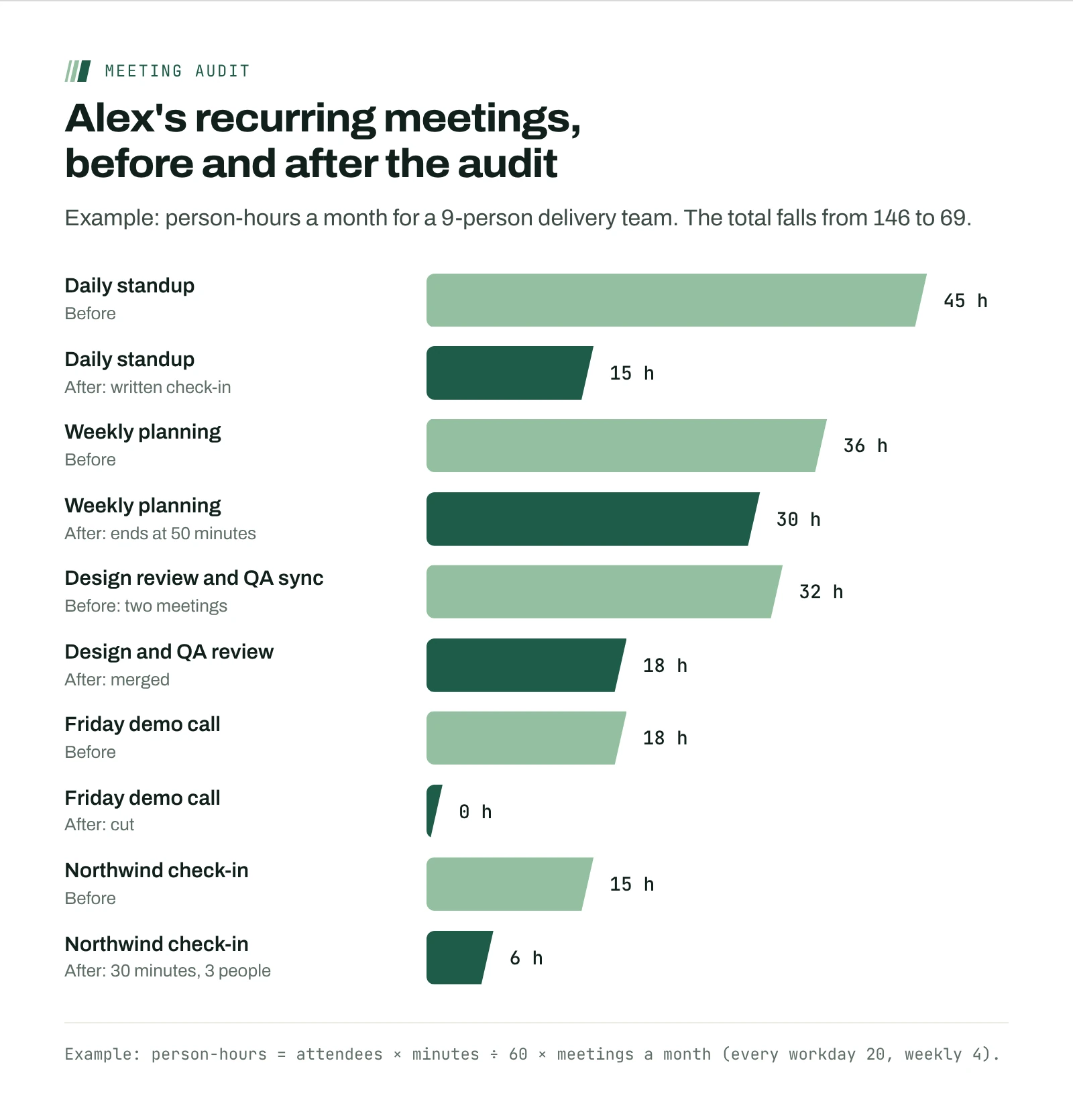
Example: Alex manages a 9-person delivery team. These are the team's six recurring meetings.
| Meeting | Owner | Cadence | Length (minutes) | Attendees | Person-hours a month | What it decided last time | Could it be written? (Y/N) | Verdict |
|---|---|---|---|---|---|---|---|---|
| Daily standup | Alex | Every workday | 15 | 9 | 45 | Nothing; updates already on the board | Y | Make async |
| Weekly planning | Alex | Weekly | 60 | 9 | 36 | Set the week's top three priorities | N | Keep |
| Design review | Sam | Weekly | 60 | 6 | 24 | Chose the onboarding layout | N | Merge |
| QA sync | Jordan | Weekly | 30 | 4 | 8 | Set the retest order | N | Merge |
| Friday demo call | Alex | Weekly | 30 | 9 | 18 | Nothing; replayed what shipped | Y | Cut |
| Northwind check-in | Priya | Weekly | 45 | 5 | 15 | Northwind approved a layout | N | Shorten |
| Total | 146 |
The changes Alex makes, in person-hours a month:
Standup: make async. A written check-in each workday, about five minutes a person: 15.
Planning: keep, ending at 50 minutes: 30.
Design review and QA sync: merge into one 45-minute weekly review for six people: 18, down from 32.
Friday demo call: cut. What shipped is already on the board: 0.
Northwind check-in: shorten to 30 minutes for Priya, Alex and one person the agenda needs: 6.
Recurring meetings fall from 146 person-hours a month to 69, so 77 go back to the team. Alex reviews the sheet in four weeks. To put a cost on each meeting, run it through the meeting cost calculator.
How ActionOrder handles this
ActionOrder, an efficiency and accountability tool for managers of remote teams, gives each person one clear next step at a time, already prepped. Every card has one owner and a status: done, in progress, waiting or stuck, and people set "stuck" themselves. The team view, on Pro, shows each card's owner and status and a Friday recap, so status calls can shrink. Starting a card holds focus: new cards queue behind it, and only items a manager marks urgent and items due today get through, as a small bar. Nothing runs in the background. Join the waitlist. ActionOrder is in pre-launch.
Questions people ask
What is meeting fatigue?
Meeting fatigue is the tiredness, irritability and loss of focus that build up across a day or week of meetings. It tends to be worst when video calls run back to back with cameras on. It is not a medical diagnosis. Fewer meetings and real gaps between them help.
What are the symptoms of meeting fatigue?
Common signs are feeling mentally drained after calls, irritated eyes, wanting to be alone, irritability, and feeling too tired to start other work. They match the five dimensions of the Zoom Exhaustion & Fatigue Scale. Exhaustion that doesn't lift with rest is worth raising with a doctor.
Is meeting fatigue the same as Zoom fatigue?
Not quite. Zoom fatigue is the video-call version, named after one platform but used for any video tool. Meeting fatigue is wider: it also comes from how many meetings you attend, how useful they are and whether you get time to recover, on camera or not.
What is meeting recovery syndrome?
Meeting recovery syndrome is the time people spend cooling off after a frustrating meeting before they can get back to work. The term appears in work by Steven Rogelberg and colleagues, who note it may be worse when a meeting felt ineffective. It is why a bad meeting costs more than its scheduled minutes.
How many meetings a day is too many?
No study sets a safe number. In one diary study, the number of meetings people attended, more than the hours, was related to daily fatigue. A practical test is whether each person still gets a long focus block each day and a break between calls. If not, audit and cut.
How long should a break between meetings be?
Five to ten minutes is a sensible minimum. Researchers studying meeting recovery suggest ending meetings five to ten minutes early, so a 30-minute meeting ends at 25. Microsoft's small brain-activity study used 10-minute breaks between half-hour calls and found less buildup of stress.
Sources
- Nonverbal Overload: A Theoretical Argument for the Causes of Zoom FatigueJeremy N. Bailenson, Technology, Mind, and Behavior, 2021, via the Stanford Virtual Human Interaction Lab
- Stanford researchers identify four causes for ‘Zoom fatigue’ and their simple fixesStanford News, Stanford University, February 23, 2021
- Zoom Exhaustion & Fatigue ScaleGéraldine Fauville and colleagues, Computers in Human Behavior Reports, July 6, 2021, via NSF Public Access Repository
- Video-conferencing usage dynamics and nonverbal mechanisms exacerbate Zoom Fatigue, particularly for womenGéraldine Fauville and colleagues, Computers in Human Behavior Reports, 2023
- The fatiguing effects of camera use in virtual meetings: A within-person field experimentKristen M. Shockley and colleagues, Journal of Applied Psychology, 2021
- Cameras, not meetings, cause Zoom fatigueAllyson Mann, UGA Today, University of Georgia, September 9, 2021
- Research Proves Your Brain Needs BreaksMicrosoft WorkLab (vendor research; Microsoft sells Teams and Outlook), April 20, 2021
- Meetings and more meetings: The relationship between meeting load and the daily well-being of employeesA. Luong and S. G. Rogelberg, Group Dynamics: Theory, Research, and Practice, 2005
- Why Am I So Exhausted?: Exploring Meeting-to-Work Transition Time and Recovery from Virtual Meeting FatigueJ. A. Allen and colleagues, Journal of Occupational and Environmental Medicine, December 2022, author manuscript via CDC Stacks
- Less acting, more doing: How surface acting relates to perceived meeting effectiveness and other employee outcomesLinda R. Shanock, Steven G. Rogelberg and colleagues, December 2013, via DigitalCommons@UNO, University of Nebraska at Omaha
- The Surprising Impact of Meeting-Free DaysMIT Sloan Management Review, no date shown, checked November 22, 2026