How to Do a Time Audit (Free Template)
A time audit shows where your working week really goes. Log one week in short blocks, compare it with your plan and change one thing. The audit sheet below is ready to copy.
A time audit is a short record of how you actually spend your working hours, kept for one week and written down every 30 to 60 minutes. You sort the entries into categories, compare the totals with what you planned, and change one or two things. For a remote manager, it shows where meetings, messages and interruptions take the week.

What is a time audit?
A time audit is a record of how you really spend your time over a set period, kept so you can compare it with how you meant to spend it. It is a diagnostic you run for a week, not a habit you keep forever.
Memory is a poor witness here. The Stanford Center for Teaching and Learning, which teaches the method to students, puts the purpose simply: by logging your time, "you can get a better idea of how you are actually spending your time". A guide on improving time awareness from the University of Washington makes the same point about estimates: "Inaccurate time estimation often goes unnoticed until you have a way of measuring it."
Remote managers have a particular reason to look: calls, chat and email from several time zones cut the day into small pieces. In Microsoft's analysis of Microsoft 365 signals, published June 17, 2025, employees using Microsoft 365 were interrupted every two minutes during core work hours, 275 times a day, by meetings, emails or chats. The same report found the average worker receives 153 Teams messages per weekday. Microsoft sells the software those signals come from. A time audit shows how much of that pattern is true of your own week; more figures like these are on our research page.
How do you do a time audit?
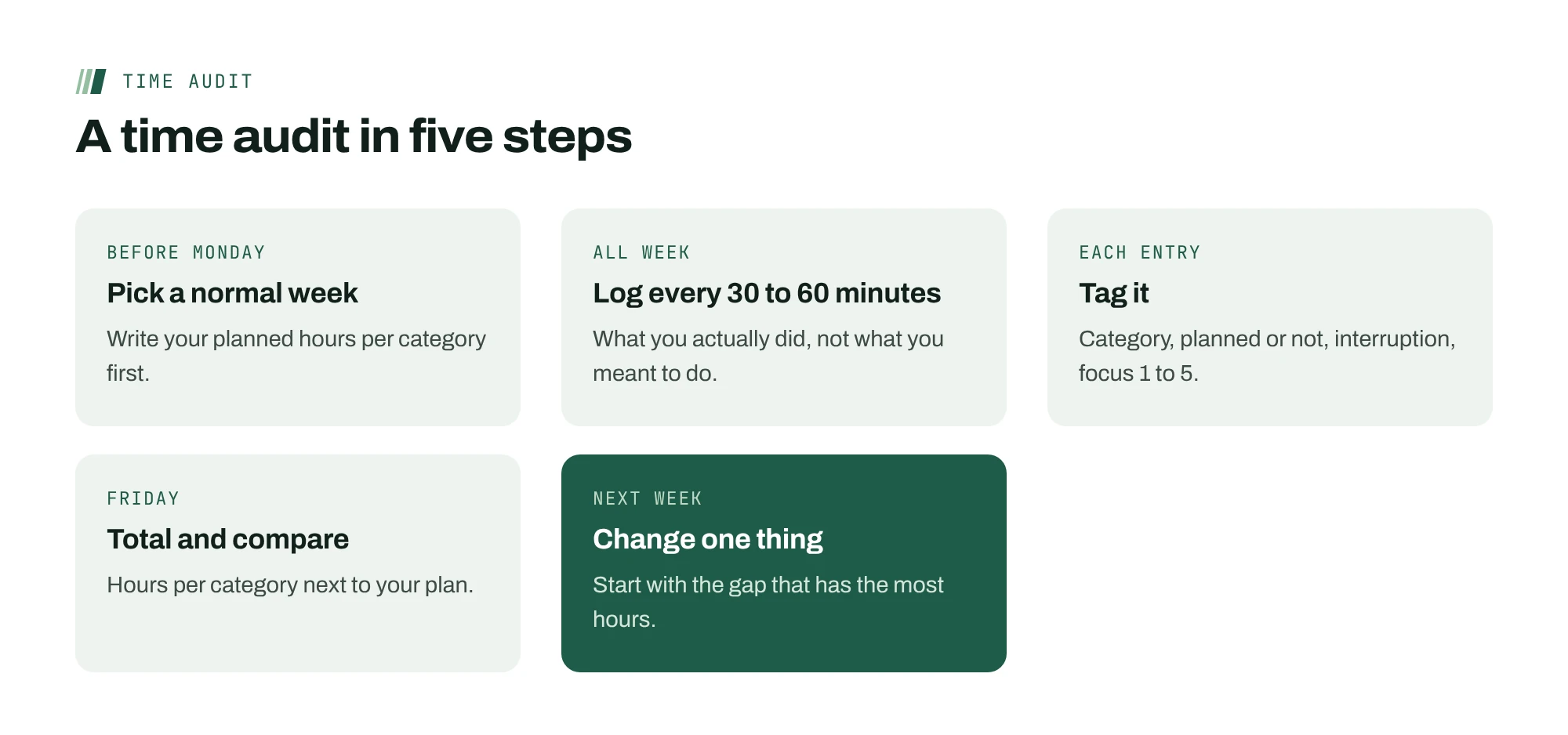
To do a time audit, pick one ordinary week, write down what you did every 30 to 60 minutes, tag each entry with a category, then total the week and compare it with your plan. Five steps cover it.
Pick a normal week and write your plan first. Avoid launch and holiday weeks. Before Monday, note the hours you expect in each category, so there is something to compare against.
Log what happened, as you go. Stanford's guidance: "Every 30 to 60 minutes, write down what you’ve been doing." Set a recurring reminder. A log written from memory at 6 p.m. becomes the day you hoped you had. Record "what you actually did and not what you think you should have been doing". "Answered Northwind's billing question" is useful. "Admin" is not.
Tag each entry. Add a category, whether it was planned, what interrupted you, and a focus score. The score borrows from a University of Waterloo audit worksheet that asks "How well did I use my time? 1=poor 5=great".
Total and compare on Friday. Put hours per category next to your plan and note the three biggest gaps.
Change one thing. Pick the change with the most hours behind it and try it for two weeks.
If a full week feels heavy, Stanford suggests: "You can start small by tracking a few hours of your day at a time." Log your mornings first, then widen it.
What categories should a time audit use?
Use six to eight categories that match the decisions you want to make. Fewer hides the problem; more turns logging into a chore. For a manager of a remote team, these seven work well.
| Category | What counts | The question it answers |
|---|---|---|
| Deep work | Planning, writing, analysis: work that needs unbroken time | Do I get unbroken time for the work only I can do? |
| Meetings | Scheduled calls and one-on-ones | Which recurring calls could be written updates? |
| Messages and chat | Email, team chat, comments in project tools | Am I answering in batches or all day long? |
| Reviews and approvals | Signing off designs, QA notes, deliverables | What waits on me that someone else could decide? |
| Admin | Scheduling, paperwork, tool settings | Which chores could be batched or handed off? |
| Unplanned and interruptions | Unscheduled calls, urgent requests, surprises | Where does unplanned work come from? |
| Breaks | Lunch, a walk, time away | Am I taking any? |
Keep "unplanned" separate. A surprise client call is still a meeting, but logging it as unplanned shows how much of the week other people decide.
Time audit template: a one-week audit sheet
Copy the sheet below into a doc or a spreadsheet, or print our weekly timesheet template and add the extra columns by hand. One line per block of 30 to 60 minutes.
One-week time audit sheet
Write a line every 30 to 60 minutes. Total it on Friday.
Time audit: [name], week of [Monday's date]
Planned hours this week: Deep work [0] · Meetings [0] · Messages and chat [0] · Reviews and approvals [0] · Admin [0] · Unplanned [0] · Breaks [0]
Day · Start · End · Minutes · What I actually did · Category · Planned? (Y/N) · Interrupted by · Focus (1 to 5)
[Mon] · [8:30] · [9:15] · [45] · [what happened, in plain words] · [category] · [Y/N] · [person, channel or none] · [1 to 5]
Categories
Deep work · Meetings · Messages and chat · Reviews and approvals · Admin · Unplanned and interruptions · Breaks
End of week
Category · Hours · Share of week · What I planned · Keep, cut or move
Three things I noticed: 1. [ ] 2. [ ] 3. [ ]
One change for the next two weeks: [ ]
The daily log
Example: Alex manages a 9-person delivery team across three time zones. Here are the first four entries of Alex's Monday.
| Day | Start | End | Minutes | What I actually did | Category | Planned? (Y/N) | Interrupted by | Focus (1 to 5) |
|---|---|---|---|---|---|---|---|---|
| Mon | 8:30 | 9:15 | 45 | Read and answered overnight messages from the team in Asia | Messages and chat | Y | None | 3 |
| Mon | 9:15 | 10:00 | 45 | Started the weekly plan; got halfway | Deep work | Y | Two chat pings from Priya about Northwind | 2 |
| Mon | 10:00 | 10:30 | 30 | Unscheduled call about a Northwind dashboard bug | Unplanned and interruptions | N | Call from Northwind | 2 |
| Mon | 10:30 | 11:30 | 60 | Reviewed Sam's designs and Jordan's QA notes | Reviews and approvals | Y | None | 4 |
The end-of-week summary
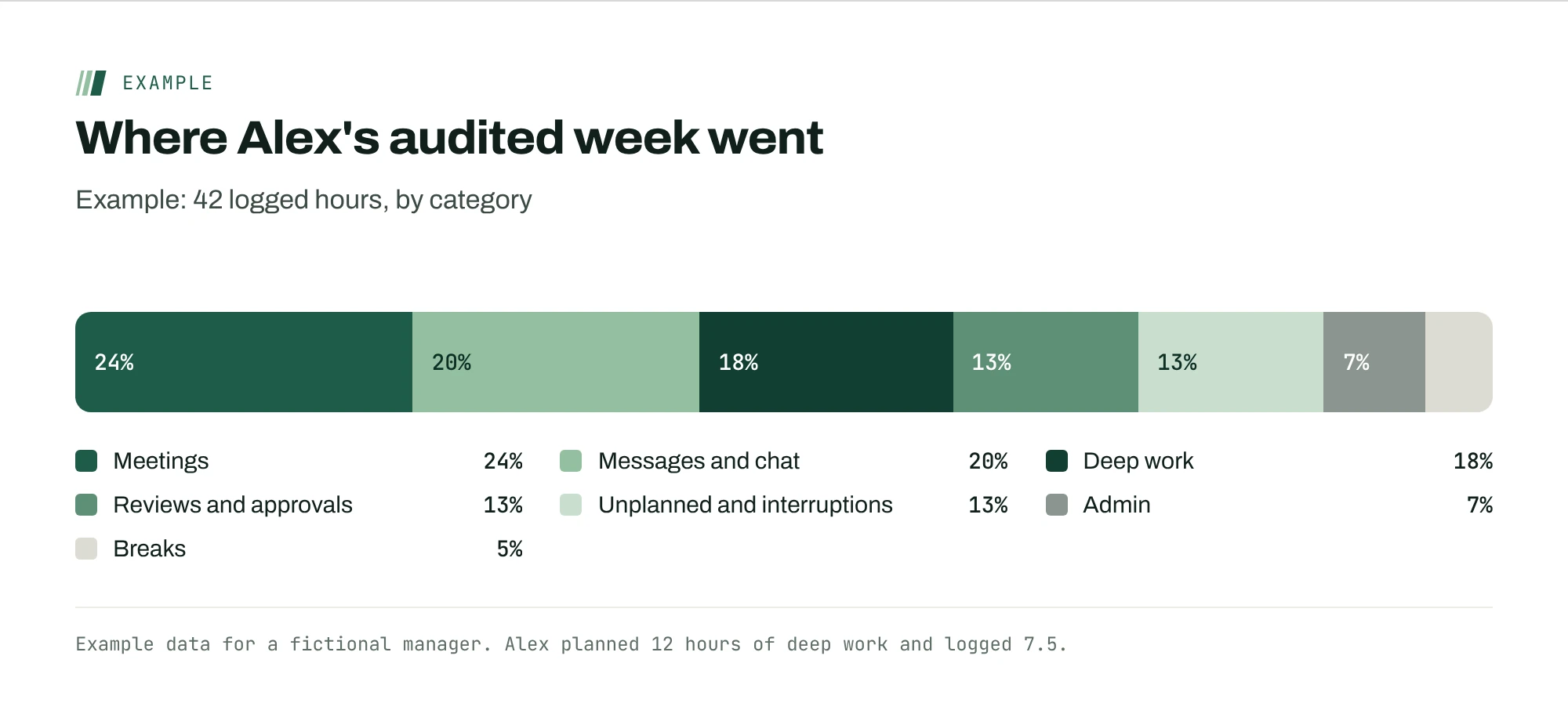
On Friday, total the minutes per category and fill one row each. Here is Alex's week.
| Category | Hours | Share of week | What I planned | Keep, cut or move |
|---|---|---|---|---|
| Deep work | 7.5 | 18% | 12 | Move: two 90-minute blocks before the first call, Tuesday and Thursday |
| Meetings | 10 | 24% | 8 | Cut: make the Wednesday status call a written update |
| Messages and chat | 8.5 | 20% | 5 | Move: answer in three set windows a day |
| Reviews and approvals | 5.5 | 13% | 6 | Keep |
| Admin | 3 | 7% | 3 | Keep |
| Unplanned and interruptions | 5.5 | 13% | 3 | Cut: write down what counts as urgent |
| Breaks | 2 | 5% | 4 | Move: a real lunch break, away from the desk |
| Total | 42 | 100% | 41 |
What should you look for when you review your audit?
Look for the gaps between your plan and your record, not for a perfect week. The Waterloo worksheet asks you to "notice any patterns for effective or ineffective time use". Five matter most for a manager.
The biggest gap. Sort the summary by the difference between planned and actual hours. Start at the top.
Estimates against actuals. Stanford suggests asking: "Did a task I thought would take 15 minutes actually take 45 minutes?" The University of Washington guide gives the same habit: "record how long it actually took and compare the results". Our guide to estimating from logged time shows what to do with the gap.
Fragmentation. Find the longest unbroken block of deep work each day. If none passes an hour, the problem is the shape of the day, not the total.
Where interruptions come from. Group the "Interrupted by" column and see whether a few people, channels or recurring requests account for most of it. Each one has its own fix.
When you focus best. Stanford's other question is "When do I have the most energy or focus?" Your focus scores answer it. Put deep work there and move meetings away from it.
Look, too, for approvals that only wait for you; someone on the team could often make them. Stop Being the Router for Your Remote Team covers how to hand them over.
How do you run a time audit with your team without it feeling like surveillance?
Make it voluntary and self-reported, go first yourself, and ask people to share category totals and one observation, not their logs. The aim is to find what the team's setup costs everyone.
Go first. Run your own audit, then share your totals and what surprised you. It shows the exercise is about the work.
Make it opt-in. People keep their own log in a sheet they control. Nothing installed, nothing watching screens.
Share totals, keep logs private. Ask for hours per category and one thing each person noticed. The line-by-line log stays with its owner.
Ask about the system. Find which meetings, channels and approvals take the most time across the team. Changing those norms is where the hours come back.
Keep it out of reviews. Say in writing that audit results won't be used to compare people or in performance reviews, and keep to it.
More on this in accountability without surveillance and our guide to how to manage a remote team.
What should you change after a time audit?
Change one or two things, chosen by where the most hours went: keep what earns its time, cut what doesn't, and move what sits in the wrong part of the day. Stanford's guidance ends the same way: "With the information you have gathered, you can start to build a more realistic schedule for yourself."
Protect focus blocks. Put two or three long blocks where your focus scores were highest, and tell the team. Chapter 5 of the playbook, Protect focus without going dark, shows how to do it without disappearing, and our guide to focus time for remote teams covers team-wide versions.
Batch messages. Answer chat and email in set windows. A written response time agreement tells everyone how fast replies need to be.
Cut or shrink recurring meetings. Put each recurring call through the meeting cost calculator, and turn status calls into written updates with async meetings.
Reduce switching. If the log shows many short blocks on different topics, group similar work. Our guide to context switching explains why fewer switches matter more than fewer minutes.
If you bill, check utilization. Put audited project hours into the utilization rate calculator.
Two weeks later, audit the one category you changed to see whether it held.
How often should you do a time audit?
Once or twice a year is enough for most managers, plus a short one after a big change: a new role, a new team, more time zones, or right after you cut meetings.
Don't leave an audit running for months. Writing a line every half hour costs attention of its own, and the entries get vague. Ongoing records, such as a timesheet for client billing, are a different tool.
How ActionOrder handles this
ActionOrder, an efficiency and accountability tool for managers of remote teams, gives each person one clear next step at a time, already prepped. People log their own time against the card they're working and can correct it, and time can only be logged against a card, so a week of entries already shows which work took the hours. Estimates are suggested from logged time on similar cards, and the person or manager can change them. Starting a card holds focus: new cards queue behind it. Nothing runs in the background. Time logging is on Pro and Business. Join the waitlist. ActionOrder is in pre-launch.
Questions people ask
What is a time audit?
A time audit is a record of how you actually spend your working time over a set period, usually one week. You write down what you did every 30 to 60 minutes, sort the entries into categories and compare the totals with your plan. It is a one-off check, not a permanent habit.
How long should a time audit last?
One ordinary work week is enough for most people, because it captures every recurring meeting and the normal flow of messages. If your weeks vary a lot, run two. If a week feels like too much, start with a few hours a day and widen it.
Is a time audit the same as time tracking?
No. Time tracking is an ongoing record, often for billing, payroll or estimates. A time audit is a short diagnostic: you log a week, review it and change something. It also records what a timesheet usually leaves out, such as interruptions and how focused you were.
Can I do a time audit in Excel or Google Sheets?
Yes. Any spreadsheet works: copy the column headings from the audit sheet above into the first row, add one row per block, and sum the minutes per category on Friday. Keep category names identical in every row so the totals add up. Paper works too.
Sources
- Time Blindness Strategy: Time AuditingCenter for Teaching and Learning, Stanford University, no date shown, checked November 22, 2026
- Auditing Your Time and AccomplishmentsUniversity of Waterloo, Student Success, adapted from Learning Strategies, Student Academic Success Services, Queen's University, no date shown, checked November 22, 2026
- Improving time awarenessDisability Resources for Students, University of Washington, no date shown, checked November 22, 2026
- Breaking down the infinite workdayMicrosoft WorkLab (vendor research, Microsoft 365 data), June 17, 2025