Project Handoff Template for Remote Teams
Pass a project to a new owner with its status, open work, decisions, risks, people and access written down, so nothing depends on a call.
A project handoff template is a document the outgoing owner fills in so a new owner can run the project without them: its status, open work, decisions already made, risks, people and access. Write it before the handoff date, let the new owner question it in writing, and stay reachable for one week afterward.
Project handoff template (copy this)
Copy the template into the project’s shared folder, next to the plan. Fill it in from the task list and threads, not from memory.
Project handoff
The outgoing owner fills it in. The new owner reads and comments.
Project handoff: [project name]
From [outgoing owner] to [new owner] · Handoff date: [date] · Questions to [outgoing owner] until [date]
Status in one line
[On track, at risk or off track] because [reason].
Goal and deadline
[What done looks like], due [date].
Open work
• [Task], [owner], [status], next step: [one line]
Decisions already made
• [Decision], see [link]. Don’t reopen without [person].
Risks and open questions
• [Risk]: watch for [signal]; if it happens, [action].
People
• [Name], [role]: [what they need from the owner, and how often].
Access to transfer
• [Tool or account]: granted by [person] by [date].
Recurring commitments
• [Report, meeting or check-in], [how often], for [audience].
Where things live
Plan: [link] · Files: [link] · Main thread: [link]
First three things to do
1. [Most urgent action] 2. [Next] 3. [Next]
To fill it in by hand, download the printable project handoff template (PDF).
What a project handoff must include
Three parts do most of the work. The one-line status tells the new owner where to look first. Decisions already made stop them from reopening settled questions. The first three things to do turn a long document into a start. If a decision isn’t written anywhere yet, log it first with the decision log template.
People and access are the easiest parts to miss. A new owner who can’t open the staging site, or doesn’t know who expects a Thursday email, loses the first week finding out.
Example: a filled-in project handoff
Example: Priya, the account lead for the client Northwind, moves to a new client account. Alex, who manages the 9-person delivery team, takes the project.
Example: Northwind site refresh
Priya hands the project to Alex before she moves to a new account.
Project handoff: Northwind site refresh
From Priya to Alex · Handoff date: December 4 · Questions to Priya until December 11
Status in one line
At risk because Northwind’s legal review of the terms page is a week late.
Goal and deadline
New site live on Northwind’s domain, due January 15.
Open work
• Terms page copy, Alex, waiting, next step: chase Northwind legal on Monday.
• Product pages, Sam, in progress, next step: last two layouts by Friday.
Decisions already made
• Releases ship Wednesdays (decision log #14). Don’t reopen without Jordan.
Risks and open questions
• Legal review slips again: watch for no reply by Wednesday; if so, ask Northwind’s project lead to escalate.
People
• Northwind project lead: a weekly status email every Thursday.
Access to transfer
• Northwind staging site and shared drive: granted by Northwind IT by December 3.
Recurring commitments
• Thursday status email to Northwind; monthly invoice review with finance.
Where things live
Plan, files and main thread are linked from the project’s pinned post.
First three things to do
1. Introduce yourself to Northwind’s project lead. 2. Chase the legal review. 3. Read decision log #10 to #14.
How to run a project handoff across time zones
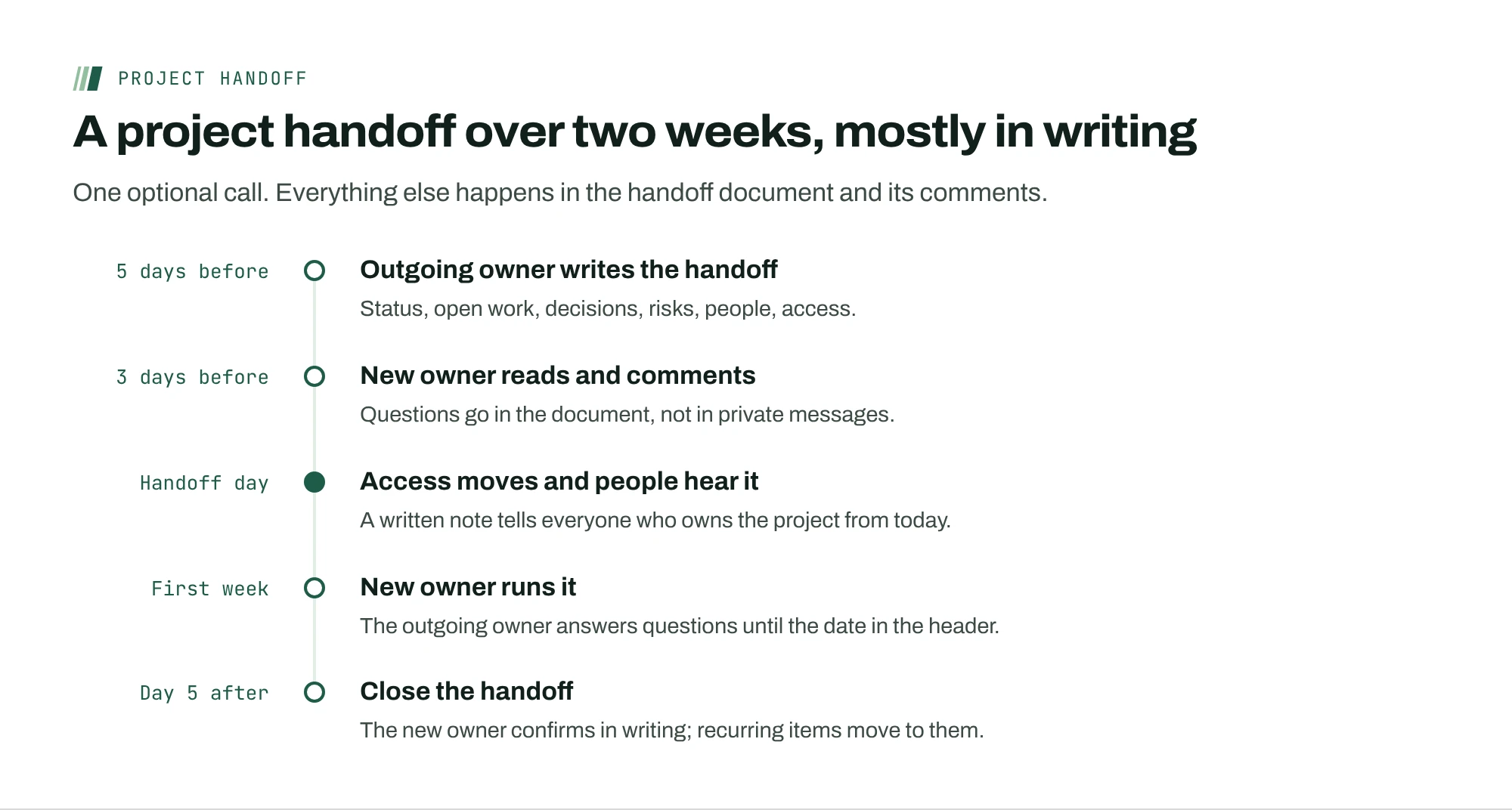
Give the handoff a week on each side and keep it in writing, so the two owners never need the same working hours.
Write it five working days before. The outgoing owner fills in every section.
Question it in the document. The new owner adds comments; the outgoing owner answers each one there.
Hold one call, if any, for the questions writing didn’t settle.
Move access and announce it. Post one note to the team and the client: from today, the new owner owns the project.
Close it in writing. After the first week, the new owner confirms they have what they need.
Chapter 4 of the playbook, Hand off work, and get out of the middle, explains why handoffs written for someone asleep work better for everyone.
Project handoff, handover document or handoff note?
Pick by what changes hands. All three work best written down and kept next to the work.
| What changes hands | Use |
|---|---|
| One task, for a few hours or overnight | The playbook’s async handoff note |
| Ongoing duties or a role, such as a weekly report you run | The handover document template |
| A whole project, with its deadline, people and open work | This project handoff template |
Fill in your project handoff here
Fill in your project handoff
Type in the boxes and the text below fills itself in. Nothing you type is stored or sent anywhere.
Your project handoff
Updates as you type. Copy it when it looks right.
Turn on JavaScript to fill in the template here, or copy the template above.
Where ActionOrder fits
ActionOrder, an efficiency and accountability tool for managers of remote teams, handles the small handoffs inside a project. Delegation hands a card to a teammate with its prep and a note, and it comes back when it’s done or handed back. Every card has one owner and a status, and on Pro the team view shows them, so the new owner sees what’s waiting or stuck.
Join the waitlist. ActionOrder is in pre-launch.
Questions people ask
How long should a project handoff document be?
One or two pages. Link to the plan, files and threads instead of copying them. If it runs longer, the open work list is usually doing the task tracker’s job; link the tracker instead.
Who writes the project handoff, the outgoing or the new owner?
The outgoing owner writes it, because they hold the context. The new owner reads it and asks questions in writing. The manager checks it’s complete before the outgoing owner leaves.
What if the outgoing owner has already left?
Rebuild it from the tools: the task list, the main threads and the recurring calendar items, then ask each person listed what they expect. Write the result in this template, so the next handoff is easier.