Remote Work Best Practices for Managers
Twelve remote work best practices for managers, from equipment and security to reply times, onboarding and ending the workday, each with a step for this week and a template.
Remote work best practices for managers are a short set of written habits: set people up with the right equipment and security, agree how the team communicates and how fast, write decisions down, keep meetings for what needs live time, judge outcomes, onboard on purpose, protect the end of the day and meet one-on-one every week.

What are the best practices for remote work?
The best practices for remote work are the 12 in the table below: equip people, agree how you communicate, write things down, manage by outcomes, and protect people's time and connection.
In October 2026, 22.1% of people at work in the U.S. teleworked or worked at home for pay, according to the Bureau of Labor Statistics. Among employees with remote-capable jobs, Gallup reports that as of August 2026, 25% work exclusively remote and 54% hybrid. Both figures are on our research page: the telework rate and work location.
If you're new to managing remotely, start with How to Manage a Remote Team Without Chasing It, which sets out the weekly operating rhythm. This page is the wider checklist, with a step, a playbook chapter and a template for each practice.
| # | Practice | Do this week | Go deeper | Template |
|---|---|---|---|---|
| 1 | Set people up with equipment, a workable space and security basics | Ask what each person still needs; check updates and Wi-Fi security | Ch. 1: Why async is different | Remote work policy |
| 2 | Agree which channel is for what, and how fast each needs a reply | Draft reply windows by message type, with one urgent lane | Ch. 5: Protect focus | Response-time agreement |
| 3 | Write it down by default, where the work lives | Log the next decision instead of leaving it in a chat thread | Ch. 4: Hand off work | Decision log |
| 4 | Run one ranked priority list | Post up to three ranked priorities on Monday, plus a "not now" list | Ch. 2: Set priorities people can find | Weekly priority post |
| 5 | Keep meetings for what needs live time | Turn one recurring status meeting into a written update | Ch. 3: Make status come from the work | Team meeting agenda |
| 6 | Meet inside the hours your time zones share | Find the overlap; post the standup in writing at the start of each person's day | Ch. 5: Protect focus | Daily standup |
| 7 | Onboard with a written plan and a buddy | Write week one as a day-by-day checklist and name a buddy | Ch. 1: Why async is different | Team working agreement |
| 8 | Judge outcomes, not activity | Write what done means, and a due date, for each active task | Ch. 6: Accountability without watching | Weekly status report |
| 9 | Hand off work with its context | Use a handoff note for the next task that crosses a time zone | Ch. 4: Hand off work | Handover document |
| 10 | End the workday on purpose | Ask for a short end-of-day note; count reply windows in the recipient's hours | Ch. 3: Make status come from the work | End-of-day report |
| 11 | Hold weekly one-on-ones and leave room for connection | Book 15 to 30 minutes with each person, their topics first | Ch. 7: Your first 30 days | One-on-one agenda |
| 12 | Change one practice at a time | Start with the row that would have saved you most time last week | Ch. 7: Your first 30 days | Retrospective |
Start with one row and run it for a week as an experiment. The sections below expand the practices the start-here guide leaves out.
How do you set people up to work remotely?
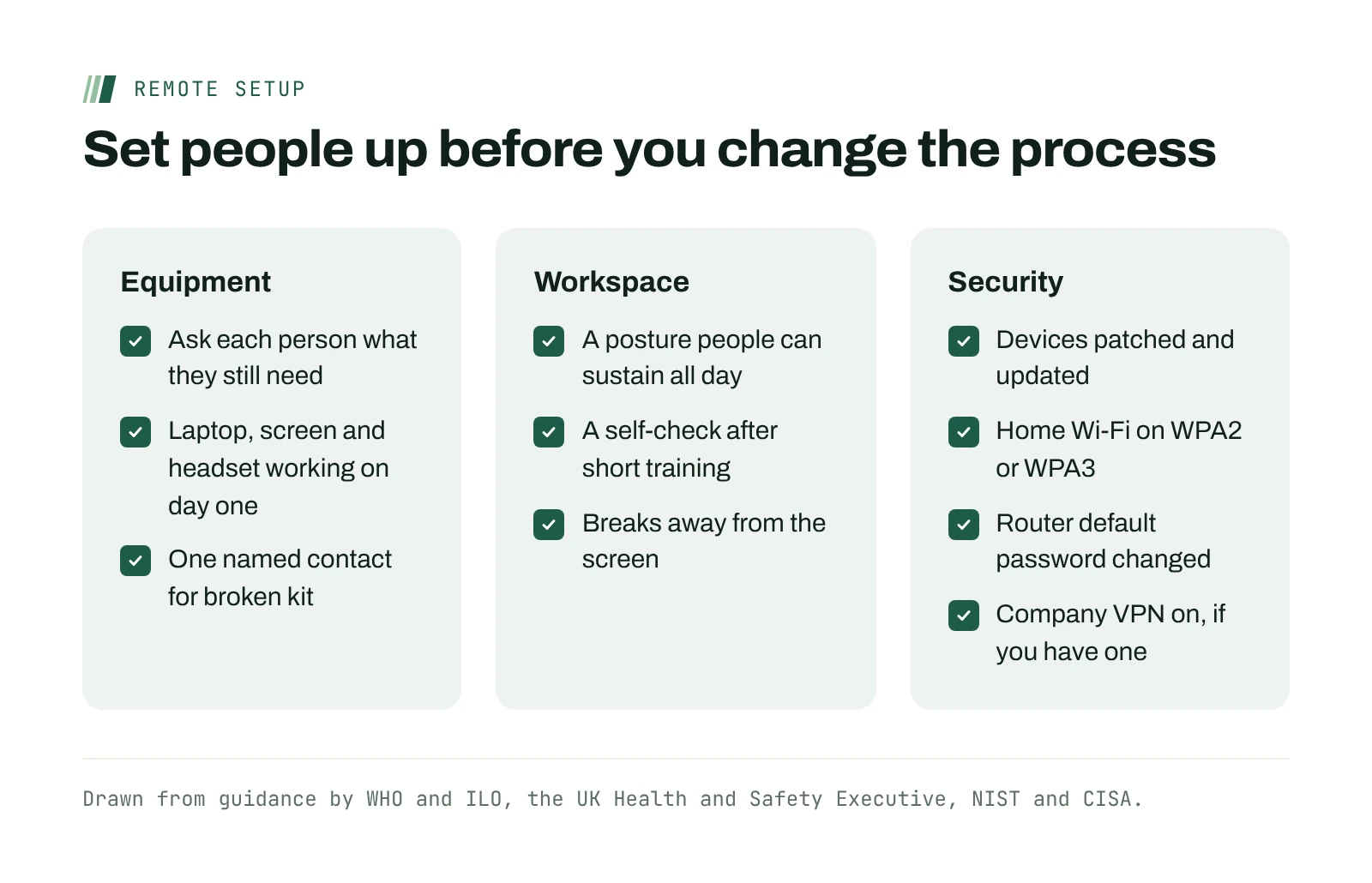
Set people up with three things before you change any process: equipment that works, a workspace they can sit in all day, and the security basics.
Equipment. The World Health Organization and the International Labour Organization list "ensuring that workers receive adequate equipment to complete the tasks of the job" among the measures employers should take. Ask each person what's missing instead of assuming.
Workspace. Britain's Health and Safety Executive asks employers to make sure "home workers can achieve a comfortable, sustainable posture while working with DSE" (display screen equipment), and notes that office-type furniture isn't always needed to get there.
Security. NIST's telework security basics start with "Keep your computers and mobile devices patched and updated." Secure home Wi-Fi with WPA2 or WPA3 and a hard-to-guess password, use the company VPN if you have one, and follow CISA's router rule: "At minimum, change the default password to one only you know."
Our remote work policy template puts equipment, expenses and security in writing; treat it as a starting point to review with counsel. Rules vary by state and country, and they change. This is general information, not legal advice.
How should a remote team communicate?
A remote team communicates well when it has agreed in writing which channel is for what, how fast each kind of message needs a reply, and where decisions are kept.
Start with response times. Agree on windows by message type, with one narrow urgent lane, counted in the recipient's working hours. Chapter 5 of the playbook gives sample windows, and our response-time agreement guide shows how to write one. WHO and ILO also recommend "agreeing on a common system to signal availability for work". Write the rules together in a one-page team working agreement: Gallup found that "Work teams that set their hybrid policy together are the most likely to say that the policy is fair."
Then make writing the default. GitLab's company handbook tells its people: "Team members should recognize that any answer or solution that isn't yet documented, should be documented immediately." When you answer the same question twice, write the answer down and reply with the link. Keep decisions in a decision log, and see asynchronous communication for formats.
How do you handle meetings and time zones on a remote team?
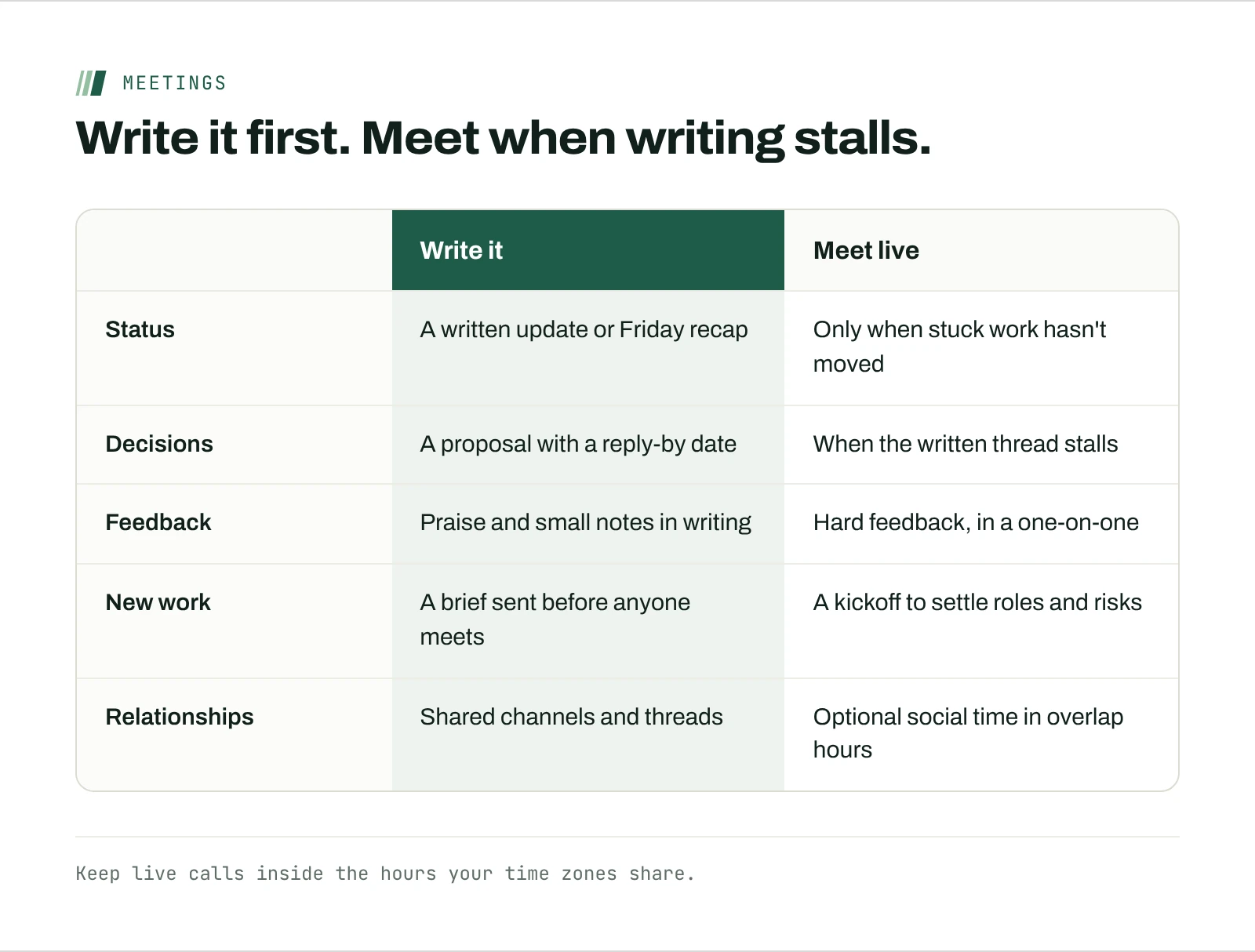
Keep meetings for what writing can't do well, and hold them inside the hours your time zones share.
Remote work already shifts talk into writing. In a study of more than 61,000 Microsoft employees, company-wide remote work increased asynchronous communication and cut meeting hours by about 5% (Berkeley Haas; see our research page). So don't add meetings back. Meet live for stalled decisions, hard feedback, kickoffs and getting to know each other, and collect updates beforehand with the team meeting agenda. Async meetings covers replacing a status call.
For time zones, find the shared hours with the time zone overlap finder, write them into the working agreement and keep live calls inside them. Move the daily update to a written standup that each person posts at the start of their own day. For handoffs across the gap, see how to delegate across time zones.
How do you onboard a new hire remotely?
Onboard remotely with a written plan, a named buddy and frequent manager time, because a new hire can't learn how the team works by sitting near it.
Gallup reports that "only 12% of U.S. employees say their company does a good job of onboarding," and that when the manager takes an active role, "employees are 3.4 times as likely to feel like their onboarding process was successful." GitLab's remote onboarding guide expects the process "to take at least two full weeks" and calls assigning an onboarding buddy "an essential step".
A remote plan has four parts:
Day one works. Accounts, equipment and access are ready before the start date.
The rules come first. The new hire reads the working agreement and reply windows on day one.
A first task with a clear finish line, small enough to finish in week one.
Two people to ask. A buddy outside the reporting line, plus a weekly one-on-one with you through the first month. The start-here guide has a check-in table by situation.
How do you manage by outcomes instead of activity?
Manage by outcomes by agreeing up front what done looks like and when it's due, then judging the result instead of how busy someone appeared.
The U.S. Office of Personnel Management's guidance for supervisors says: "In a telework environment, managing by results and not by physical presence becomes even more critical." It tells managers to "Specify who receives or monitors the outcomes and deliverables, and when interim checkpoints and due dates will occur."
So write one line on what done means, a due date and the checkpoints for each piece of work. Chapter 6 of the playbook covers the work signals worth reading, and how to know if remote employees are working lists what to check each week.
How do you protect boundaries and stay connected?
Keep people connected with a weekly one-on-one and some time that isn't about work, and protect boundaries by making the end of the workday explicit.
Start with connection. In a Gallup analysis published June 11, 2024, 25% of fully remote employees reported feeling lonely a lot of the previous day, against 16% of those working exclusively on-site and 21% of hybrid workers. Gallup's research on manager habits found that "Between 15 and 30 minutes is enough time for a meaningful conversation, but only if it happens frequently." Hold a weekly one-on-one with the team member's topics first, and keep an optional social slot inside your overlap hours.
WHO and ILO warn that without proper planning and support, telework can lead to isolation and burnout, and they list a right to disconnect and sufficient rest days among the measures employers should put in place. Treat that as practice: no reply is expected outside the recipient's working hours, and the urgent lane is the only exception. A four-line end-of-day report then lets people log off without worrying that something will drop.
Example: Taylor, head of support and operations, saw Morgan answering tickets late at night and wrote the reply-hours rule into the working agreement. Morgan now posts an end-of-day note and logs off.
For policy wording, start from the remote work policy template and review it with counsel. Rules on working hours and after-hours contact vary by state and country, and they change. This is general information, not legal advice.
What are remote work best practices for employees?
For employees, remote work best practices are a steady routine, a workspace that works, secure habits and a clear end to the day. Share this list with your team.
Keep set hours and show them in your profile.
Block focus time and check messages at set times. Protecting focus explains why.
Set up for your body: a posture you can sustain, and breaks away from the screen.
Tell your household when you need quiet.
Stay secure: install updates, use the VPN and confirm odd requests another way.
Raise blockers early, in writing, the day work stalls.
Shut down on purpose: write a short end-of-day note, then log off.
How ActionOrder handles this
ActionOrder, an efficiency and accountability tool for managers of remote teams, reads the tools your team already uses and gives each person one clear next step at a time, already prepped. Every card has one owner and a status (done, in progress, waiting or stuck), and people set "stuck" themselves. Starting a card holds focus: new cards queue behind it, and only items a manager marks urgent, and items due today, get through as a small bar. On Pro, the team view shows each card's owner and status, its queue time and a Friday recap. Integrations are read-only, and nothing runs in the background. Join the waitlist. ActionOrder is in pre-launch.
Questions people ask
What must be avoided during remote work?
Avoid judging people by how online they look, expecting instant replies at all hours, leaving decisions in private chats and meeting live for updates that could be written. On the setup side, avoid unpatched devices, default router passwords and public Wi-Fi you haven't checked with the venue.
What are some tips for successfully working remotely?
Keep set hours and share them, work from a space that supports a comfortable posture and block time for focus. Keep devices updated, write things down where your team can find them, raise blockers early and end each day with a short note before you log off.
What is the difference between remote and hybrid work best practices?
Most practices are the same: written norms, outcomes over activity and regular one-on-ones. Hybrid teams also have to decide who is in the office when, and make sure people on the call aren't left out of decisions made in the room.
How do you keep remote employees engaged?
Give each person clear expectations, a weekly conversation about their work and a visible link to the team's goals. Ask in one-on-ones what would help them do their best work, and act on one answer at a time.
Sources
- A-41. People at work by telework status and selected characteristics, October 2026U.S. Bureau of Labor Statistics, updated November 6, 2026
- Indicator: Hybrid WorkGallup, checked November 22, 2026
- Crucial changes needed to protect workers' health while teleworkingWorld Health Organization, February 2, 2022
- Managing home workers' health and safetyHealth and Safety Executive (UK), checked November 22, 2026
- Telework Security BasicsJeff Greene, NIST, March 19, 2020
- Telework Guidance and ResourcesCISA, checked November 22, 2026
- The importance of a handbook-first approach to communicationThe GitLab Handbook, last modified October 30, 2026
- When everyone works remotely, communication and collaboration suffer, study findsLaura Counts, Berkeley Haas, September 9, 2021
- 8 Practical Tips for Leaders for a Better Onboarding ProcessEmily Wetherell and Bailey Nelson, Gallup, August 12, 2021
- The complete guide to remote onboarding for new-hiresThe GitLab Handbook, last modified November 4, 2026
- Results-Oriented ManagementU.S. Office of Personnel Management, checked November 22, 2026
- 1 in 5 Employees Worldwide Feel LonelyRyan Pendell, Gallup, June 11, 2024
- A Great Manager's Most Important HabitGallup, May 29, 2023, updated February 16, 2026